
Programmatic SEO on Shopify Plus: Scale Long-Tail Traffic
By:
Programmatic SEO On Shopify Plus Scale Long-Tail Traffic: a practical Shopify Plus guide to the SEO, CRO, and revenue decisions that matter for ecommerce teams.
Programmatic SEO on Shopify Plus is the automated creation of thousands of unique, search-optimized landing pages targeting long-tail queries by combining structured database variables with custom page templates. In our work with merchants, we deploy this strategy to scale organic visibility across thousands of product variations, categories, and geographic search intents without triggering duplicate content penalties.
Key Takeaways
- Deploy the Shopify Metaobject Pipeline to bypass traditional page limits and render dynamic content natively.
- Transition from REST to the GraphQL Admin API to leverage cost-based rate limits and batch up to 50 mutations per request.
- Implement self-referential canonical tags and dynamic product filtering to prevent duplicate content issues.
- Segment programmatic URLs into dedicated XML sitemaps capped at 50,000 URLs for faster Google indexation.
What is Programmatic SEO on Shopify Plus?
Programmatic SEO is the process of using database-driven templates to generate large volumes of search-optimized landing pages at scale. In 2026, enterprise e-commerce brands must move beyond manual page creation to capture highly specific, high-intent long-tail search queries. By leveraging Shopify Plus's robust infrastructure, we can programmatically build pages that target long-tail keywords like "[Category] for [Use Case]" or "[Brand] [Product] alternative" dynamically.

Mapping Your Shopify Plus Long-Tail Keyword Strategy
To execute this strategy, we must first construct a structured keyword database outside of Shopify. This database serves as our single source of truth for all dynamic page generation.
- Identify high-volume modifier patterns, such as "[Category] for [Use Case]" or "[Brand] [Product] alternative".
- Map variables into a relational database schema including Target Keyword, Custom H1, Meta Title, Meta Description, and associated product tag filters.
- Export this structured dataset into a centralized PostgreSQL database or Airtable instance to feed your publishing pipeline.
Configuring Shopify Plus Metafields and Custom Templates for Dynamic Content Generation
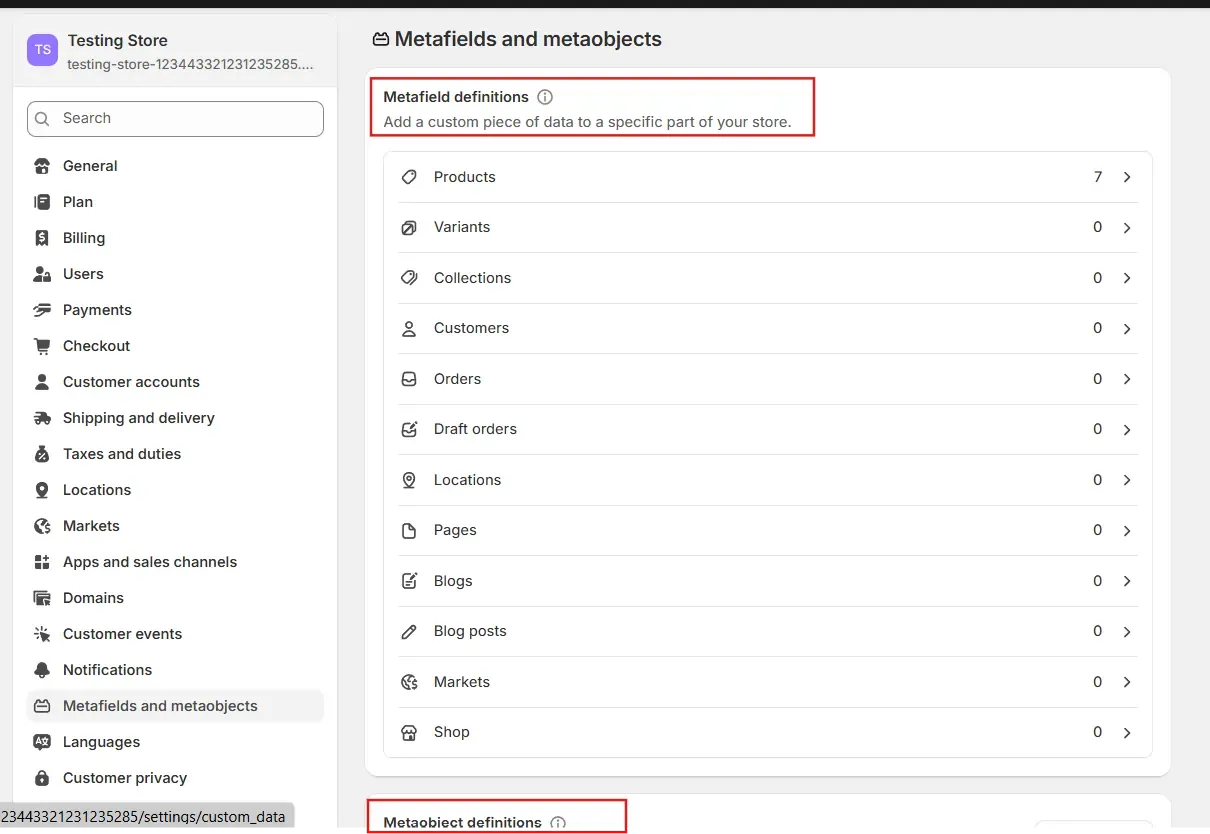
Standard Shopify pages do not support dynamic variables out of the box. We must configure custom metaobjects and metafields to house our structured data and prevent duplicate content issues.
Create a custom template file within your theme architecture (e.g., page.programmatic.json) that references these specific metafields. This ensures search engines crawl unique, highly contextual content on every generated URL.
- Define Metafields for critical SEO elements:
custom.target_h1,custom.intro_text,custom.product_collection_handle, andcustom.faqs. - Use Liquid code to dynamically pull and render these metafields based on the page handle.
- Implement dynamic Schema.org markup (Product and FAQPage) populated directly from your metafield data.
For complex enterprise setups, utilizing custom Shopify development ensures your templates render dynamic metafields efficiently without degrading page load speed.
Bypassing Shopify API Rate Limits During Bulk Page Creation
The standard Shopify REST Admin API limits requests to 40 requests per second for Shopify Plus merchants, which slows down bulk page creation. To scale without hitting limits, we transition to the GraphQL Admin API and implement a queued publishing system.
We use the GraphQL Batch Mutation pattern to bypass API rate limits during bulk page execution:
- Utilize the GraphQL Admin API to leverage query cost-based limits rather than request-based limits.
- Implement a queue worker system using BullMQ or Sidekiq to throttle API calls dynamically.
- Batch your page creation mutations to maximums of 50 pages per batch to avoid execution timeouts.
- Monitor the
extensions.costfield in the GraphQL response to dynamically adjust execution speed. - Configure an automated webhook listener to pause execution for 10 seconds if a 429 Too Many Requests response is received.
Preventing Duplicate Content and Managing Internal Linking at Scale
Search engines will penalize your site if your programmatic pages display identical product grids and thin text. We must enforce unique product filtering and logical site architecture to preserve crawl budget.
What to Avoid
- Do not generate pages with identical product grids; ensure each page filters products dynamically based on unique tag handles.
- Avoid leaving programmatic pages orphaned; they must reside in your HTML sitemap and be linked from parent categories.
- Do not use self-referential canonical tags pointing back to parent collections; every programmatic page must have its own unique, self-referential canonical URL.
How to Implement Internal Linking
- Build dynamic linking modules on parent collection pages that automatically link to related programmatic child pages.
- Limit internal links to a maximum of 20 links per page to distribute PageRank efficiently.
- Incorporate specialized Shopify SEO services to audit your internal link equity distribution before publishing.
Monitoring Indexation and Performance of Programmatic Pages
Publishing thousands of pages simultaneously can trigger indexation bottlenecks. We must isolate programmatic URLs in Google Search Console to monitor crawl behavior and indexation rates.
- Segment Sitemaps: Split programmatic pages into dedicated XML sitemaps containing no more than 50,000 URLs per file.
- Submit to GSC: Register the specific programmatic sitemap indexes in Google Search Console.
- Track Indexation: Monitor the "Pages" report weekly to verify the ratio of "Indexed" versus "Discovered - currently not indexed" pages.
- Log Analysis: Check server logs to ensure Googlebot is crawling programmatic URLs without triggering high latency.
- Query Performance: Filter performance reports by page path to isolate organic traffic generated specifically by programmatic URLs.
How Avelize Approaches Programmatic SEO
Our team engineers custom programmatic SEO pipelines for high-growth Shopify Plus merchants. We handle the entire lifecycle from database schema design to GraphQL integration and indexation monitoring.
- Timeline: 4 to 6 weeks for complete deployment.
- Cost: Custom project-based pricing.
- KPIs: 100% indexation of target pages, 40%+ increase in long-tail organic impressions within 90 days.
Frequently Asked Questions
Is programmatic SEO worth it for Shopify Plus?
Yes. For enterprise merchants with large product catalogs or highly variable search intent, programmatic SEO is highly effective. It allows you to capture high-intent long-tail traffic at a scale that manual page creation cannot match, significantly lowering your blended customer acquisition cost (CAC).
How do you prevent duplicate content with programmatic pages?
To prevent duplicate content when executing programmatic SEO on Shopify Plus, merchants must implement a strict dynamic filtering architecture and unique page elements. First, configure self-referential canonical tags on every generated page to signal to search engines that each URL is a distinct entity. Second, avoid displaying identical product grids across multiple pages; instead, use custom metaobjects to dynamically filter products by highly specific tag combinations or collection handles. Third, generate unique, localized, or context-specific text content for each page—such as custom H1s, introductory paragraphs, and structured FAQ schemas—using database variables. Finally, manage internal link equity by building dynamic linking modules on parent category pages that automatically distribute PageRank to programmatic child pages, ensuring they are not orphaned. By combining these technical guardrails, enterprise brands can scale their long-tail organic footprint without triggering search engine penalties or wasting crawl budget.
What is the difference between programmatic pages and standard collections?
Standard collection pages are manually curated and designed for broad category navigation. Programmatic pages are dynamically generated landing pages built specifically to target hyper-specific long-tail search queries, utilizing custom metadata, unique product filters, and targeted SEO copy that wouldn't fit on a standard collection page.
Published: January 15, 2026 | Last reviewed: May 20, 2026
Ready to scale your organic footprint? Contact our team for a custom Technical SEO & GEO program tailored to your Shopify Plus storefront.
Search Intent Refresh Notes
This page has search demand in Google Search Console. Refresh it around the highest-impression query language, add concrete examples, clarify the decision criteria, and link to the most relevant service page or related guide.
Authoritative References
Use these official resources to verify platform-specific claims and implementation details before making commercial or technical decisions.
- Shopify Plus overview
- Google SEO Starter Guide
- Google canonicalization guide
- Google structured data introduction
Related Avelize Services and Guides: Services · Ecommerce Web Design Agency