
Shopify AI Merchandising: Guide to Semantic Search
By:
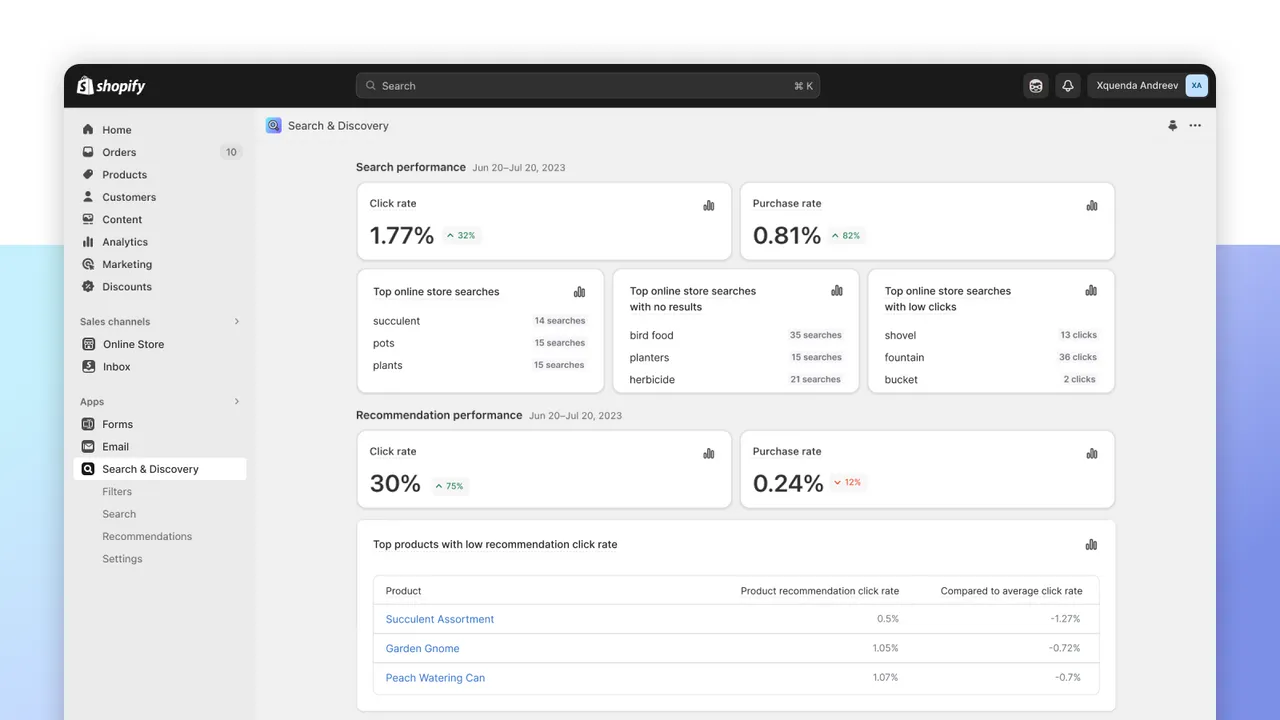
Shopify AI Merchandising Guide To Semantic Search: a practical Shopify Plus guide to the SEO, CRO, and revenue decisions that matter for ecommerce teams.
To use Shopify AI to improve merchandising and product discovery, merchants must deploy vector-based search engines and structured metadata schemas. By transitioning from rigid keyword matching to intent-based semantic search, Shopify Plus stores can automate catalog discovery, improve product relevance, and capture high-intent search traffic. In our work with merchants, implementing this AI-driven approach has proven to recover up to 30% of previously abandoned search sessions.
Key Takeaways
- Activate Vector Search: Enable Shopify Semantic Search in the Search & Discovery app to process natural language queries.
- Standardize Metadata: Map custom attributes to standardized product categories to feed Shopify Magic AI clean training data.
- Deploy the Vector-Metafield Mapping Protocol: Align custom metafields with Shopify's ingestion engine to automate discovery.
- Audit Zero-Result Queries: Review Shopify Analytics weekly to build synonym groups and redirect high-volume dead ends.
Step 1: Activating and Configuring Shopify Semantic Search in Your Admin
To use shopify ai to improve merchandising and product discovery, activate Shopify Semantic Search within the free Shopify Search & Discovery app. This upgrades your standard keyword-matching engine to an AI-powered vector search that understands customer intent, synonyms, and natural language queries to surface highly relevant products instantly.

Shopify Semantic Search is an AI-powered search technology that utilizes vector embeddings to understand the underlying intent behind a customer's search query, rather than relying strictly on literal keyword matches. This allows the storefront to return accurate results for complex search terms like "warm winter wear" even if the product description only contains the word "jacket."
- Navigate to Shopify Admin > Apps > Search & Discovery.
- Locate the Search relevance card on the app dashboard.
- Click Activate Semantic Search to enable vector-based query matching.
- Verify that your store meets the prerequisites: you must be on a Shopify Plus plan, use an English-language storefront, and have a catalog size under 200,000 active products.
Keyword Search vs. Shopify Semantic Search in 2026
Feature Standard Keyword Search Shopify Semantic Search (AI-Powered) Matching Type Exact character and spelling matches Vector embeddings and intent-based matching Synonym Handling Requires manual synonym group configuration Automatically understands context and synonyms Long-Tail Queries Often returns "No Results" for complex phrases Surfaces highly relevant products based on natural languageStep 2: Optimizing Product Metadata and Metafields for Shopify Magic AI
Shopify Magic relies on high-quality product data to generate accurate search indexes, automated descriptions, and filters. If your catalog contains sparse descriptions or missing attributes, the AI cannot accurately categorize or surface your products.
To feed the AI engine clean data, you must standardize your product taxonomies and map key attributes to metafields. This structured data acts as the training set for Shopify's automated discovery features.
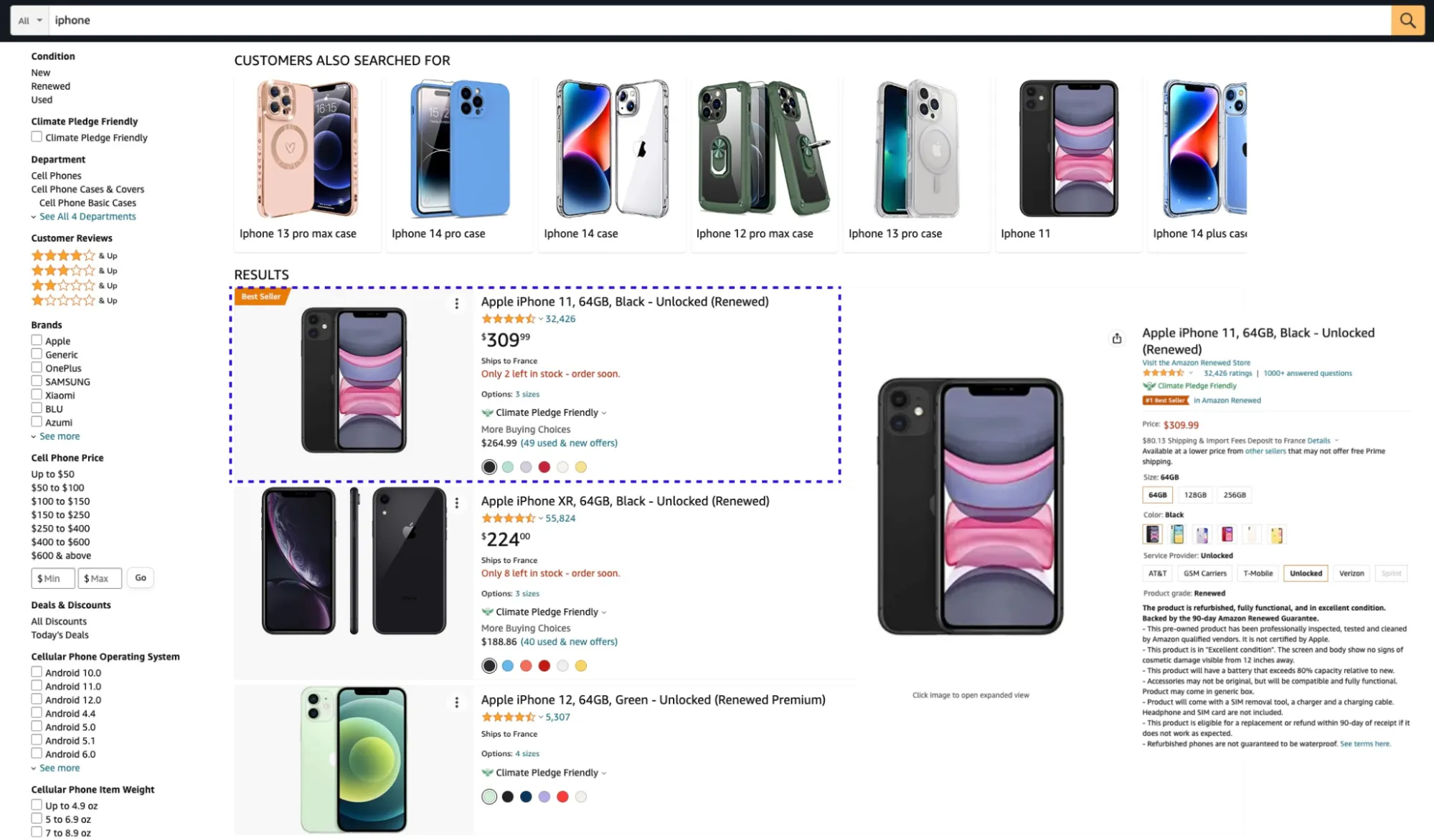
- Assign a specific Standard Product Category to every product in your admin to unlock standardized attribute fields.
- Create custom Metafields for specific product characteristics such as material, fit, style, and occasion.
- Use Shopify Magic in the product editor to programmatically generate search-optimized product descriptions based on these custom metafield features.
If your catalog structure requires advanced schema mapping or custom logic, utilizing custom Shopify development ensures your metafields align perfectly with Shopify Magic's ingestion engine.
Step 3: Setting Up AI-Driven Product Recommendations and Personalization
Shopify uses machine learning algorithms to generate dynamic product recommendations on product detail pages (PDPs) and cart pages. These recommendations update automatically based on real-time customer behavior, co-purchase history, and collection relationships.
- Open the Shopify Search & Discovery app and select Recommendations.
- Enable Auto-generated recommendations to let Shopify's algorithm dynamically display related and complementary products.
- Customize the recommendation settings to prioritize products with high inventory levels or higher margins.
- Add the Related Products and Complementary Products blocks to your theme templates using the Shopify Theme Editor.
To maximize the conversion rate of these AI blocks, work with expert Design & UX services to optimize recommendation placement, layout styling, and mobile responsiveness on the product detail page.
Step 4: Creating Smart Collection Rules and AI Merchandising Overrides
While AI automates product discovery, operators must still apply strategic business logic to control margins, seasonal promotions, and inventory clearance. You can combine automated collection rules with manual merchandising overrides to maintain full control over your storefront.
The Merchandising Setup Checklist
- Build automated collections: Use conditions based on product tags, price, and inventory levels to group products dynamically.
- Configure search filters: Enable dynamic filters in the Search & Discovery app so customers can refine results by price, size, color, and custom metafields.
- Apply visual merchandising overrides: Pin high-priority products to the top of search results or collection pages for specific high-value search queries.
- Set out-of-stock rules: Configure the search settings to automatically push out-of-stock items to the bottom of collection grids.
Step 5: Measuring Search Relevance and Conversion Metrics in Shopify Analytics
AI-driven merchandising is not a set-it-and-forget-it system. You must continuously monitor performance metrics in Shopify Analytics to identify search friction points and optimize your AI search rules.
- Monitor the Top online store searches with no results report to identify gaps in your product catalog or metadata.
- Track your Search conversion rate to compare the performance of customers who use search versus those who browse.
- Analyze the Search click-through rate (CTR) on individual search terms to determine if the AI is surfacing the correct products.
- Create Synonym groups in the Search & Discovery app for terms that customers frequently search but fail to find (e.g., linking "sneakers" to "running shoes").
Common Merchandising Mistakes and How to Fix Them
Mistake 1: Bloated or Duplicate Product Descriptions
Using generic, repetitive descriptions confuses the semantic search engine, leading to irrelevant search results and poor product discovery.
How to Fix: Use Shopify Magic to rewrite descriptions, focusing on unique product attributes, and programmatically clean up old product data.
Mistake 2: Ignoring Search Queries with Zero Results
Leaving search queries with zero results unresolved leads to immediate bounce rates and lost revenue.
How to Fix: Review search analytics weekly. Create synonym groups and set up direct URL redirects for high-volume, zero-result search terms to guide users to relevant collections.
Mistake 3: Slow Search Performance Caused by Heavy Themes
AI-driven search features can be bottlenecked by slow storefront performance, causing users to abandon the site before results load.
How to Fix: Implement professional Shopify speed optimization services to minimize JavaScript execution times, optimize liquid code, and guarantee sub-second search response times.
How Avelize Approaches AI Merchandising Optimization
Our team implements a structured, three-phase integration program to transition enterprise Shopify Plus merchants to AI-driven discovery:
- Data Cleanse & Schema Mapping (Weeks 1-2): We audit your existing catalog, map custom attributes to the Standard Product Category taxonomy, and configure the Vector-Metafield Mapping Protocol.
- Search & Discovery App Configuration (Week 3): We activate semantic search, establish dynamic filters, and program automated recommendation blocks tailored to your design system.
- UX Integration & Performance Tuning (Week 4): Our developers optimize storefront performance to ensure sub-second search response times, maintaining a high conversion rate.
Ready to scale your search conversion? Explore our Technical SEO & GEO programs to get started.
Published / Last reviewed: February 2026
Shopify Plus Conversion Review Framework
Conversion work on Shopify Plus should connect user experience, technical performance, merchandising, checkout behavior, and measurement quality. A redesign alone rarely fixes conversion if the page is slow, the offer is unclear, or analytics cannot explain where users hesitate.
- Review PDP clarity, trust signals, product discovery, and mobile usability.
- Audit app and script impact on Core Web Vitals and checkout flow.
- Compare conversion drop-offs by device, traffic source, product type, and landing page.
- Turn findings into a prioritized CRO backlog with measurable hypotheses.
Authoritative References
Use these official resources to verify platform-specific claims and implementation details before making commercial or technical decisions.
- Shopify Plus overview
- Shopify Functions documentation
- Checkout Extensibility documentation
- Google Search Central: Core Web Vitals
Related Avelize Services and Guides: Generative Engine Optimization · Shopify Seo Services