
Shopify Plus CRO Audit: Find & Fix Funnel Leaks
By:
Find and fix the conversion leaks costing your Shopify Plus store revenue — a tactical audit covering collection pages, PDPs, cart, and multi-step checkout.
Performing a Shopify CRO audit requires a systematic analysis of your store's technical performance, user experience, and checkout funnel to identify and eliminate friction points. By combining quantitative data from a conversion rate calculator for ecommerce with qualitative user behavior insights, merchants can systematically plug funnel leaks. In our work with merchants, executing this audit before peak shopping seasons like BFCM is the single most effective way to maximize return on ad spend (ROAS) and scale revenue without increasing traffic acquisition costs.
Key Takeaways
- The 2.5% Benchmark: Establish a baseline conversion rate using a conversion rate calculator for ecommerce, aiming for a healthy 2.5% to 3.0% target.
- The Under-100KB Rule: Compress all product images to under 100KB and convert them to WebP to accelerate mobile rendering.
- Express Checkout Integration: Deploy Shop Pay and Apple Pay to reduce checkout times by up to 50% and decrease cart abandonment.
- The High-Impact Action Matrix: Prioritize high-impact, low-effort fixes first—such as removing unused Shopify apps and enabling address auto-complete.
1. What is a Shopify CRO Audit and Why is it Critical?
A Shopify CRO audit is a comprehensive evaluation of an e-commerce store's technical infrastructure, user experience (UX) design, and checkout funnel to isolate and resolve friction points that prevent visitors from completing a purchase. In our work with merchants on Shopify Plus, we analyze how custom Liquid code, headless architectures built on Hydrogen or Next.js, and integrations like Klaviyo and Triple Whale affect the user journey. By auditing these elements, merchants can implement targeted optimizations to increase their conversion rates and average order value (AOV).
2. Benchmark Your Baseline: Using a Conversion Rate Calculator for Ecommerce
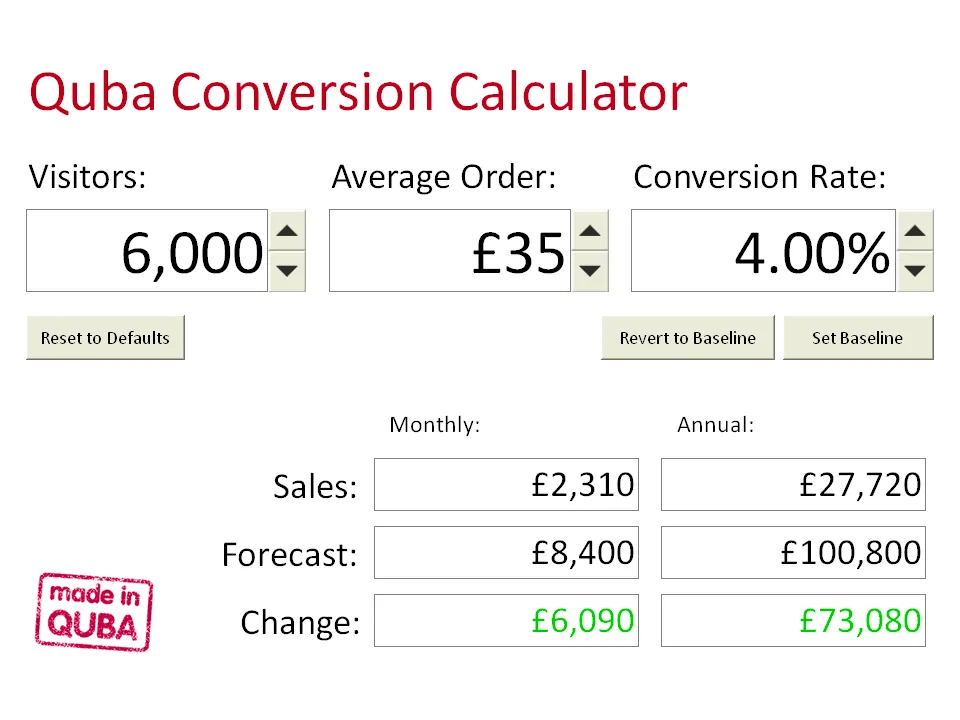
To measure the success of your optimization efforts, you must first calculate your baseline conversion rate using this standard formula:
- Conversion Rate Formula: (Total Conversions / Total Sessions) x 100
- Healthy Benchmark: Aim for a baseline conversion rate of 2.5% to 3.0% for established Shopify stores.
- Revenue Impact: Increasing your conversion rate from 1.5% to 2.5% on 100,000 monthly sessions with an $80 AOV generates an extra $80,000 in monthly revenue.
For professional support in mapping these metrics to a tailored design system, explore our Design & UX services.
3. Eliminate Technical Friction: Shopify Speed Optimization Tactics That Prevent Bounce
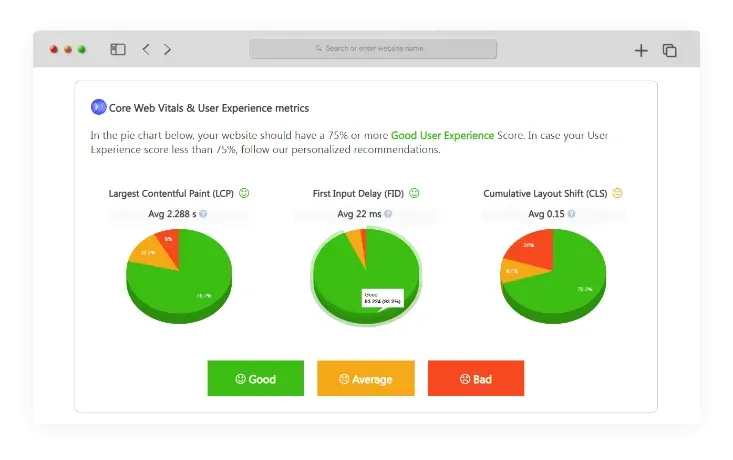
Slow page load times directly kill conversions. Mobile bounce rates increase by 32% as page load times stretch from 1 second to 3 seconds. We optimize the critical rendering path by leveraging the GraphQL Storefront API for headless setups and monitoring Core Web Vitals to ensure rapid page delivery.
How to Fix Your Store Speed
- Audit your installed Shopify apps and completely delete unused ones to eliminate leftover background scripts.
- Compress all product images to under 100KB and convert them to modern WebP formats.
- Implement lazy loading for images and videos below the fold to prioritize critical rendering paths.
- Minimize custom liquid code and consolidate external JavaScript tracking pixels.
If your store suffers from slow load times, consider a specialized Shopify Speed Optimization program to resolve core web vitals issues.
4. Audit the Discovery Phase: Fixing Homepage and Collection Page Drop-offs
If users cannot find products within three clicks of landing on your homepage, they will exit your store.
Common Mistakes to Avoid
- Using large, auto-rotating hero carousels that distract users and dilute your primary offer.
- Lacking dynamic collection page filters, forcing users to scroll through hundreds of irrelevant products.
- Hiding the search bar on mobile layouts or delivering zero-result search pages.
How to Optimize Discovery
- Replace carousels with a single static hero image featuring one primary call-to-action (CTA).
- Enable predictive search that auto-suggests products, collections, and popular search terms as users type.
- Implement sticky collection filters for price, size, color, and availability to streamline navigation.
5. Optimize the Product Detail Page (PDP): Removing Friction at the 'Add to Cart' Stage
The product detail page is where buying decisions are finalized. Any missing information here creates instant friction.
The PDP Optimization Checklist
- Position the "Add to Cart" button above the fold on both desktop and mobile viewports.
- Display clear shipping timelines, costs, and return policies directly beneath the checkout button.
- Use visual variant selectors, such as color swatches, instead of generic dropdown menus.
- Show verified star ratings and customer reviews immediately below the product title.
- Incorporate high-quality product videos alongside zoomable images to set accurate expectations.
For complex product configurations or custom variant layouts, leverage Custom Shopify Development to build high-converting interfaces.
6. Secure the Sale: Streamlining Shopify Cart and Checkout UX for Peak Season
Cart abandonment accounts for an average loss of 70% of potential sales. Simplifying the final steps of the funnel is critical. With Shopify's shift toward Checkout Extensibility, championed by Tobi Lütke to maximize checkout speed, optimizing this final step is easier than ever.
How to Streamline Your Checkout
- Implement a slide-out drawer cart with a visual progress bar indicating how close the customer is to unlocking free shipping.
- Integrate express checkout options like Shop Pay, Apple Pay, and Google Pay to reduce checkout times by up to 50%.
- Enable address auto-complete using the Google Maps API to prevent delivery entry errors.
- Remove unnecessary form fields and default to matching shipping and billing addresses.
7. Prioritize and Execute: The High-Impact Shopify CRO Audit Action Matrix
To maximize your return on investment, prioritize your audit findings using this impact-to-effort matrix:
- High Impact / Low Effort (Do First): Enable express checkout buttons, compress product images, and remove unused Shopify apps.
- High Impact / Medium Effort (Do Next): Implement a slide-out cart with free-shipping progress bars and optimize mobile PDP layouts.
- Medium Impact / High Effort (Plan Ahead): Restructure global navigation menus and build custom product comparison matrices.
8. How Avelize Approaches Shopify CRO Audits
Our team executes a comprehensive, data-driven CRO program designed to identify and resolve high-impact funnel leaks within 14 business days:
- Technical & Speed Audit (Days 1-4): We analyze Core Web Vitals, Liquid scripts, and app payloads. KPI: Mobile Page Speed Score > 70.
- Funnel & Heatmap Analysis (Days 5-8): We track user drop-offs on PDPs and checkout using tools like Hotjar or Triple Whale. KPI: Friction points mapped.
- UX & Checkout Review (Days 9-11): We evaluate checkout extensibility, cart drawer UX, and mobile navigation. KPI: Cart-to-purchase transition rate improvement plan.
- Implementation & Roadmap Delivery (Days 12-14): We deliver a prioritized development roadmap. Cost: Custom based on store complexity.
To learn more about our technical optimization programs, visit our Conversion Rate Optimization services page.
Frequently Asked Questions
What is a good conversion rate for a Shopify store and how do you calculate it?
A good conversion rate for an established Shopify store typically ranges between 2.5% and 3.0%, though top-performing brands in the top 20% of the industry often achieve conversion rates exceeding 4.0%. To calculate your store's baseline conversion rate, use the standard ecommerce formula: divide your total number of completed transactions (conversions) by the total number of unique user sessions during the same period, then multiply the result by 100. For example, if your Shopify store records 2,500 successful purchases out of 100,000 total sessions over a 30-day window, your conversion rate is exactly 2.5%. Tracking this metric consistently allows merchants to measure the direct financial impact of technical optimizations, such as improving page load speeds, streamlining the checkout flow, and reducing cart abandonment friction before high-traffic events like BFCM.
How does Shopify speed optimization affect conversion rates?
Page speed directly correlates with user retention and conversion. Studies show that mobile conversion rates drop by approximately 20% for every one-second delay in page load time. By optimizing Core Web Vitals—specifically Largest Contentful Paint (LCP) and Interaction to Next Paint (INP)—merchants reduce bounce rates and keep high-intent shoppers engaged throughout the purchasing funnel.
What is the difference between a CRO audit and a standard site audit?
While a standard site audit focuses broadly on general SEO issues, broken links, and basic metadata, a Shopify CRO audit specifically targets user behavior, funnel friction, and conversion bottlenecks. It combines quantitative analytics (like checkout drop-off rates) with qualitative insights (such as heatmap tracking and user session recordings) to optimize the path to purchase.
Ready to maximize your store's conversion potential before the next peak traffic surge? Contact our team today to explore our Conversion Rate Optimization (CRO) retainers and technical engineering programs.
Published / Last reviewed: February 2026
Shopify Plus Conversion Review Framework
Conversion work on Shopify Plus should connect user experience, technical performance, merchandising, checkout behavior, and measurement quality. A redesign alone rarely fixes conversion if the page is slow, the offer is unclear, or analytics cannot explain where users hesitate.
- Review PDP clarity, trust signals, product discovery, and mobile usability.
- Audit app and script impact on Core Web Vitals and checkout flow.
- Compare conversion drop-offs by device, traffic source, product type, and landing page.
- Turn findings into a prioritized CRO backlog with measurable hypotheses.
Authoritative References
Use these official resources to verify platform-specific claims and implementation details before making commercial or technical decisions.
- Shopify Plus overview
- Shopify Functions documentation
- Checkout Extensibility documentation
- Google Search Central: Core Web Vitals
Related Avelize Services and Guides: Conversion Rate Optimization · Checkout Ux · Ecommerce Web Design Agency