
Shopify Plus Automation: Custom Integration Strategies
By:
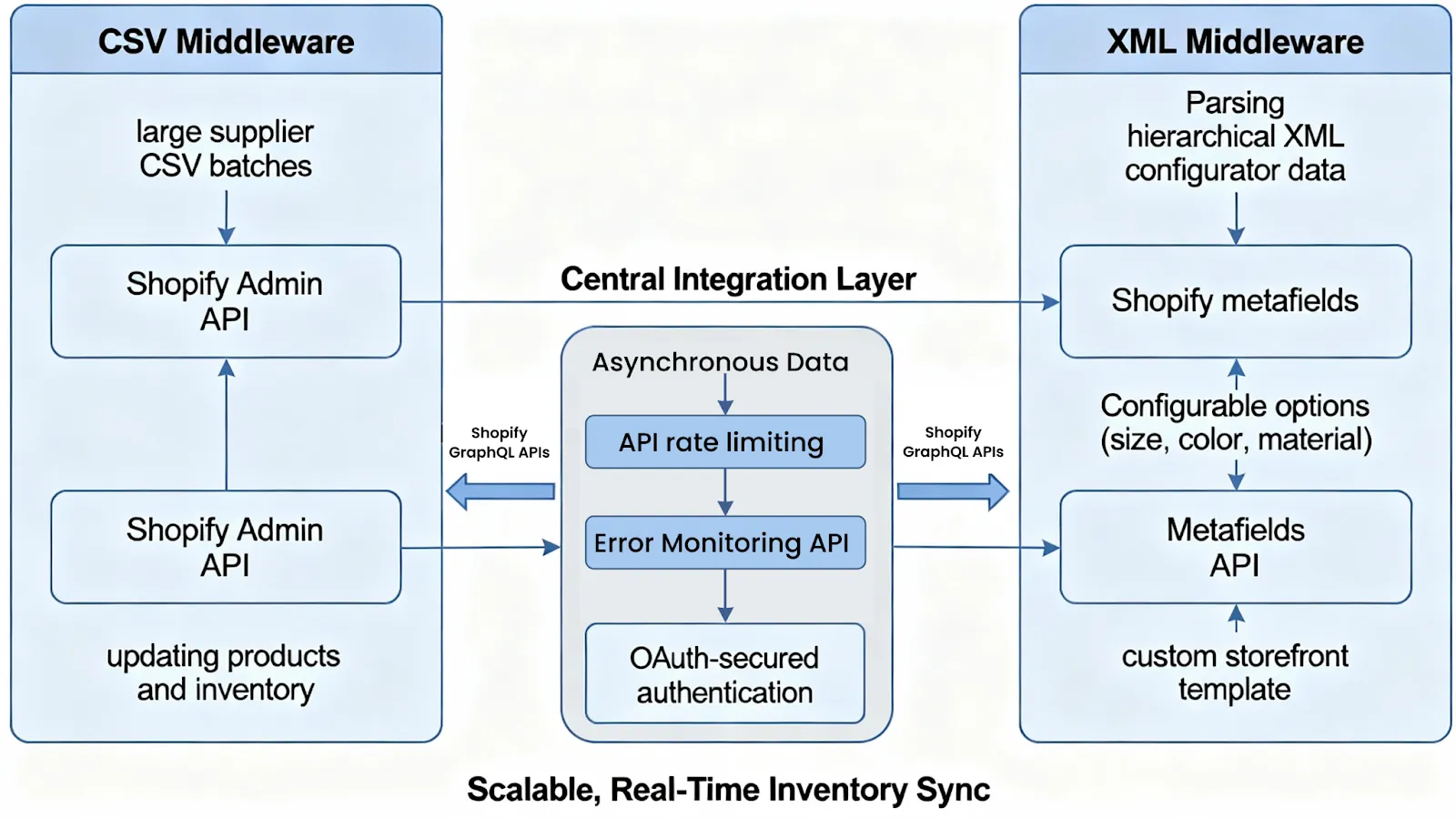
Shopify plus automation integration at the enterprise level requires moving beyond basic low-code tools to prevent catastrophic rate-limiting and data desynchronization. In our work with merchants, we have found that scaling operations during high-volume events like BFCM demands a decoupled, queue-first architecture. By offloading transactional payloads to external message queues and leveraging asynchronous GraphQL mutations, enterprise brands can guarantee 100% data integrity between Shopify Plus and legacy ERPs like NetSuite or SAP.
Key Takeaways
- The Queue-First Ingestion Pattern: Decouple webhook ingestion from processing using AWS SQS or RabbitMQ to return a 200 OK within 2 seconds.
- The Redis-72 Idempotency Gate: Store unique transaction IDs in Redis with a 72-hour TTL to prevent duplicate ERP order creation.
- Bulk GraphQL Operations: Shift from synchronous mutations to asynchronous bulk operations to bypass Shopify's 40 points/second API rate limit.
- Automated Subscription Monitoring: Implement automated cron checks to instantly recreate deleted webhook subscriptions.
Architecting the Integration: Shopify Flow vs. Custom App Webhooks in 2026
Shopify process automation is the systematic orchestration of e-commerce events to eliminate manual workflows and synchronize data across enterprise platforms. While native Shopify Flow handles low-complexity, asynchronous triggers, high-volume operations require custom app webhooks paired with an external message queue to prevent API rate-limiting and guarantee transactional delivery during peak traffic events.
Shopify Flow is an excellent low-code tool for internal tasks, but it is not designed to handle core transactional data at scale.
Feature Shopify Flow Custom App Webhooks Best For Low-priority, asynchronous tasks (tagging customers, Slack alerts) High-throughput, mission-critical operations (ERP sync, inventory updates) Rate Limits Shared platform limits Dedicated GraphQL leaky bucket (40-80 points/sec) Idempotency None (susceptible to duplicate runs) Customizable (via Redis or database locks) Failover Basic retry logic Dead Letter Queues (DLQ) & Exponential BackoffFor complex transactional workflows, enterprise brands must leverage custom Shopify development to build dedicated middleware that buffers incoming payloads.
Mitigating Shopify API Rate Limits: GraphQL Asynchronous Mutations for Bulk Workflows
Shopify's GraphQL Admin API uses a leaky bucket algorithm calculated in cost points, typically capped at 40 points/second for Shopify Plus merchants. Standard synchronous API calls will quickly trigger 429 Too Many Requests errors during high-volume sales events.
How to Fix: Implement Bulk Operations
To update thousands of products or import massive inventory sheets without hitting rate limits, you must shift from synchronous mutations to asynchronous bulk operations.
- Step 1: Prepare your data in a JSONL (JSON Lines) file where each line represents a single mutation.
- Step 2: Request a secure upload URL from Shopify using the
stagedUploadsCreatemutation. - Step 3: Upload your JSONL file directly to the provided Google Cloud Storage URL.
- Step 4: Execute the
bulkOperationRunMutationAPI call, passing the staged upload path as the target. - Step 5: Poll the
bulkOperationquery or listen for theBULK_OPERATIONS_FINISHwebhook to confirm processing completion.
Step-by-Step ERP Sync: Connecting Shopify Plus to NetSuite and SAP via Custom Endpoints
Direct connections between Shopify and legacy ERPs like NetSuite or SAP fail under load because these enterprise resource planning systems cannot process hundreds of concurrent write requests per second.
The Enterprise Integration Checklist
- Verify Webhook Authenticity: Validate the
X-Shopify-Hmac-SHA256header using your app's shared secret key to block unauthorized payloads. - Decouple Ingestion from Processing: Accept the webhook, write the raw payload to a fast message queue (like AWS SQS or RabbitMQ), and immediately return a 200 OK response within 2 seconds.
- Transform the Payload: Use a serverless function (AWS Lambda or GCP Cloud Functions) to map Shopify's JSON structure into the exact XML or JSON format required by NetSuite's SuiteTalk or SAP's IDoc interface.
- Throttle ERP Delivery: Configure your message consumer to pull messages from the queue only as fast as your ERP's API can safely ingest them.
- Write Back ERP Identifiers: Once ingested, write the ERP internal ID back to Shopify as an order metafield using our enterprise Shopify Plus development services architecture.
Ensuring Idempotency: Preventing Double-Processing and Duplicate Order Creation
Shopify guarantees "at-least-once" delivery for webhooks, meaning the same webhook payload can, and will, be sent multiple times. Without strict idempotency controls, this causes duplicate orders in your ERP and double-billing of customers.
What to Avoid (Common Mistakes)
- Do not rely on the order of delivery; webhooks can arrive out of sequence.
- Do not use mutable fields like order tags or notes as the unique identifier in your ERP.
- Do not process incoming payloads without verifying if the transaction ID already exists in your database.
How to Implement Idempotency
Store the unique X-Shopify-Order-Id or order.id value in a fast, distributed cache like Redis with a 72-hour TTL (Time-To-Live). Before processing any incoming payload, query the cache: if the key exists, discard the duplicate request; if it does not exist, write the key to Redis and proceed with the ERP sync.
Error Handling and Failover: Setting Up Automated Retries and Real-Time Webhook Alerting
If your middleware endpoint fails to respond with a 200 OK status code, Shopify will retry the webhook up to 19 times over 48 hours. However, if your endpoint fails continuously, Shopify will automatically delete your webhook subscription, cutting off your ERP sync entirely.
Implementing a Resilient Failover Strategy
- Dead Letter Queues (DLQ): If a payload fails to process after 3 retries within your queue, route it to a Dead Letter Queue for manual inspection instead of letting it block the pipe.
- Exponential Backoff with Jitter: When retrying failed calls to NetSuite or SAP, space out the retry attempts exponentially to prevent overwhelming the target system during a recovery phase.
- Automated Subscription Monitoring: Deploy a cron job that checks your active Shopify webhook subscriptions every hour and automatically recreates any subscriptions that have been deleted.
- Real-Time Alerting: Integrate PagerDuty, Datadog, or Slack webhooks to alert your engineering team immediately if the webhook failure rate exceeds 5% within any 5-minute window.
How Avelize Approaches Enterprise Automation
We engineer custom integration pipelines designed to handle peak transactional volumes without data loss. Our structured deployment process ensures complete system reliability:
- Step 1: Architecture Audit & Mapping (Weeks 1-2) — We map your data flows and design custom schemas to align Shopify Plus with your ERP.
- Step 2: Queue & Middleware Provisioning (Weeks 3-5) — Our team builds the serverless middleware and configures AWS SQS/RabbitMQ queues to achieve sub-100ms ingestion latency.
- Step 3: ERP Integration & Idempotency Gate Testing (Weeks 6-8) — We implement the Redis-72 Idempotency Gate to prevent duplicate transactions.
- Step 4: Load Testing & BFCM Simulation (Weeks 9-10) — We simulate extreme traffic loads to verify that auto-scaling and failover mechanisms perform flawlessly under stress.
Frequently Asked Questions
How does Shopify's API rate limiting affect ERP integrations?
Shopify's GraphQL Admin API operates on a leaky bucket algorithm calculated in cost points rather than a strict request-per-second limit. For Shopify Plus merchants, this bucket typically has a capacity of 80 points and refills at a rate of 40 points per second. Standard synchronous API mutations, such as updating inventory or creating orders, consume significant point allocations per call. During high-volume sales events like BFCM, concurrent synchronous requests from an ERP or middleware will rapidly deplete this bucket, triggering HTTP 429 Too Many Requests errors and halting data synchronization. To mitigate this, enterprise architectures must utilize Shopify's Bulk Operations API for large-scale data transfers, or implement a queue-first middleware using AWS SQS or RabbitMQ. This middleware throttles outgoing requests to match Shopify's leak rate, ensuring continuous, error-free communication between Shopify Plus and external systems without hitting rate limits.
What is the difference between Shopify Flow and custom webhooks?
Shopify Flow is a low-code tool designed for simple, asynchronous internal tasks like customer tagging or risk alerts. Custom webhooks, when combined with dedicated middleware, are required for mission-critical, high-throughput integrations like ERP synchronization because they support custom idempotency gates, advanced error handling, and rate-limit throttling.
How long does it take to deploy a custom ERP integration on Shopify Plus?
A resilient, enterprise-grade custom integration typically takes 8 to 10 weeks to design, build, test, and deploy. This timeline includes rigorous load testing and the implementation of failover systems like Dead Letter Queues to guarantee operational stability during peak traffic events.
Ready to secure your enterprise store against peak traffic failures? Explore our Shopify Plus development services to architect a resilient, high-throughput integration today.
Published / Last reviewed: February 2026
Authoritative References
Use these official resources to verify platform-specific claims and implementation details before making commercial or technical decisions.
Related Avelize Services and Guides: Custom Apps · Plus Customization · Ecommerce Web Design Agency