
Shopify Plus Migration: ERP Integration & Data Blueprint
By:
Shopify Plus Migration Erp Integration & Data Blueprint: a practical Shopify Plus guide to the SEO, CRO, and revenue decisions that matter for ecommerce teams.
Migrating an enterprise legacy database to Shopify Plus requires a systematic, schema-mapped approach to prevent data truncation, broken ERP connections, and drops in organic search rankings. In our work with merchants, we have found that success depends on translating highly normalized relational databases (like NetSuite or SAP) into Shopify's de-normalized GraphQL Admin API structure. By establishing strict data validation protocols and robust middleware pipelines, enterprise brands can transition platforms with zero operational downtime.
Key Takeaways
- Utilize the delta-sync validation protocol to run parallel database writes, ensuring zero dropped orders during the 48-hour cutover window.
- Map legacy relational schemas directly to Shopify's GraphQL Admin API using custom Metafields and Metaobjects to prevent data truncation.
- Mitigate Shopify's standard rate limit of 40 cost points per second by implementing an asynchronous leaky-bucket queue via AWS SQS or Google Pub/Sub.
- Preserve SEO equity by executing a 1:1 redirect mapping using Cloudflare Workers for migrations exceeding Shopify's native redirect limits.
How do you map legacy database schemas to Shopify Plus API fields?
A shopify plus migration requires mapping legacy relational database schemas (SQL/ERP) to Shopify’s JSON-based REST or GraphQL Admin APIs. This process translates flat tables like inventory, customers, and orders into Shopify's structured resources, utilizing Metafields and Custom Data definitions to house proprietary legacy attributes that do not natively exist within Shopify's standard schema.

Legacy enterprise architectures (such as NetSuite, SAP, or custom Microsoft SQL databases) utilize highly normalized relational structures. Shopify utilizes a de-normalized, document-style API structure. To prevent data truncation, map your core entities using the following schema rules:
- Product IDs & SKUs: Map legacy parent IDs to Shopify
Productobjects, and child SKUs to ShopifyProductVariantobjects. - Inventory Levels: Map legacy warehouse locations to Shopify
LocationIDs to preserve multi-location inventory (Fulfillment Service API). - Custom Product Attributes: Map proprietary fields (e.g., material specs, warranty codes) to
MetafieldsorMetaobjects. - Customer Records: Map legacy unique identifiers to
customer.idor save them as a custom namespace incustomer.metafieldsfor ERP reconciliation.
Product Object
Map to unique handle
Child SKU / Inventory Item
ProductVariant Object
Map to SKU with unique barcode
Warehouse Locations
Location ID
Map to Multi-Location Inventory
Custom Specs / Warranties
Metafields / Metaobjects
Custom namespace definitions
Customer ID
customer.id / Metafields
Save legacy ID for ERP reconciliation
For complex schema mapping and custom API integration, leveraging expert Shopify Plus migrations ensures data integrity across custom fields.
What is the best ERP integration architecture for Shopify Plus in 2026?
Enterprise integrations require robust data pipelines to synchronize inventory, pricing, and order states between Shopify and your ERP. When designing ERP integration patterns in 2026, merchants must weigh the trade-offs of middleware, iPaaS, and custom development.
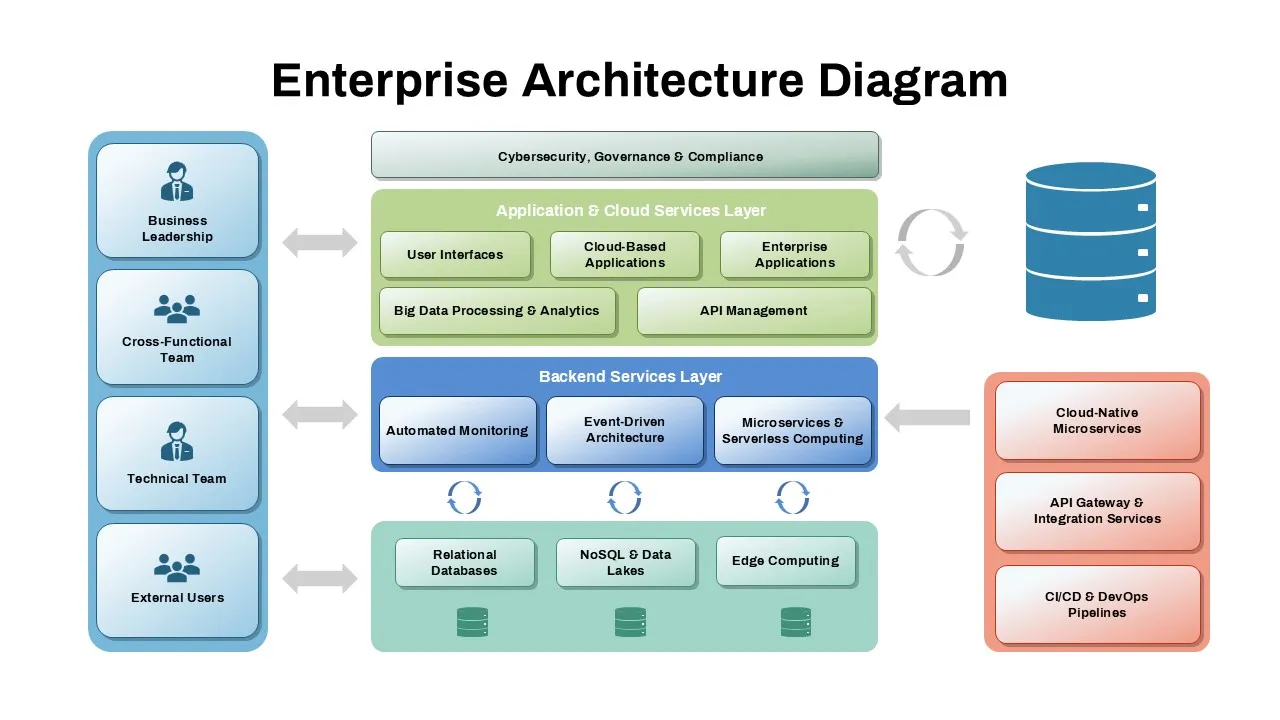
Middleware & iPaaS (e.g., Celigo, MuleSoft, Boomi)
- Pros: Pre-built connectors for NetSuite/SAP, visual error-handling consoles, and built-in retry logic.
- Cons: Higher recurring software costs, potential latency overhead, and limited customization for highly unique business logic.
Custom Private Apps (Node.js/Go hosted on AWS/GCP)
- Pros: Zero middleware licensing fees, ultra-low latency, and complete control over API call optimization.
- Cons: Requires ongoing internal maintenance, infrastructure monitoring, and manual handling of rate limits.
Managing Shopify API Rate Limits
- Use Shopify’s GraphQL Admin API instead of the REST API to reduce payload sizes and conserve API budget.
- Implement a leaky-bucket algorithm queue to handle Shopify's standard rate limit of 40 cost points per second (which scales up for Shopify Plus merchants).
- Configure webhook subscriptions (e.g.,
orders/create,inventory_levels/update) to trigger asynchronous processing queues via AWS SQS or Google Pub/Sub.
How do you migrate historical customer data and order histories safely?
Migrating historical customer data and transaction histories requires strict ordering of operations to prevent customer frustration and broken records.
Common Mistakes to Avoid
- Triggering Automated Emails: Importing customer records or historical orders without disabling transactional notifications, resulting in thousands of spam emails to your existing customer base.
- Orphaned Order Records: Importing orders before products are fully migrated, which breaks the relational link between orders and product variants.
How to Fix and Implement Safely
- Password Migration: Since Shopify uses unique encryption algorithms, you cannot directly import raw password hashes. Implement Shopify Plus Multipass to seamlessly authenticate customers using your legacy identity provider, or run an automated email activation campaign post-launch.
- Historical Orders: Import order records with the
financial_statusset to "paid" andfulfillment_statusset to "fulfilled". Ensure you setsend_receipt: falseandsend_fulfillment_receipt: falsein your API payloads to suppress customer notifications. - Sequencing: Always import 1) Locations, 2) Products and Variants, 3) Customers, and 4) Historical Orders.
How do you preserve SEO equity during a Shopify Plus migration?
Legacy URL paths (e.g., /product.aspx?id=9876) must map cleanly to Shopify's strict URL routing structures (e.g., /products/product-handle) to prevent a catastrophic drop in search rankings.
To protect organic visibility and domain authority during a platform transition, implement advanced technical SEO & GEO programs to map redirects and maintain crawl budgets.
The Redirect Mapping Workflow
- Export all indexable URLs from your legacy platform using a crawler like Screaming Frog.
- Export your newly generated Shopify product, collection, and page handles.
- Create a deterministic mapping file pairing old URLs to new Shopify paths.
- Upload mappings in bulk using Shopify’s native URL Redirect API or redirect import tool.
- For migrations exceeding Shopify's native redirect limits, handle redirect logic at the DNS level using Cloudflare Workers or fast edge-routing rules.
How Avelize approaches enterprise migrations
Our team engineers migrations using a highly structured, phase-based framework designed to eliminate operational disruption. Over a typical 12-to-16 week deployment timeline, we execute schema mapping, middleware configuration, and comprehensive dry-run testing before initiating the final launch sequence.
- Phase 1: Discovery & Schema Design (Weeks 1-3): We map legacy tables to Shopify GraphQL endpoints and define custom Metaobjects.
- Phase 2: Integration Development (Weeks 4-8): We build and test custom private apps or configure iPaaS middleware to handle real-time ERP synchronization.
- Phase 3: Dry-Run Testing (Weeks 9-11): We execute a 10% sample migration and run load tests to verify system stability under peak traffic.
- Phase 4: Cutover & Launch (Weeks 12-16): We deploy the delta-sync validation protocol, update DNS records, and run live smoke tests.
Frequently Asked Questions
Is Shopify Plus worth it for high-volume B2B merchants?
Yes. Shopify Plus provides dedicated B2B features, custom pricing lists, and robust API limits that easily accommodate complex wholesale operations alongside direct-to-consumer channels.
How long does a Shopify Plus ERP integration take?
A standard enterprise ERP integration typically takes between 8 and 12 weeks, depending on the complexity of your custom business logic and the chosen middleware architecture.
What is the difference between iPaaS and custom private apps for ERP sync?
The difference between an integration Platform as a Service (iPaaS) and a custom private application for Shopify Plus ERP synchronization lies in maintenance overhead, licensing costs, and execution latency. An iPaaS solution, such as Celigo, MuleSoft, or Boomi, provides pre-built connectors for enterprise resource planning systems like NetSuite or SAP. This architecture reduces initial development timelines but introduces high recurring subscription fees and potential latency overhead. Conversely, custom private applications built on Node.js or Go and hosted on cloud infrastructure like AWS or GCP offer ultra-low latency and complete control over API call optimization. Custom builds eliminate middleware licensing fees but require dedicated engineering resources to manage infrastructure, monitor logs, and handle Shopify's GraphQL rate limits. For high-volume merchants processing over 50,000 daily orders, custom private applications utilizing asynchronous queues via AWS SQS typically deliver superior performance and long-term cost efficiency.
Planning an enterprise platform transition? Contact our team of engineering experts to explore our Shopify Plus migrations and technical integration programs.
Published / Last reviewed: May 15, 2026
Shopify Plus Migration Risk Checklist
A Shopify Plus migration should be planned around risk, not only around launch tasks. The most important work is deciding which URLs, templates, analytics events, redirects, integrations, and checkout flows must survive the move without damaging revenue or organic search visibility.
- Map current revenue-driving URLs and search queries before changing templates.
- Validate redirects, canonicals, structured data, and sitemap output before launch.
- Test checkout, payments, analytics, consent, and third-party scripts in a staging flow.
- Measure Core Web Vitals, conversion rate, crawl errors, and revenue after launch.
Phased Shopify Plus Implementation Plan
For many teams, a phased migration is safer than changing every business-critical system at once. Start with the pages and flows that create the highest revenue or SEO risk, then move into secondary templates, automation, and experimentation after the foundation is stable.
Authoritative References
Use these official resources to verify platform-specific claims and implementation details before making commercial or technical decisions.
Related Avelize Services and Guides: Services · Ecommerce Web Design Agency