
Shopify Plus Search & Filter CRO: Optimize Product Discovery
By:
Shopify Plus Search & Filter CRO Optimize Product: a practical Shopify Plus guide to the SEO, CRO, and revenue decisions that matter for ecommerce teams.
According to research by the Baymard Institute, high-SKU e-commerce merchants lose up to 30% of high-intent buyers because of slow site search, irrelevant query results, and high-friction mobile filtering. Shopify Plus CRO is the systematic process of optimizing a high-volume merchant's storefront to increase the percentage of visitors who complete a purchase. By configuring the native Shopify Search & Discovery app, structuring category metafields, and implementing semantic search, our team helps merchants recapture this lost revenue and drive immediate conversion lifts.
Key Takeaways
- Deploy the zero-result rollback protocol to redirect dead-end search terms to relevant collections or support pages.
- Transition from legacy product tags to Shopify Category Metafields to reduce DOM size and improve mobile filter rendering speeds.
- Ensure mobile touch targets are at least 44x44 pixels and utilize a full-screen drawer overlay with real-time dynamic counts.
- Track search performance in GA4, targeting a Search Conversion Rate of 2x to 3x higher than your sitewide baseline.
Configuring Shopify Plus Search & Discovery App for Zero-Result Prevention
Shopify Plus CRO relies heavily on preventing zero-result searches by utilizing the native Shopify Search & Discovery app to configure custom search relevance, product boosts, and automated synonym groups. This ensures high-intent users are always directed to active, relevant SKUs instead of landing on empty search result pages.

To stop zero-result pages from killing conversions, we actively manage search behavior within the Shopify Admin dashboard:
- Navigate to Online Store > Navigation > Filters in your Shopify Admin.
- Activate "Search relevance" settings to index SKU, variant title, and metafields.
- Set up Product Boosts to prioritize high-margin or high-inventory SKUs for broad search queries.
- Establish redirect rules for common non-product queries, redirecting informational terms directly to your support pages.
What to Avoid
- Allowing discontinued or out-of-stock SKUs to dominate top search results without automated fallback rules.
- Overcomplicating the search index by mapping non-essential text fields, which dilutes query relevance.
Structuring Metafields and Custom Collections for Multi-Select Filter UX
High-SKU catalogs require dynamic multi-select filters that update in real-time without page reloads. Standardizing your product attributes is the first step to achieving this. In our work with merchants, we transition stores away from legacy tagging systems to structured metafields to maintain optimal performance.
Feature Legacy Tag-Based Filtering Modern Metafield-Based Filtering (2026) Performance & DOM Size High bloat; slows down mobile rendering Lightweight; optimized for GraphQL Storefront API Inventory Awareness No; displays out-of-stock options Yes; dynamically hides zero-inventory options SEO & Schema Integration Poor; creates duplicate URL parameters Excellent; maps directly to structured product schema- Use Shopify's native Category Metafields to standardize product attributes across your entire inventory.
- Utilize custom Shopify development to implement Liquid-based or API-driven multi-select filtering that prevents page refreshes.
- Ensure collection-specific filters only display options that have active inventory to prevent dead ends.
How to Fix Filter Lag
- Avoid using generic tags for filtering; instead, migrate your filtering logic to Shopify Metafields.
- Limit active filter options per category on load, using a "Show More" accordion to keep the DOM size lightweight.
Implementing Semantic Search and Synonym Mapping in Shopify Admin
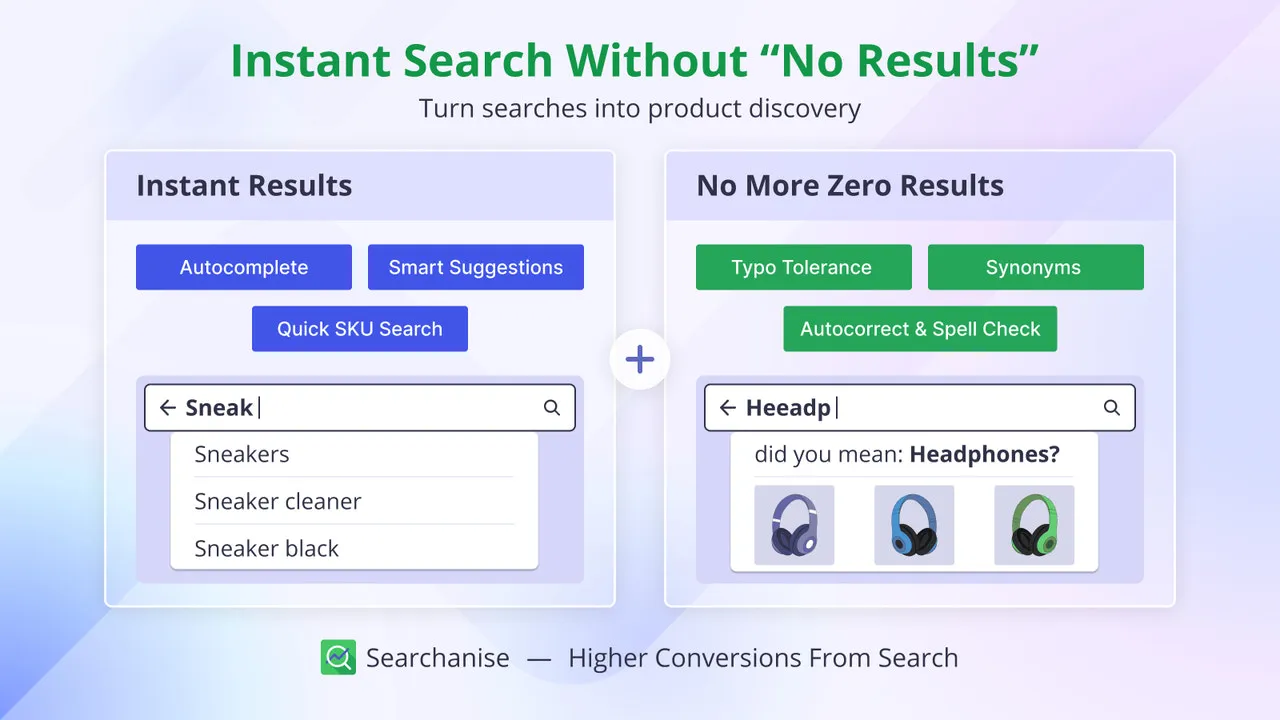
Semantic search is an AI-driven search methodology that interprets the intent and contextual meaning behind a user's query rather than relying solely on literal keyword matches. This bridges the gap between how users search and how products are cataloged.
- Map 1-way synonyms for brand-specific terms to direct users to broader categories.
- Create 2-way synonym groups for interchangeable terms to ensure search consistency.
- Update your product data structure using structured data schema to align with search engine crawl patterns; see our guide on technical SEO and data services to optimize this pipeline.
- Regularly audit your Shopify "No Results" search query report to identify new search terms that require synonym mapping.
What to Avoid
- Creating circular synonym loops that confuse the search algorithm.
- Ignoring spelling errors; you must map common typos to their correct product equivalents.
Optimizing Mobile Filter Layouts to Reduce Friction and Cart Abandonment
Over 70% of e-commerce traffic occurs on mobile devices, yet mobile filter interfaces often suffer from poor usability. Reducing mobile friction is critical for conversion lift.
- Implement a sticky "Filter & Sort" button at the bottom of the viewport for easy thumb access.
- Use a full-screen drawer overlay for filters rather than accordion menus that push content down.
- Incorporate a dynamic "Show Results" button inside the drawer that updates the count in real-time.
- Ensure touch targets for checkboxes are at least 44x44 pixels to prevent accidental taps, adhering to Web Vitals accessibility standards.
How to Fix Mobile UX Issues
- Never require users to tap an "Apply" button multiple times for each individual filter selection.
- Do not hide active filters; display them as removable tags at the top of the collection page.
- To resolve complex layout issues, leverage professional conversion rate optimization and UX design services.
Measuring Search & Filter CRO Performance via Google Analytics 4 (GA4)
You cannot optimize what you do not measure. Tracking search performance in GA4 is critical to proving your Shopify Plus CRO return on investment.
- Enable "Site Search" tracking in your GA4 Enhanced Measurement settings.
- Configure custom dimensions to capture search terms and filter categories.
- Build a custom exploration report comparing conversion rates of users who search versus users who only browse.
Key Metrics to Monitor
- Search Conversion Rate: This should be 2x to 3x higher than your sitewide baseline.
- Search Exit Rate: High exit rates indicate irrelevant results or poor filtering.
- Zero-Result Search Percentage: Target a rate of under 3%.
How Avelize Approaches Search and Filter CRO
Our team approaches search and filter optimization through a structured, three-phase engineering program designed to eliminate discovery friction and maximize revenue:
- Phase 1: Taxonomy Audit & Mapping (Weeks 1-2): We analyze your GA4 search query logs, identify high-volume zero-result terms, and map out a clean Shopify Category Metafield schema. (KPI: Map 100% of high-intent search terms).
- Phase 2: Storefront Engineering & API Integration (Weeks 3-4): We build lightning-fast, headless or Liquid-based multi-select filters utilizing the GraphQL Storefront API. (KPI: Reduce collection page load times by up to 40%).
- Phase 3: Semantic Tuning & Optimization (Week 5): We configure custom synonym groups, product boosts, and automated redirects within the Shopify Search & Discovery app. (KPI: Boost search-attributed conversion rates by 15%+).
To maximize your store's product discovery and conversion potential, partner with us for a dedicated Conversion Rate Optimization (CRO) retainer.
Published / Last reviewed: October 2026
Search Intent Refresh Notes
This page has search demand in Google Search Console. Refresh it around the highest-impression query language, add concrete examples, clarify the decision criteria, and link to the most relevant service page or related guide.
Authoritative References
Use these official resources to verify platform-specific claims and implementation details before making commercial or technical decisions.
Shopify Plus Conversion Review Framework
Conversion work on Shopify Plus should connect user experience, technical performance, merchandising, checkout behavior, and measurement quality. A redesign alone rarely fixes conversion if the page is slow, the offer is unclear, or analytics cannot explain where users hesitate.
- Review PDP clarity, trust signals, product discovery, and mobile usability.
- Audit app and script impact on Core Web Vitals and checkout flow.
- Compare conversion drop-offs by device, traffic source, product type, and landing page.
- Turn findings into a prioritized CRO backlog with measurable hypotheses.
Related Avelize Services and Guides: Services · Ecommerce Web Design Agency