
Scale Shopify Plus: Custom Workflow Automation Blueprints
By:
Scale Shopify Plus Custom Workflow Automation Blueprints: a practical Shopify Plus guide to the SEO, CRO, and revenue decisions that matter for ecommerce teams.
To scale operations without API bottlenecks, enterprise brands must transition from legacy polling to event-driven Shopify process automation. By leveraging Shopify Plus GraphQL mutations, serverless queues, and webhook verification, merchants can eliminate manual data entry and rate-limiting errors. This guide outlines the exact technical architecture required to build resilient, high-throughput workflows that support rapid growth.
Key Takeaways
- Implement the event-driven queue pattern using AWS EventBridge to handle peak traffic spikes of up to 10,000 requests per minute without dropping payloads.
- Transition from REST to GraphQL to utilize cost-based rate limits, reducing total API call volume by up to 70% in 2026.
- Enforce the 24-hour Redis deduplication rule by caching the
X-Shopify-Webhook-Idheader to prevent duplicate order processing. - Deploy the exponential backoff retry strategy with randomized jitter to handle transient network errors gracefully.
What is Shopify Process Automation and Why Does Enterprise Scale Demand It?
Shopify process automation is the programmatic integration of Shopify Plus APIs, webhooks, and enterprise ERPs to automate order routing, inventory synchronization, and customer tagging without manual intervention. This architecture eliminates data silos and rate-limiting errors by replacing fragile third-party middleware with direct, event-driven GraphQL and webhook-based pipelines.

Scaling to $10M+ GMV requires moving away from legacy polling architectures. Polling wastes API calls and introduces latency, whereas event-driven architectures react instantly to store events. In our work with merchants, we find that migrating to an asynchronous, decoupled stack is the single most effective way to protect checkout stability during high-volume events like BFCM.
Feature Legacy Polling Architecture Event-Driven Architecture API Overhead High (continuous requests) Zero (triggered on demand) Latency 5 to 15 minutes Real-time (sub-second) Rate Limit Risk High (REST leaky bucket) Low (GraphQL cost-based) Scalability Poor under BFCM load Excellent (serverless queue)Building this infrastructure requires specialized enterprise Shopify development services to ensure your middleware handles peak traffic spikes without drops.
Configuring Shopify Plus Automation Integration via Webhooks and GraphQL
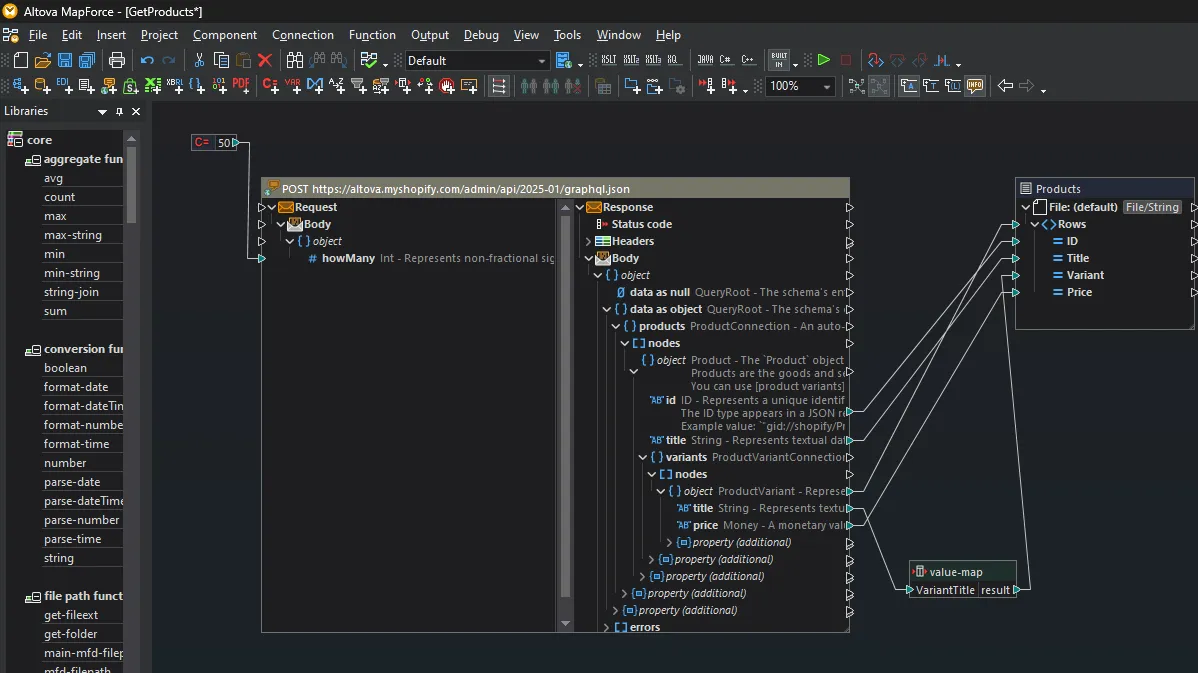
Shopify's REST Admin API enforces a strict leaky bucket limit of 40 requests per second for Plus merchants. Exceeding this threshold halts integrations and breaks data flows. Transitioning to the GraphQL Admin API is critical because it uses cost-based rate limits. A single GraphQL query can retrieve nested data that would require dozens of REST calls, allowing us to implement the cost-based rate throttle pattern.
- Register for webhook events using the
webhookSubscriptionCreatemutation in GraphQL. - Configure webhooks to use the latest API version to prevent breaking changes.
- Validate webhook authenticity by verifying the
X-Shopify-Hmac-SHA256header against your shared secret. - Respond with a 200 OK status within 2 seconds to prevent Shopify from retrying and disabling the webhook.
Building a Custom Order Routing and Fraud Prevention Workflow
High-volume merchants cannot afford to send high-risk orders straight to fulfillment. Automated order routing saves manual review hours and prevents chargebacks. We recommend employing the risk-score hold playbook to isolate suspicious transactions automatically.
- Capture the
orders/createwebhook payload to initiate the evaluation sequence immediately. - Query the
Orderobject via GraphQL to retrieve theriskAnalysesand payment status. - Apply custom business rules to flag suspicious shipping addresses or mismatched billing data.
- Use the
fulfillmentOrderHoldmutation to pause fulfillment if risk signals exceed your threshold. - Release the hold and assign the order to the optimal warehouse once cleared by fraud filters.
Automating Multi-Warehouse Inventory Sync at Scale
Overselling damages customer retention and brand trust. Real-time inventory synchronization across multiple fulfillment nodes is non-negotiable. To achieve this, our team deploys the multi-warehouse lock pattern to guarantee inventory accuracy across all channels.
Enterprise Inventory Sync Checklist
- Map all physical warehouse locations to unique Shopify Location IDs in your database.
- Batch inventory updates using the
inventoryBulkAdjustQuantityAtLocationGraphQL mutation. - Implement a Redis-based lock system to prevent race conditions during flash sales.
- Configure safety stock thresholds to reserve 5% of stock for high-velocity SKUs.
- Schedule an hourly reconciliation script to verify database alignment with Shopify.
Testing, Error Handling, and Retries for Enterprise Shopify Process Automation
Even the best integrations encounter network drops, API deprecations, and database timeouts. Resilience must be engineered into your codebase to prevent catastrophic failures during peak sales periods.
Common Mistakes to Avoid
- Processing incoming webhooks synchronously, which leads to timeout errors during high-traffic events.
- Ignoring the
X-Shopify-Shop-Api-Call-Limitheaders, resulting in unexpected 429 Too Many Requests errors. - Failing to deduplicate webhooks, which leads to duplicate orders, double charges, and incorrect inventory counts.
How to Fix and Implement Resilient Automations
- Acknowledge webhooks immediately, queue the payload, and process the business logic asynchronously.
- Implement an exponential backoff retry strategy with jitter (retrying at 5s, 30s, 5m, and 30m intervals).
- Store the unique
X-Shopify-Webhook-Idin a Redis cache for 24 hours to filter out duplicate deliveries. - Partner with dedicated enterprise Shopify development services to build, monitor, and scale your integration infrastructure.
How Avelize Approaches Enterprise Shopify Workflow Automation
We build highly resilient, custom integrations tailored to the unique operational constraints of scaling Shopify Plus merchants. Our structured implementation process ensures zero downtime and complete data integrity:
- Phase 1: Architecture Audit (Weeks 1-2) — We map your existing data flows, identify API bottlenecks, and design the event-driven queue blueprint. Cost: $5,000 | KPI: 100% visibility into integration failure points.
- Phase 2: Infrastructure Engineering (Weeks 3-6) — Our team builds the serverless AWS EventBridge or Google Cloud Pub/Sub pipelines and configures the Redis deduplication layer. Cost: $15,000 | KPI: Sub-second webhook ingestion latency.
- Phase 3: Integration & Load Testing (Weeks 7-8) — We run end-to-end simulations of BFCM-level traffic to validate error handling and retry mechanisms. Cost: $10,000 | KPI: 99.99% successful transaction processing under load.
Ready to eliminate manual bottlenecks and secure your operations? Explore our specialized enterprise Shopify development services to build your high-throughput automation infrastructure today.
Last reviewed: October 2026
Shopify Plus Migration Risk Checklist
A Shopify Plus migration should be planned around risk, not only around launch tasks. The most important work is deciding which URLs, templates, analytics events, redirects, integrations, and checkout flows must survive the move without damaging revenue or organic search visibility.
- Map current revenue-driving URLs and search queries before changing templates.
- Validate redirects, canonicals, structured data, and sitemap output before launch.
- Test checkout, payments, analytics, consent, and third-party scripts in a staging flow.
- Measure Core Web Vitals, conversion rate, crawl errors, and revenue after launch.
Phased Shopify Plus Implementation Plan
For many teams, a phased migration is safer than changing every business-critical system at once. Start with the pages and flows that create the highest revenue or SEO risk, then move into secondary templates, automation, and experimentation after the foundation is stable.
Authoritative References
Use these official resources to verify platform-specific claims and implementation details before making commercial or technical decisions.
Search Intent Refresh Notes
This page has search demand in Google Search Console. Refresh it around the highest-impression query language, add concrete examples, clarify the decision criteria, and link to the most relevant service page or related guide.
Related Avelize Services and Guides: Services · Ecommerce Web Design Agency