
Shopify B2B Pricing: Custom Tiers & Volume Discounts
By:
Shopify B2B Pricing Custom Tiers & Volume Discounts: a practical Shopify Plus guide to the SEO, CRO, and revenue decisions that matter for ecommerce teams.
To configure custom wholesale pricing and volume discounts on Shopify Plus without breaking your D2C catalog, merchants must leverage native Shopify B2B Catalogs mapped directly to Company Locations. This architecture eliminates legacy draft-order workarounds, prevents duplicate SKU inventory sync issues, and maintains a single, unified inventory pool. In our work with merchants, transitioning to this native setup reduces checkout friction and preserves search engine rankings by avoiding duplicate product pages.
Key Takeaways
- The Single-SKU Rule: Never duplicate SKUs for wholesale; use native Shopify B2B Catalogs to manage pricing rules from a single product ID.
- Direct Mapping: Map custom price lists directly to B2B Company Locations to automate negotiated rates at checkout.
- Native Quantity Breaks: Configure volume-based discounts directly within the admin to eliminate heavy, speed-reducing theme scripts.
- Operational Efficiency: Enforce Minimum Order Quantities (MOQs) and purchase increments to ensure wholesale viability.
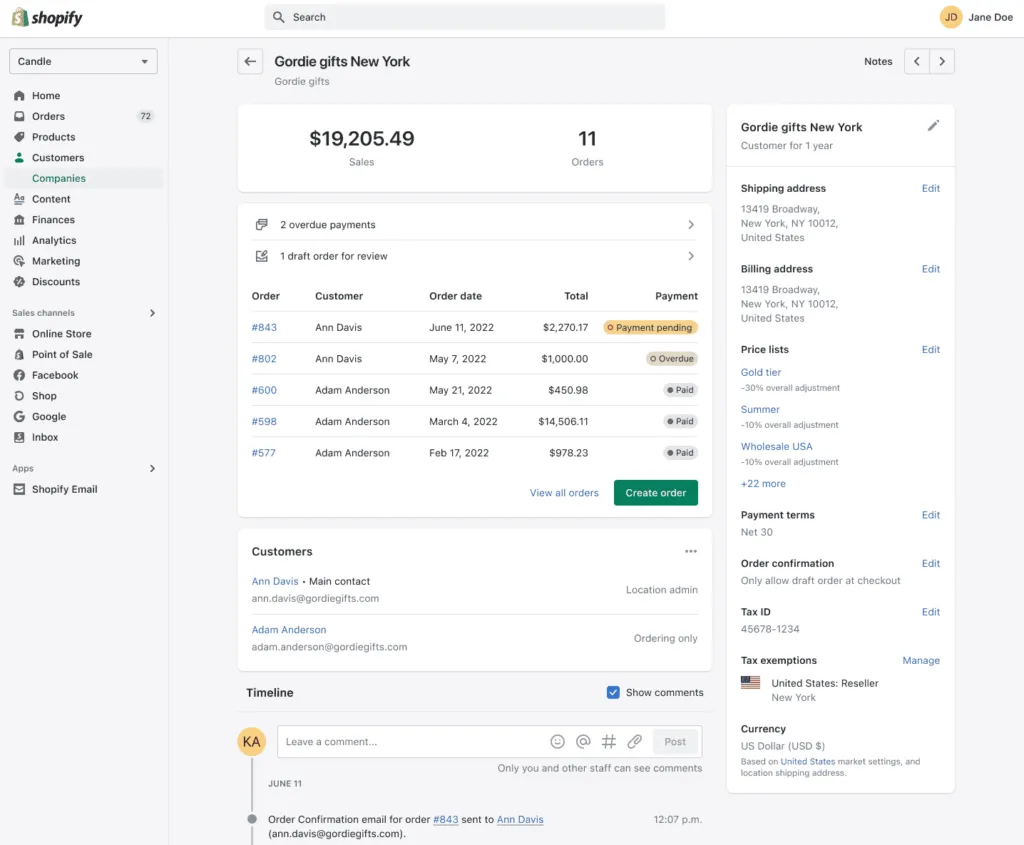
Step 1: Creating and Mapping Price Lists to Shopify B2B Company Locations
Shopify B2B Catalogs is the native pricing and product availability framework that allows Shopify Plus merchants to set custom wholesale rates and volume-based discounts for specific business customers. According to the Shopify Help Center, mapping native price lists directly to B2B Company Locations allows merchants to offer percentage-based or fixed-price adjustments on a single shared SKU catalog without affecting D2C retail pricing.

To establish clean price segregation, we implement the Unified SKU Protocol. This eliminates the need for duplicate storefronts or manual invoicing workarounds. To map your custom price lists directly to your B2B customers' profiles:
- Navigate to Shopify Admin > Customers > Companies.
- Select or create a Company Location for your B2B client.
- Under the Catalogs section, click Assign catalog.
- Select the specific price list that contains your negotiated wholesale rates.
- Set the priority order if a company location is mapped to multiple catalogs.
Step 2: Configuring Wholesale Volume Discounts and Quantity Breaks Natively
Native quantity breaks allow you to incentivize larger order volumes directly on the product page without relying on external theme scripts that slow down your site. This ensures compliance with Core Web Vitals guidelines.
- Go to Products > Catalogs and select your active B2B catalog.
- Click Manage pricing and select the products you want to discount.
- Click Set quantity breaks to define your volume tiers.
- Enter the minimum quantity required to trigger the discount.
- Input the specific fixed price or percentage discount for that tier.
Volume Discount Setup Checklist:
- Verify that the target products are set to Active status.
- Input the exact minimum quantity threshold for Tier 1 (e.g., 50 units).
- Enter the discounted price or percentage reduction for Tier 1.
- Repeat the process for Tier 2 (e.g., 100 units) and Tier 3 (e.g., 250 units).
- Click Save to apply the volume rules instantly to the assigned company locations.
Step 3: Managing D2C and B2B Catalog Coexistence Without Duplicate SKUs
Maintaining separate SKUs for retail and wholesale customers creates massive inventory sync issues and dilutes your search engine rankings. Utilizing a single SKU catalog is critical for operational efficiency.
- Keep a single, unified inventory pool for all sales channels to prevent overselling.
- Assign D2C customers to your default Online Store catalog.
- Restrict wholesale-only products by creating a separate catalog assigned exclusively to B2B Company Locations.
- Ensure your theme is optimized to render these dynamic price states cleanly.
If you require advanced logic or custom layout adjustments for your B2B storefront, leverage specialized custom Shopify development to ensure seamless catalog rendering and fast page speeds.
Native Shopify B2B vs. Legacy Wholesale Apps
Feature Native Shopify B2B (2026) Legacy Third-Party Apps SKU Management Single SKU shared across channels Requires duplicate SKUs or draft orders Checkout Speed Instant, native checkout processing Delayed by external API calls and scripts SEO Impact Zero dilution; single canonical page High risk of duplicate content penalties Inventory Sync Real-time, unified inventory pool Prone to overselling due to sync delaysStep 4: Setting Up Minimum Order Quantities (MOQs) and Increments
Enforcing minimum order quantities (MOQs) and purchasing increments ensures that B2B buyers meet wholesale viability standards before reaching checkout.
- Open your B2B catalog in Products > Catalogs.
- Select the products or specific variants requiring purchase restrictions.
- Set the Minimum quantity (e.g., must buy at least 10 units).
- Set the Group increments (e.g., must buy in multiples of 5 units).
- Save changes to update the quantity selectors on the product detail pages.
Step 5: Testing the Checkout Flow for Custom B2B Pricing Tiers
Before launching your B2B store, you must validate that your pricing tiers, payment terms, and quantity breaks function correctly under a simulated business buyer profile.
- Create a test customer profile in your admin and assign it to an active B2B Company Location.
- Log in to your storefront using the test customer's credentials.
- Add items to your cart to verify that the retail price switches to the mapped B2B price.
- Increase cart quantities to confirm that the quantity breaks apply at the exact thresholds.
- Proceed to checkout to ensure payment terms (such as Net 30) and B2B shipping rates display correctly.
Common Pricing Mistakes and How to Avoid Them
What to Avoid:
- Using legacy wholesale apps: These apps often rely on draft orders or duplicate variants, which cause checkout errors and slow down page loading speeds.
- Duplicating SKUs: Creating separate product pages for B2B splits your product reviews, dilutes page authority, and ruins inventory tracking.
- Ignoring price list priority: Failing to set catalog priorities can lead to customers seeing incorrect, overlapping discount rates.
How to Fix:
- Audit existing apps: Uninstall legacy wholesale apps to prevent script conflicts with native Shopify B2B features during checkout.
- Consolidate SKUs: Merge duplicate products and use native Catalogs to manage pricing rules from a single product ID.
- Optimize SEO: Ensure your wholesale-specific pages do not dilute your search rankings by executing a clean technical setup. If your B2B transition affects your organic visibility, consult our experts in technical SEO and GEO programs to protect and grow your search rankings.
How Avelize Approaches B2B Pricing Architecture
Our team implements a structured, four-week migration framework to transition merchants from legacy wholesale apps to native Shopify Plus B2B pricing. We focus on preserving SEO equity, clean ERP integration, and optimal checkout performance.
- Week 1: Catalog Audit & Schema Mapping: We analyze your current SKU structure and map existing wholesale agreements to native Shopify Catalogs.
- Week 2: ERP & Inventory Integration: We configure the Shopify GraphQL Storefront API to sync custom price lists directly with your ERP without middleware latency.
- Week 3: Theme Optimization & MOQ Enforcement: We build custom Liquid and React components to display volume discount tables cleanly on your product detail pages.
- Week 4: End-to-End Testing & Launch: We execute simulated checkouts across all customer tiers to validate pricing accuracy and payment terms.
Our integration programs target a complete reduction in third-party app fees and optimized checkout conversion rates. Learn more about our custom Shopify development services to scale your B2B operations.
Frequently Asked Questions
What is the difference between Shopify B2B Catalogs and legacy wholesale apps?
Shopify B2B Catalogs represent a native architectural framework built directly into the Shopify Plus core, allowing merchants to manage wholesale pricing, volume discounts, and product availability within a single, unified SKU database. In contrast, legacy third-party wholesale apps rely on external scripts, duplicate variants, or draft-order workarounds to simulate pricing tiers. Because legacy apps operate outside Shopify's core checkout, they frequently cause inventory sync delays, slow down page load speeds by injecting heavy JavaScript, and dilute search engine optimization (SEO) performance through duplicate product pages. By utilizing native Catalogs in 2026, Shopify Plus merchants preserve a single inventory pool, maintain fast checkout speeds, and protect organic search rankings. This native integration ensures that wholesale buyers see accurate, negotiated pricing instantly upon logging in, while retail customers continue to experience a clean, uncompromised D2C checkout flow without performance bottlenecks.
Can I set different payment terms for different B2B locations?
Yes. Within the Shopify Admin, you can assign specific payment terms (such as Net 15, Net 30, or Net 60) directly to individual Company Locations. This allows you to enforce unique credit terms for different branches of the same business customer while maintaining a single, centralized billing profile.
How do native Shopify B2B volume discounts affect retail D2C customers?
They do not affect them at all. Because native volume discounts are configured within B2B Catalogs mapped exclusively to authenticated Company Locations, retail D2C customers browsing your public storefront will only see standard retail pricing. The volume discount rules and quantity selectors only render when an authorized B2B customer logs into their business account.
Ready to transition your wholesale operations to a high-performance, native setup? Contact our team today to discuss how our technical SEO and GEO programs can protect your search rankings and streamline your B2B checkout flow.
Published / Last reviewed: May 24, 2026
Search Intent Refresh Notes
This page has search demand in Google Search Console. Refresh it around the highest-impression query language, add concrete examples, clarify the decision criteria, and link to the most relevant service page or related guide.
Authoritative References
Use these official resources to verify platform-specific claims and implementation details before making commercial or technical decisions.
Shopify Plus Pricing 2026: What Enterprise Teams Should Budget For
Shopify Plus pricing should not be evaluated as a single monthly fee. For enterprise teams, the real budget usually combines platform fees, payment processing, transaction rules, app costs, implementation work, analytics setup, QA, and ongoing optimization.
The safest way to compare Shopify Plus cost is to separate the decision into four layers:
- Platform cost: the contracted Shopify Plus fee and any commercial terms quoted by Shopify.
- Payment and transaction costs: Shopify Payments, external gateways, payment method mix, and international selling requirements.
- Implementation cost: theme work, migration, integrations, tracking, redirects, QA, and launch support.
- Operating cost: apps, CRO testing, maintenance, analytics, SEO monitoring, and performance optimization.
Shopify Plus Features That Affect Pricing Decisions
The pricing question is not only whether Shopify Plus is more expensive than standard Shopify plans. The better question is whether the additional enterprise capabilities reduce operational friction, technical risk, or conversion loss enough to justify the cost.
- Checkout extensibility and advanced checkout customization needs.
- B2B, wholesale, multi-market, or multi-store operating requirements.
- Higher-volume merchandising, automation, and integration workflows.
- SEO, analytics, and migration safeguards that reduce launch risk.
Hidden Shopify Plus Costs to Include in the 2026 Budget
Many Shopify Plus budgets miss the work around the platform: app rationalization, theme performance cleanup, data migration, redirect mapping, analytics QA, consent tooling, and post-launch conversion measurement. These costs matter because they decide whether the platform change actually improves revenue or simply moves the same problems into a new stack.
When Shopify Plus Is Worth It
Shopify Plus is usually easier to justify when the business has meaningful operational complexity, international growth, B2B requirements, checkout constraints, or performance and SEO debt that is holding back conversion. It is harder to justify when the store only needs a cosmetic redesign or does not yet have the traffic, revenue, or team capacity to use the enterprise features.
Need a Shopify Plus Cost and SEO Review?
If you are comparing Shopify Plus pricing against migration risk, SEO impact, performance debt, or conversion upside, I can review the current store and map the highest-risk cost items before you commit to a migration or rebuild.
Related Shopify and Ecommerce Growth Guides
Continue with these related guides for implementation, SEO, performance, and conversion context.
Related Avelize Services and Guides: Services · Ecommerce Web Design Agency