
Shopify Plus Migration Consultant SEO Replatforming Guide
By:
Hiring a Shopify Plus migration consultant is the single most effective way to prevent catastrophic organic traffic loss during an enterprise replatforming. When migrating to Shopify Plus, structural URL changes, theme swaps, and metadata shifts present severe algorithmic risks. Our team at Avelize uses a rigorous, data-backed migration framework to map legacy paths, preserve structural schema, and deploy flawless redirect matrices, ensuring your domain authority remains fully intact throughout the transition.
Key Takeaways for a Risk-Free Migration
- The 100k Redirect Limit: Shopify natively limits CSV redirects to 100,000; larger catalogs require edge routing via Cloudflare Workers.
- Strict URL Subfolders: Shopify enforces rigid
/products/and/collections/subdirectories, requiring precise structural mapping. - The 14-Day Post-Launch Window: Daily Google Search Console monitoring and live redirect audits are mandatory to catch 404 spikes.
- Schema Preservation: Rebuilding Product and Breadcrumb JSON-LD schema prevents rich snippet drops in search engine results pages (SERPs).
What is a Shopify Plus Migration Consultant?
A Shopify Plus migration consultant is a technical SEO specialist who plans, executes, and audits the transition of enterprise e-commerce stores to Shopify Plus. In our work with merchants, we find that these specialists prevent organic traffic loss by mapping complex legacy URL structures, managing bulk 301 redirects, preserving metadata, and conducting post-launch technical search audits.
Pre-Migration: Crawling Legacy URLs and Establishing the SEO Baseline
Before modifying any DNS records, you must capture a complete snapshot of your current site. This baseline crawl serves as your safety net and the source of truth for your redirect mapping. In our work with merchants, we always begin by capturing a comprehensive dataset to prevent orphaned pages.
- Crawl your live site using Screaming Frog or DeepCrawl to capture all indexable URLs, canonical tags, and response codes.
- Export 12 months of organic landing page data from Google Analytics 4 and Google Search Console to identify high-value traffic drivers.
- Pull your legacy XML sitemaps to ensure no legacy URL is missed during the mapping phase.
- Store this data in a secure master spreadsheet to track indexation status and crawl performance post-migration.
For complex configurations, leveraging professional Technical SEO & GEO programs during this phase guarantees that hidden orphaned URLs are identified before they turn into 404 errors.
Shopify URL Mapping: Adapting Legacy Paths to Shopify's Rigid Subfolders
Shopify Plus enforces a strict, non-negotiable URL structure. When Tobi Lütke and the Shopify product team designed the platform's URL architecture, they optimized it for high-concurrency events like BFCM, but this introduced rigid subfolder structures that require careful mapping. Unlike legacy platforms where you can define custom nested paths, Shopify categorizes all pages into predefined subdirectories.
- Products must live under the
/products/subfolder. - Collections must live under the
/collections/subfolder. - Standard pages must live under the
/pages/subfolder. - Blog posts must live under the
/blogs/blog-name/subfolder.
If your legacy site uses nested hierarchies like /category/subcategory/product-name, you must map these directly to Shopify’s flat /products/product-name structure. To visualize this transition, review the structural comparison table below:
/shop/category/item-name
/products/item-name
Collection Page
/catalog/category-name
/collections/category-name
Standard Page
/about-our-company
/pages/about-our-company
If your migration involves a complete visual redesign alongside structural changes, our conversion rate optimization and UX design services ensure your new layout maintains high conversion rates alongside search performance.
The 301 Redirect Matrix: Mapping, Testing, and Uploading Bulk Redirects
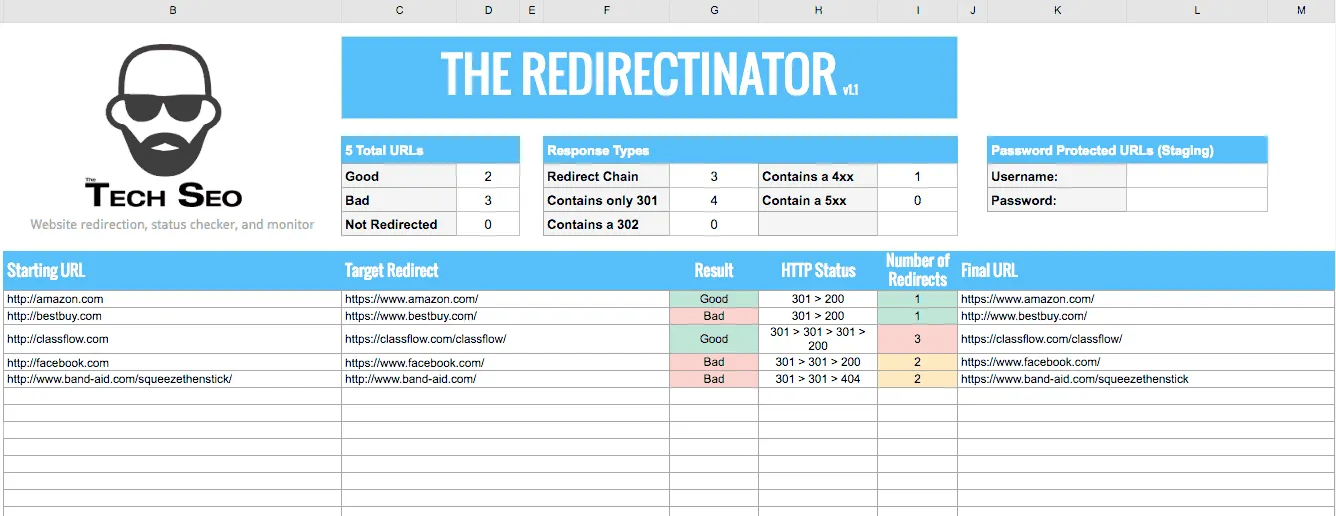
The redirect matrix is the most critical asset in your migration. A single broken link or redirect loop can drop your organic rankings overnight. Our team utilizes "the 100k-limit bypass pattern" to handle massive enterprise catalogs seamlessly.
What to Avoid: Common Redirect Mistakes
- Redirect Chains: Redirecting URL A to URL B, which then redirects to URL C. This wastes crawl budget and slows down page load times.
- Redirecting to Non-Canonical URLs: Always point your 301 redirects to the clean, canonical version of the new Shopify URL.
- Mass Redirecting to the Homepage: Do not map deleted products to your homepage; Google treats these as soft 404s, passing zero ranking equity.
How to Fix and Implement Bulk Redirects
Shopify Plus allows you to upload redirects natively via CSV, but it has a limit of 100,000 redirects. For larger enterprise catalogs, we bypass this limitation by deploying edge-redirection rules using Cloudflare Workers or Fastly, handling redirects at the DNS level before the request ever hits Shopify's servers.
- Create a two-column CSV with headers:
Old Path(relative path) andRedirect To(absolute or relative path). - Map out-of-stock or discontinued products to their closest active category or parent collection page.
- Use bulk redirect testing tools like Screaming Frog in list mode to test your map in a staging environment before going live.
Theme and Metadata Migration: Preserving Title Tags, H1s, and Schema Markup
Your search rankings rely heavily on on-page signals. If your new Shopify theme strips away your optimized title tags, header structures, or structured data, your rankings will plummet. Ensure your new Shopify theme preserves tracking scripts for Klaviyo and Triple Whale alongside your core metadata.
- Export your legacy meta titles, meta descriptions, and H1 tags during the initial crawl phase.
- Import your metadata into Shopify using Matrixify or custom metafields to ensure complete alignment with your legacy pages.
- Ensure your new Shopify theme uses correct heading hierarchies (only one
<h1>per page). - Rebuild your Product, Article, and Breadcrumb Schema markup using JSON-LD.
If your default theme lacks advanced schema capabilities, or if you are migrating to a headless Hydrogen setup, our team uses the GraphQL Storefront API to query clean product data without losing SEO equity. We can implement this via our E-commerce app and integration development services.
Staging Site Audit: Technical SEO Verification in the Sandbox Environment
Never launch a Shopify Plus store without a comprehensive technical audit of your password-protected staging environment. This is where we verify that Core Web Vitals and rendering paths are fully optimized.
The Staging SEO Checklist
- Bypass Staging Protection: Use Screaming Frog with your Shopify store password to crawl the sandbox site.
- Verify Canonical Tags: Ensure all canonical tags point to the primary Shopify domain and do not reference the
.myshopify.comsubdomain. - Check Robots.txt: Verify that Shopify's default robots.txt is active and does not block critical CSS, JS, or product image assets.
- Audit Noindex Tags: Confirm that no
noindexdirectives are present on pages you want indexed post-launch. - Test Mobile Friendliness: Ensure the new theme elements render correctly on mobile devices without layout shifts.
- Analyze Site Speed: Run Core Web Vitals audits to ensure the new theme is fully optimized before the official launch to protect your mobile rankings.
Post-Launch Protocol: 14-Day Search Console Monitoring and Indexation Tracking
The 14 days following your launch are critical. We implement "the 14-day post-launch stabilization playbook" to actively monitor crawl behavior and catch errors before search engines de-index your pages.
- Update Google Search Console: Add and verify all domain variations (HTTP, HTTPS, www, and non-www) and submit your new Shopify sitemap index (
/sitemap.xml). - Monitor Crawl Errors: Check the "Indexing" report daily for sudden spikes in 404 errors or excluded pages.
- Run Live Redirect Audits: Crawl your top 1,000 highest-traffic legacy URLs to confirm they return a
301 Moved Permanentlystatus code and resolve to the correct target page. - Track Keyword Positions: Monitor your target keywords daily to detect any volatility or ranking drops, allowing you to quickly troubleshoot specific pages.
How Avelize Approaches Shopify Plus Migrations
Our team executes migrations using a structured 45-day playbook designed to eliminate algorithmic risk and preserve search equity.
- Phase 1: Discovery & Baseline Crawl (Days 1–10): We map the entire legacy architecture and extract 12 months of GSC data. KPI: 100% of indexable URLs mapped.
- Phase 2: Redirect Architecture & Staging (Days 11–30): We build the 301 redirect matrix and configure the sandbox environment. KPI: Zero redirect loops on staging.
- Phase 3: Launch & Post-Migration Monitoring (Days 31–45): We execute DNS switchover and run daily indexation audits. KPI: Maintenance of >95% of pre-migration organic traffic within 30 days.
Frequently Asked Questions
How does a Shopify Plus migration consultant prevent organic traffic loss?
A Shopify Plus migration consultant prevents organic traffic loss by executing a structured technical SEO protocol that bridges the gap between your legacy platform and Shopify's rigid architecture. First, they establish a comprehensive URL baseline by crawling 100% of your legacy site and cross-referencing this data with 12 months of Google Search Console landing page performance. Second, they engineer a 301 redirect matrix, mapping legacy nested paths to Shopify's strict subfolder structures (such as /products/ and /collections/) while eliminating redirect chains or soft 404 errors. Third, they preserve search engine visibility by auditing metadata, rebuilding JSON-LD schema markup, and verifying canonical tags on a password-protected staging site. Finally, during the critical 14-day post-launch window, they monitor Google Search Console crawl errors and run live redirect audits to resolve any indexing issues immediately, ensuring your domain authority remains completely intact. By systematically addressing these technical components, our team mitigates the risk of ranking drops and ensures a seamless transition.
What is the 100,000 redirect limit on Shopify Plus?
Shopify Plus natively allows up to 100,000 URL redirects via its administration panel. For enterprise merchants with larger catalogs or complex legacy URL histories, our team bypasses this limitation by deploying edge-redirection rules using Cloudflare Workers or Fastly, handling redirects at the DNS level before the request ever hits Shopify's servers.
How long does a technical SEO migration to Shopify Plus take?
A standard technical SEO migration for an enterprise Shopify Plus store typically takes between 45 to 90 days. This timeline allows for comprehensive legacy crawling, staging site audits, custom Liquid schema development, and the mandatory 14-day post-launch monitoring phase to stabilize search engine indexing.
Ready to replatform without losing your hard-earned search rankings? Contact our team today to learn more about our Technical SEO & GEO programs.
Published / Last reviewed: 2026
Shopify Plus Migration Risk Checklist
A Shopify Plus migration should be planned around risk, not only around launch tasks. The most important work is deciding which URLs, templates, analytics events, redirects, integrations, and checkout flows must survive the move without damaging revenue or organic search visibility.
- Map current revenue-driving URLs and search queries before changing templates.
- Validate redirects, canonicals, structured data, and sitemap output before launch.
- Test checkout, payments, analytics, consent, and third-party scripts in a staging flow.
- Measure Core Web Vitals, conversion rate, crawl errors, and revenue after launch.
Phased Shopify Plus Implementation Plan
For many teams, a phased migration is safer than changing every business-critical system at once. Start with the pages and flows that create the highest revenue or SEO risk, then move into secondary templates, automation, and experimentation after the foundation is stable.
Authoritative References
Use these official resources to verify platform-specific claims and implementation details before making commercial or technical decisions.
Related Shopify and Ecommerce Growth Guides
Continue with these related guides for implementation, SEO, performance, and conversion context.
- Vetting a Shopify Plus Consultant: Beyond Agency Retainers
- Shopify Plus Migration: ERP Integration & Data Blueprint
Related Avelize Services and Guides: Replatforming · Technical Audits · Shopify Seo Services