
Shopify Plus Mobile CRO: 5 Tactics to Boost Conversions
By:

Shopify Conversion Rate Optimization Services: a practical Shopify Plus guide to the SEO, CRO, and revenue decisions that matter for ecommerce teams.
Shopify Plus mobile CRO is the systematic process of diagnosing, testing, and optimizing the mobile user journey on Shopify Plus to eliminate checkout friction, accelerate page load speeds, and leverage native high-converting features like Shop Pay to align mobile conversion rates with desktop benchmarks. In our work with merchants, we regularly see mobile conversion rates lag desktop by 30% to 50%; resolving this requires optimizing Liquid rendering, deploying Checkout Extensibility, and streamlining mobile-first navigation.
Key Takeaways
- The Shop Pay Acceleration: Activating Shop Pay reduces checkout time by up to 60% and increases checkout-to-order conversion by 1.91x on mobile.
- The 48px Target Rule: Every interactive element must maintain a minimum touch target of 48x48 pixels to prevent mobile rage-clicks.
- The Extensibility Migration: Transitioning from legacy checkout.liquid to Shopify Checkout Extensibility in 2026 is mandatory for deploying high-converting, lightweight checkout UI extensions.
- The Sticky ATC Intersection: Implementing a vanilla JavaScript Intersection Observer for a sticky Add-to-Cart button keeps the primary conversion action visible on deep scrolls.
Audit Your Mobile Funnel: Identifying Drop-Off Points in the Shopify Plus Checkout
To systematically improve performance, we must first isolate where mobile users abandon the purchase path. Mobile-specific friction points often hide in plain sight within standard responsive layouts.

- Analyze your mobile cart-to-checkout abandonment rate using Shopify Analytics to establish your baseline.
- Isolate mobile-specific load times per page template using native Shopify Web Vitals.
- Map user sessions to identify where mobile users experience layout shifts or rage-click on non-interactive elements.
How to Fix
Configure custom Google Analytics 4 (GA4) funnel exploration reports to isolate mobile traffic. Identify exactly where users drop off between cart, checkout initiation, shipping selection, and payment completion. If you need assistance setting up advanced tracking, our team can help through our Technical SEO & GEO programs.
Accelerating Mobile Page Speed: Optimizing Liquid Themes and Image Delivery for Mobile Devices
Mobile page speed directly impacts conversion. Slow Liquid rendering and unoptimized asset delivery will cause mobile shoppers to bounce before your primary call-to-action loads. Liquid rendering is the server-side process where Shopify compiles theme templates before serving HTML to the mobile browser.
- Implement responsive image syntax using
srcsetandsizesin your Liquid templates to serve scaled images. - Defer non-critical JavaScript using
deferorasynctags to prevent render blocking on 3G and 4G networks. - Eliminate heavy third-party app scripts on mobile viewports by leveraging Shopify's native theme features.
How to Fix
Replace standard image tags in your Liquid files with the Shopify image_tag filter. This automatically generates WebP and AVIF formats while setting appropriate responsive sizes. For complex custom themes, consider utilizing our professional Shopify Plus development services to safely refactor legacy theme code.
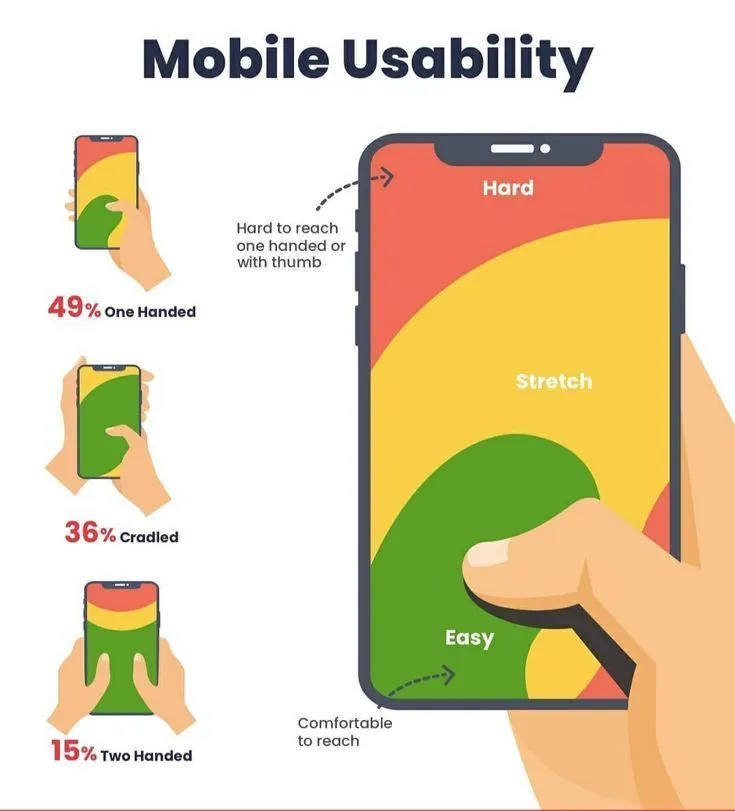
Streamlining Mobile Navigation: Designing a Thumb-Friendly Header and Search UI
Mobile users expect immediate access to products. Complex desktop navigation structures translated directly to mobile will crush your conversion rates. We utilize the thumb-zone priority layout to ensure key navigation elements sit within natural physical reach.
- Keep the search bar persistently visible or easily accessible via a sticky header layout.
- Ensure touch targets for all interactive elements are at least 48x48 pixels with adequate spacing.
- Incorporate predictive search with auto-suggestions and visual product thumbnails.
What to Avoid
- Avoid multi-level hamburger menus that require more than three taps to reach a product collection page.
- Do not hide the search icon behind a tiny, non-standard icon on mobile viewports.
- Never use hover-based dropdown menus that fail on touch-screen devices.
Leveraging Shopify Checkout Extensibility for One-Tap Mobile Purchases
Shopify Checkout Extensibility allows Plus merchants to customize the checkout experience securely, replacing legacy checkout.liquid files with high-performing, mobile-first components.
- Transition to Checkout Extensibility to enable custom, lightweight UI extensions.
- Prioritize Shop Pay as the primary accelerated checkout option to reduce checkout time by up to 60%.
- Utilize native checkout UI extensions to display dynamic order bumps and loyalty rewards directly in the mobile checkout flow.
Implementation Checklist
- Verify your theme compatibility and migrate your store to Shopify Checkout Extensibility in the Shopify Admin.
- Enable Shop Pay, Apple Pay, and Google Pay in your payment provider settings to capture one-tap purchases.
- Deploy native checkout UI extensions to replace legacy, render-blocking checkout scripts.
- Test the mobile checkout flow on both iOS and Android devices to ensure auto-fill forms function flawlessly.
Optimizing Mobile Product Pages (PDP): Sticky Add-to-Cart and Dynamic Payment Buttons
Mobile product pages must present critical information within the first viewport to drive immediate purchase intent. We deploy the sticky ATC intersection observer pattern to maintain a persistent call-to-action without cluttering the screen.
- Implement a sticky Add-to-Cart (ATC) button that triggers when the user scrolls past the primary buy box.
- Position dynamic payment buttons (like Shop Pay or Apple Pay) directly below the primary ATC button.
- Collapse secondary product details, FAQs, and reviews into clean, expandable accordion tabs.
How to Fix
Write a lightweight vanilla JavaScript intersection observer in your theme to toggle the sticky ATC layout. If your team lacks the internal bandwidth to refactor these critical templates, leverage our Conversion Rate Optimization (CRO) retainers to build native, fast-loading PDP components.
A/B Testing Your Mobile CRO Changes: Setting Up Shopify Plus Launchpad and Web Pixels
Deploying mobile optimizations without isolated testing can introduce conversion regressions. Shopify Plus offers native tools to measure performance accurately.
- Use Shopify Web Pixels to collect clean, first-party behavioral data on mobile devices without relying on heavy third-party tracking scripts.
- Deploy Shopify Launchpad to schedule and automate theme changes, pricing updates, and homepage layouts for high-traffic mobile campaigns.
- Monitor mobile-specific metrics, focusing on Add-to-Cart Rate, Mobile Conversion Rate, and Average Order Value (AOV).
How Avelize Approaches Mobile CRO
Our team implements a structured, data-driven methodology to optimize your mobile storefront:
- Phase 1: Mobile UX & Speed Audit (Week 1): We identify critical friction points and layout shifts using real user monitoring.
- Phase 2: Liquid & Checkout Extensibility Refactoring (Weeks 2-4): We replace legacy scripts with native UI extensions and optimize image delivery.
- Phase 3: Post-Launch Monitoring & Web Pixel Optimization (Weeks 5-6): We run isolated tests to validate conversion rate lifts and ensure data accuracy.
Ready to eliminate mobile checkout friction and unlock hidden revenue? Partner with our team to deploy a high-converting mobile storefront through our specialized Shopify Plus development services.
Published / Last reviewed: October 24, 2026
Authoritative References
Use these official resources to verify platform-specific claims and implementation details before making commercial or technical decisions.
- Shopify Plus overview
- Shopify Functions documentation
- Checkout Extensibility documentation
- Google Search Central: Core Web Vitals
Shopify Plus Conversion Review Framework
Conversion work on Shopify Plus should connect user experience, technical performance, merchandising, checkout behavior, and measurement quality. A redesign alone rarely fixes conversion if the page is slow, the offer is unclear, or analytics cannot explain where users hesitate.
- Review PDP clarity, trust signals, product discovery, and mobile usability.
- Audit app and script impact on Core Web Vitals and checkout flow.
- Compare conversion drop-offs by device, traffic source, product type, and landing page.
- Turn findings into a prioritized CRO backlog with measurable hypotheses.
Related Shopify and Ecommerce Growth Guides
Continue with these related guides for implementation, SEO, performance, and conversion context.
Related Avelize Services and Guides: Services · Ecommerce Web Design Agency