
Google Ads for Shopify Plus: Feed & Landing Page Fixes
By:
Stop wasting ad spend. Fix your product feed, speed up landing pages, and secure tracking to maximize ROAS with Google Ads for Shopify Plus.
To scale Google Ads for Shopify Plus successfully, merchants must eliminate technical friction across product feeds, landing page performance, and checkout tracking. When scaling spend, minor data mismatches or latency issues quickly compound into thousands of dollars in wasted budget. We ensure your Shopify Plus architecture is fully optimized to support high-volume Google Merchant Center syncs and high-converting paid traffic.
Key Takeaways
- Resolve silent Google Merchant Center disapprovals by mapping custom Shopify metafields for GTINs and MPNs.
- Eliminate international pricing mismatches by aligning Shopify Markets subfolders with localized Google Ads feeds.
- Improve mobile conversion rates by optimizing Core Web Vitals, targeting a Largest Contentful Paint (LCP) under 2.0 seconds.
- Secure transaction tracking by migrating legacy scripts to sandbox-safe GTM configurations via Shopify Checkout Extensibility.
How do you fix missing Shopify metafields and GTINs in Google Merchant Center?
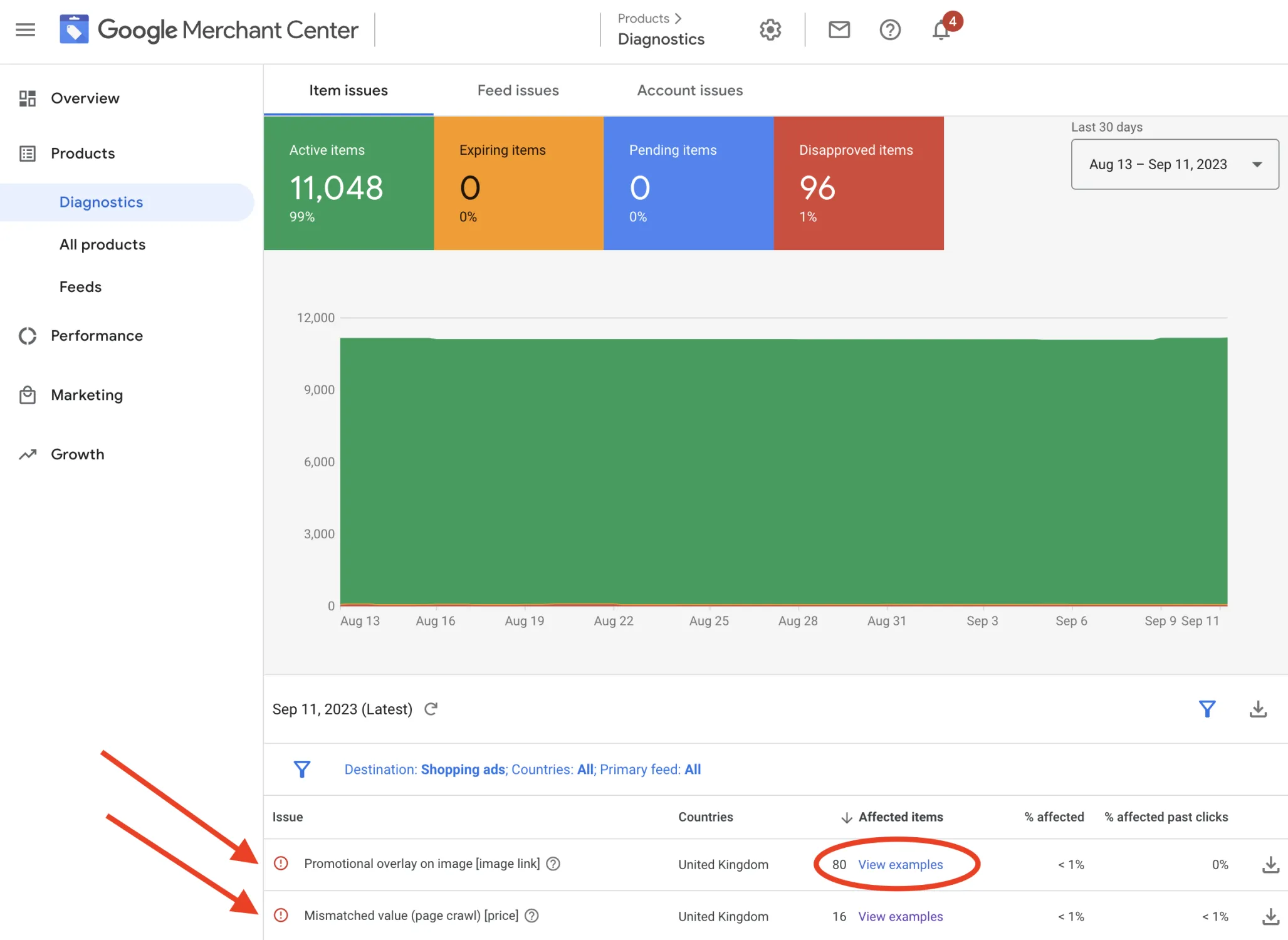
Google Ads for Shopify Plus optimization requires syncing high-quality product data from Shopify's backend to Google Merchant Center. By mapping custom Shopify metafields (like GTINs, MPNs, and color variants) directly to your feed, you prevent silent product disapprovals, lower your cost-per-click, and maximize product visibility in Google Shopping. A Global Trade Item Number (GTIN) is a unique identifier used to globally identify trade items, and Google relies heavily on this data to match search queries with your products.
The Problem
Standard Shopify feeds often omit critical product identifiers like GTINs or custom attributes. This results in limited search impressions or complete product disapprovals within Google Merchant Center.
How to Fix
- Map custom Shopify metafields to Google Merchant Center attributes using native feed apps or advanced feed management tools.
- Enforce a mandatory validation rule in your Shopify admin: never publish a product without a valid GTIN (UPC/EAN) or MPN.
- Store specific variant attributes like color, size, and material in custom metafields and map them directly to Google's standard taxonomy.
What to Avoid
Avoid using generic placeholder values like "N/A" or "00000000" for GTINs. Google flags these values as invalid, which can trigger automatic product suspensions.
How do you align multi-currency pricing for international Google Ads?
The Problem
International shoppers bounce when search ads display local currency but the landing page or checkout defaults back to your store's base currency.
How to Fix
- Enable multi-currency feeds in Google Merchant Center to target specific country-and-currency combinations dynamically.
- Utilize Shopify Markets to set up localized subfolders that match your target Google Ads landing page URLs.
- Deploy our Custom Shopify Development team to ensure your theme dynamically updates currency selectors based on the user's incoming UTM parameters.
What to Avoid
Do not target multiple countries using a single feed without currency conversion parameters. This triggers pricing mismatches and immediate feed suspension.
How does landing page speed impact Google Ads ROAS?
The Problem
High mobile bounce rates on paid traffic are frequently caused by slow landing pages with severe Cumulative Layout Shift (CLS) from heavy third-party apps.
How to Fix
- Audit your active theme and eliminate unused JavaScript files, tracking pixels, and legacy app snippets.
- Assign explicit width and height attributes to all image elements to prevent layout shifts during page rendering.
- Leverage professional speed optimization to refactor render-blocking CSS and defer non-critical scripts.
What to Avoid
Do not send high-budget Performance Max traffic directly to unoptimized collection pages containing heavy filter apps that delay the first contentful paint past 2.5 seconds.
How do you configure Shopify Checkout Extensibility for Google Tag Manager?
The Problem
The deprecation of legacy checkout files requires migrating to Checkout Extensibility, which regularly breaks existing Google Tag Manager (GTM) purchase tracking.
How to Fix
- Configure the Shopify Customer Privacy and Web Pixels API to securely transmit conversion events to GTM.
- Create custom pixels in your Shopify admin using sandbox-safe JavaScript to capture the purchase event.
- Map critical transaction variables including transaction_id, value, and currency directly to your Google Ads conversion tag.
What to Avoid
Do not rely on hardcoded script tags in the post-purchase page. Checkout Extensibility blocks unauthorized scripts, resulting in a 100% loss of conversion data.
How do you prevent out-of-stock ad spend with Shopify inventory rules?
The Problem
Google Ads often continues to display ads for out-of-stock product variants, draining budget on clicks that cannot convert.
How to Fix
- Configure your product feed app to automatically filter out variants when inventory levels drop below 1 unit.
- Set automated rules in Google Ads to pause specific product groups when inventory counts hit zero.
- Integrate real-time inventory syncs between your ERP and Shopify to update Merchant Center within 15 minutes of a stockout.
What to Avoid
Do not allow backorders on low-margin items without updating the feed availability attribute to "backorder", or you risk violating Google's merchant policies.
The 10-Point Pre-Scale Verification Checklist
Before scaling your daily ad spend, execute this technical verification checklist to prevent budget waste and tracking failures.
- Verify that 100% of active products have zero critical warnings in Google Merchant Center.
- Confirm that the Google Tag Manager conversion tag matches Shopify's backend revenue with less than a 2% discrepancy.
- Test mobile page load speeds to ensure the Largest Contentful Paint (LCP) is under 2.0 seconds.
- Verify that Google Ads enhanced conversions are active and passing hashed customer data securely.
- Audit international landing pages to confirm currency matches the Google Ads targeting settings.
- Confirm that out-of-stock variants are dynamically hidden or marked as unavailable in the XML feed.
- Test the entire checkout flow using Checkout Extensibility to confirm custom web pixels fire correctly.
- Check that GTINs are valid and do not contain placeholder values.
- Ensure UTM parameters are standard across all campaigns for accurate attribution in Google Analytics 4.
- Verify that Shopify's CDN is serving optimized WebP/AVIF images to mobile traffic.
How Avelize approaches this
Our team engineers high-performance Shopify Plus setups that align perfectly with Google Ads requirements. We audit your feed architecture, optimize Core Web Vitals, and deploy Checkout Extensibility tracking to secure your data pipeline.
- Timeline: 2 to 4 weeks for complete feed, speed, and tracking optimization.
- Cost: Tailored project-based pricing based on catalog complexity.
- KPI: 100% feed approval rate, LCP under 2.0s, and sub-2% tracking discrepancy.
Ready to audit your feed and secure your tracking before scaling? Contact our team for a comprehensive Technical SEO & GEO program to maximize your ROAS.
Published / Last reviewed: October 24, 2026
Related Shopify and Ecommerce Growth Guides
Continue with these related guides for implementation, SEO, performance, and conversion context.
- Meta Ads for Shopify Plus: Advanced Scaling Strategy
- Aligning Google & Meta Ads for Shopify Plus Scaling
- Meta Ads Creative Testing: Shopify Scaling Framework
- Scale Shopify Plus: Google Ads & Meta Testing [2026]
- Meta Ads Creative Testing: Scale Ecommerce ROAS
- Google Ads for Shopify Plus: Advanced ROI Playbook
- Meta Ads Ecommerce Creative Testing: The Enterprise Guide
- Google Ads for Shopify Plus: Scale Without Margin Erosion
- AI Creative Testing for Meta Ads: Shopify Plus Strategy
- Shopify Plus Google Shopping: Advanced ROAS Strategies
Related Avelize Services and Guides: Plus Customization · Ecommerce Web Design Agency