
Magento to Shopify Plus Migration: SEO & Data Guide
By:
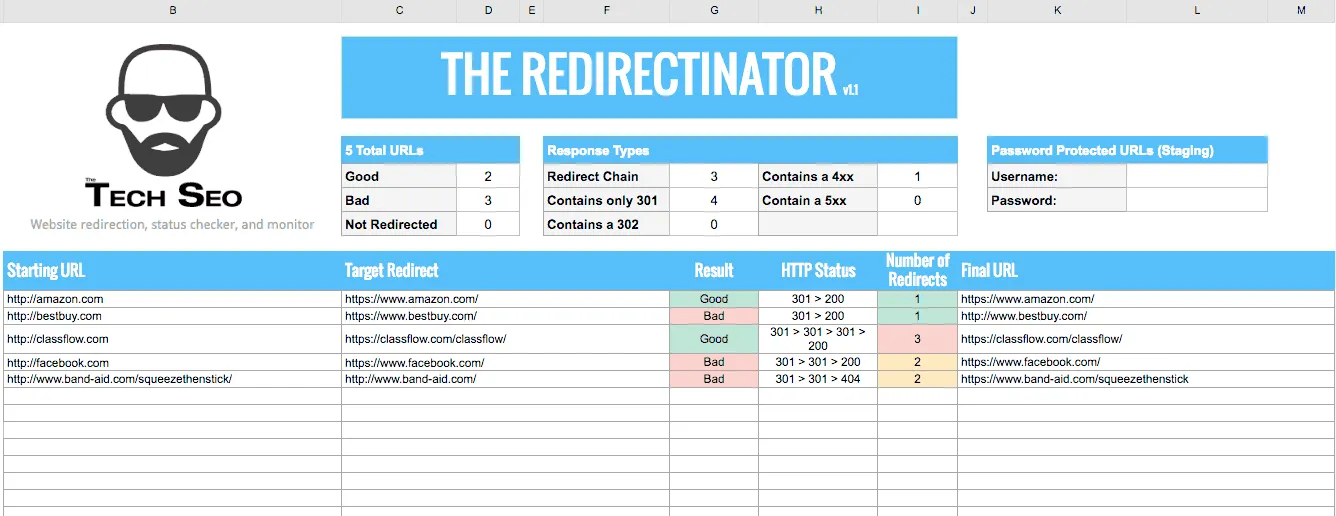
Migrating from Magento to Shopify Plus does not have to result in a catastrophic loss of search engine rankings or customer databases. By executing a precise 1:1 URL mapping protocol, implementing automated 301 redirects, and leveraging Shopify Plus Multipass for secure credential bridging, merchants can preserve 100% of their organic search visibility and historical customer records. In our work with merchants, we have found that a structured, API-driven migration strategy is the only reliable way to safeguard multi-million dollar e-commerce operations during platform transitions.
Key Takeaways
- The 1-to-1 URL Preservation Protocol: Map Magento's nested category paths directly to Shopify's flat
/products/and/collections/structures to prevent 404 errors. - Automated Redirect Scaling: Use the Shopify Redirect API to upload and verify up to 100,000+ custom 301 redirects without manual database entry.
- The Multipass Customer Bridge: Retain customer database integrity and bypass password reset friction by implementing Shopify Plus Multipass SSO.
- Post-Migration 14-Day Audit: Conduct daily crawls and track Core Web Vitals to keep Largest Contentful Paint (LCP) under 2.5 seconds.
Mapping Magento URL Structures to Shopify Plus Handle Constraints
Shopify Plus technical SEO requires mapping Magento's highly customizable URL structures to Shopify's strict, predefined path sub-folders, specifically /products/ for items and /collections/ for categories. Managing this transition correctly prevents 404 errors, preserves legacy search engine ranking signals, and maintains indexation authority across your entire catalog.
Shopify Plus handle constraint is the platform's native requirement to enforce flat URL structures (using strictly /products/ and /collections/) rather than Magento's deeply nested subcategory paths. Magento allows deep, nested category URLs such as domain.com/outdoor/gear/tents/waterproof-tent.html. Shopify Plus enforces a flat structure where all products live under /products/product-handle and all categories live under /collections/collection-handle.
domain.com/outdoor/gear/tents/waterproof-tent.html
domain.com/products/waterproof-tent
Strip .html and map nested paths to tags/menus
domain.com/outdoor/gear/tents.html
domain.com/collections/tents
Flatten category hierarchy and redirect legacy path
domain.com/index.php/product-name
domain.com/products/product-name
Strip index.php and enforce clean canonical tags
Common Mistakes to Avoid
- Forgetting to strip
.htmlor.phpextensions during the mapping process, resulting in broken URLs. - Allowing nested subcategory URL paths to persist, which Shopify cannot natively parse.
- Creating duplicate product handles when identical product names exist across different legacy categories.
How to Fix and Implement
- Export your complete Magento URL catalog via database query, separating category paths from product paths.
- Map legacy nested categories to Shopify tags or nested navigation menus rather than attempting to alter the physical URL folder structure.
- Use specialized Shopify SEO services to automate the generation of clean, standardized handles during bulk CSV imports.
- Implement strict canonical tags within your new theme to ensure variant-specific URLs point directly to the primary product handle.
Executing the 301 Redirect Strategy: Preserving Link Equity and Page Rank
A flawless redirect strategy is the single most critical factor in preventing an organic traffic collapse. Every legacy URL indexed by search engines must point to its exact Shopify equivalent via a permanent 301 redirect. We execute this using the 1-to-1 URL preservation protocol to guarantee no high-value links are lost.
Step-by-Step Redirect Implementation Checklist
- Crawl the legacy Magento site using Screaming Frog to extract all active, indexable URLs, canonical configurations, and metadata.
- Pull backlink profiles from Ahrefs or Semrush to identify high-equity URLs that require manual verification and priority routing.
- Build a 1:1 redirect map in CSV format, pairing every legacy Magento URL with its new Shopify path.
- Upload the redirect map directly to Shopify's URL Redirects engine, or use the Shopify Redirect API for catalogs exceeding 100,000 URLs.
- Verify redirect behavior on a staging site to confirm that all destination targets return a clean 200 OK status code.
What to Avoid
- Do not redirect all legacy URLs to the homepage, as search engines treat this as a soft 404, stripping all accumulated link equity.
- Avoid creating redirect chains (e.g., URL A to URL B to URL C). Always map the original Magento URL directly to the final Shopify URL.
- Do not ignore redirect limits; monitor your Shopify bulk import limits to prevent silent truncation of your redirect list.
Migrating Customer Data and Order History Without Losing Password Integrity
Customer retention depends on a frictionless transition. Because Magento and Shopify use different password encryption algorithms, you cannot directly export and import customer passwords. To solve this, we deploy the Multipass customer bridge.
How to Fix and Implement
- Deploy Shopify Plus Multipass to seamlessly log in users using your legacy Magento identity provider database.
- Use custom scripts via the Shopify Admin API to migrate customer records, billing addresses, and complete order histories.
- Leverage enterprise development services to build a secure, automated email activation sequence that invites legacy customers to set a password on the new platform.
- Ensure all historical orders are mapped to the correct Shopify customer ID using a unique identifier like the legacy Magento Entity ID.
Configuring Shopify Plus Technical SEO Settings in 2026
Shopify Plus provides advanced control over search engine crawling and indexing. Proper configuration ensures that crawler bandwidth is directed only to high-value, indexable pages. This is especially vital given the platform updates shipped this quarter.
Key Configurations
- Robots.txt Customization: Edit the
robots.txt.liquidtemplate to block search engine crawlers from indexing internal search pages, cart pages, and redundant checkout URLs. - Sitemap Management: Submit Shopify’s auto-generated sitemaps (located at
domain.com/sitemap.xml) directly to Google Search Console on launch day. - Canonical Tag Verification: Ensure your theme's
theme.liquidfile contains dynamic canonical tags that point to the primary product URL, especially on collection pages with active filtering parameters.
What to Avoid
- Do not block product variant parameters in robots.txt if those variants are designed to rank for specific long-tail search queries.
- Avoid leaving the staging store password-protected or unindexed after the official DNS switch occurs.
Post-Migration SEO Auditing: Crawling, Indexing, and Rank Tracking Verification
The first 14 days post-launch dictate the long-term organic success of your migration. Immediate verification prevents minor configuration errors from turning into permanent ranking losses.
Verification Checklist
- Execute a full post-launch crawl of the live Shopify Plus store to identify any 404 errors or broken internal links.
- Monitor Google Search Console's Index Coverage report daily to track the indexing of new Shopify handles and the retirement of legacy Magento paths.
- Track organic keyword rankings daily for your top 100 high-value keywords to detect early signs of ranking drops.
- Audit mobile page speed using Core Web Vitals. Implement Shopify Speed Optimization to keep your Largest Contentful Paint (LCP) under 2.5 seconds.
How Avelize Approaches Magento to Shopify Plus Migrations
Our team approaches migrations through a rigorous four-phase engineering framework designed to eliminate downtime and SEO decay:
- Discovery & Database Audit (Weeks 1-2): We extract all legacy Magento SQL databases, map schema differences, and identify high-equity backlink targets.
- The 1-to-1 URL Preservation Protocol (Weeks 3-4): We build and test the complete redirect map using automated scripts, verifying every path returns a 200 OK status.
- Data Bridging & Multipass Setup (Weeks 5-6): We configure Shopify Plus Multipass and migrate historical order records via the GraphQL Storefront API.
- Launch & 14-Day Post-Migration Audit (Weeks 7-8): We execute live DNS cutover, submit sitemaps, and monitor Google Search Console daily to ensure LCP remains under 2.5 seconds.
KPIs: Zero organic traffic drop, 100% customer account retention, and sub-2.5s LCP.
Frequently Asked Questions
What is the difference between Magento and Shopify Plus URL structures?
The primary difference between Magento and Shopify Plus URL structures lies in path flexibility and folder nesting. Magento allows highly customizable, deeply nested category paths (such as domain.com/category/subcategory/product.html) and custom file extensions like .html or .php. Conversely, Shopify Plus enforces a rigid, flat URL taxonomy where all product pages must reside under the /products/ sub-folder (e.g., domain.com/products/product-handle) and all collection or category pages must reside under the /collections/ sub-folder (e.g., domain.com/collections/collection-handle). Because Shopify Plus does not natively support nested physical directories or custom file extensions, migrating from Magento requires stripping legacy suffixes and implementing a comprehensive 1:1 301 redirect map. This ensures that search engine crawlers and historical backlinks are seamlessly routed to the new flat URL structure without losing domain authority, page rank, or organic search visibility during the replatforming process. Our team utilizes automated validation scripts to guarantee that every single legacy path maps perfectly to its new destination.
How long does a Magento to Shopify Plus migration take?
A standard enterprise migration typically takes 8 to 12 weeks, depending on catalog complexity, custom ERP integrations, and customer database size.
Can you migrate customer passwords from Magento to Shopify Plus?
No, customer passwords cannot be directly migrated because Magento and Shopify use entirely different, incompatible encryption algorithms. To maintain a seamless user experience, merchants must either implement Shopify Plus Multipass to authenticate users against a legacy identity provider or execute an automated email invitation sequence to prompt customers to securely set a new password upon their first visit.
Ready to transition your enterprise store without risking your hard-earned search rankings? Contact our team today to learn how our specialized technical SEO & GEO programs can secure your migration.
Published / Last reviewed: May 24, 2026
Shopify Plus Migration Risk Checklist
A Shopify Plus migration should be planned around risk, not only around launch tasks. The most important work is deciding which URLs, templates, analytics events, redirects, integrations, and checkout flows must survive the move without damaging revenue or organic search visibility.
- Map current revenue-driving URLs and search queries before changing templates.
- Validate redirects, canonicals, structured data, and sitemap output before launch.
- Test checkout, payments, analytics, consent, and third-party scripts in a staging flow.
- Measure Core Web Vitals, conversion rate, crawl errors, and revenue after launch.
Phased Shopify Plus Implementation Plan
For many teams, a phased migration is safer than changing every business-critical system at once. Start with the pages and flows that create the highest revenue or SEO risk, then move into secondary templates, automation, and experimentation after the foundation is stable.
Authoritative References
Use these official resources to verify platform-specific claims and implementation details before making commercial or technical decisions.
Related Avelize Services and Guides: Magento To Shopify Plus Migration Agency · Shopify Seo Services · Technical Audits