
Shopify Markets International SEO: Hreflang & Subfolder Setup
By:
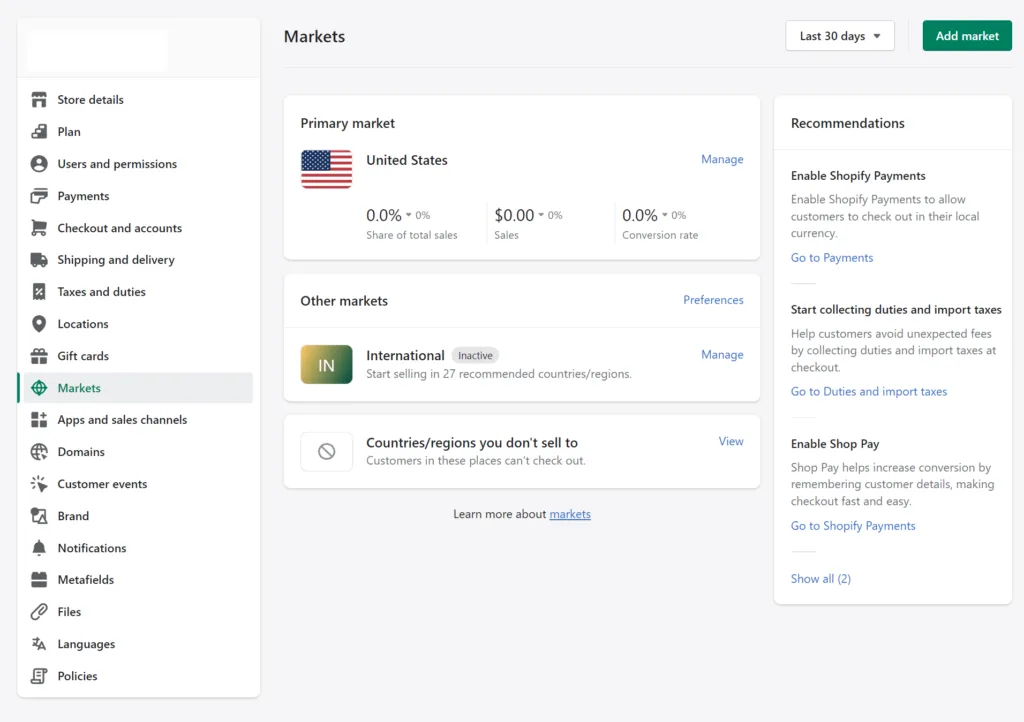
Shopify Markets International SEO Hreflang & Subfolder: a practical Shopify Plus guide to the SEO, CRO, and revenue decisions that matter for ecommerce teams.
Native Shopify Markets setups simplify multi-region selling, but default theme configurations often inject conflicting hreflang tags, misconfigure canonical URLs, and trigger duplicate content penalties across localized subfolders. Achieving full search indexation and capturing cross-border revenue requires overriding liquid canonical output, bypassing IP-based geo-redirects for search crawlers, and structuring market-specific XML sitemaps. In our work with Shopify Plus merchants, eliminating these structural indexation blocks is essential to scaling international organic search performance across global markets.
Key Takeaways
- Canonical Fixes: Default Liquid themes frequently set subfolder canonicals back to the primary domain, causing Google Search Console duplicate content drops.
- Crawler Protection: Hard IP-based automatic redirects bounce Googlebot back to US IPs, completely blocking international subfolders from being crawled.
- Architecture Choice: Subfolder structures (e.g.,
/en-ca/) consolidate backlink equity into one root domain, outperforming subdomains for cross-border SEO growth in 2026. - Dynamic Overrides: Custom Liquid canonical replacements using
{{ request.origin }}{{ request.path }}restore exact self-referencing canonical URLs for every active market.
Auditing Default Shopify Markets Subfolder and Hreflang Output
Shopify Markets international SEO is the technical optimization of Shopify’s native multi-region subfolders, localized liquid tags, and hreflang architecture to ensure search engines correctly index regional product catalogs, prevent duplicate content penalties, and route global users to the correct localized domain without indexing blocks.
Shopify automatically injects hreflang tags into the {{ content_for_header }} Liquid hook. In multi-market setups, this native automation frequently generates missing self-referential tags, incorrect language codes, or omitted regional variations.
To identify execution errors in your store's native markup, perform an automated audit using Screaming Frog or Lumar:
- Crawl the site using a Googlebot Desktop user-agent setting.
- Filter response codes by regional subfolders to verify all market URLs return an HTTP 200 OK status.
- Extract all
<link rel="alternate" hreflang="...">elements from the raw HTML response. - Confirm that every regional subfolder page contains a reciprocal link back to the primary market canonical URL.
- Ensure an x-default tag is explicitly defined and points to your primary global root URL.
Configuring Regional Subfolders vs. Subdomains in Shopify Admin
Choosing between subfolders (e.g., example.com/en-ca/) and subdomains (e.g., ca.example.com) impacts how domain authority distributes across your international catalog. In 2026, subfolders remain the gold standard for enterprise commerce setups looking to leverage established root authority.
Subfolders consolidate all backlink equity into a single root domain, making them the standard choice for scaling enterprise e-commerce operations efficiently.
- Navigate to Shopify Admin > Settings > Markets.
- Select the target market and click Languages and Domains.
- Select Use subfolders to enforce centralized domain authority across all international territories.
- Verify that each language mapped to the subfolder uses correct ISO 639-1 language and ISO 3166-1 alpha-2 country codes.
- Disable unmanaged subfolders to stop search crawlers from discovering empty or unlocalized catalog pages.
Resolving Native Hreflang Misalignments and Duplicate Canonical Tags
Shopify’s default theme logic frequently points the <link rel="canonical"> tag of a regional subfolder page back to the primary market URL. This triggers duplicate content flags in Google Search Console and prevents regional pages from ranking in local SERPs.
How to Fix Canonical Tag Self-Referencing
Override default theme canonical tags by modifying your theme.liquid file. Replace standard Liquid canonical calls with dynamic market-aware URL references:
- Locate
<link rel="canonical" href="{{ canonical_url }}">in yourlayout/theme.liquidfile. - Replace it with
<link rel="canonical" href="{{ request.origin }}{{ request.path }}">to force absolute self-referential canonical URLs per subfolder. - Audit your theme to remove third-party apps that inject duplicate canonical headers via JavaScript.
- Deploy custom liquid overrides or utilize professional Shopify SEO services to handle complex multi-currency canonical mapping safely.
Common Mistakes to Avoid
- Self-canonicalizing to primary domain: Setting subfolder canonicals to the default market URL forces search engines to drop the subfolder from SERPs completely.
- Mismatched hreflang target URLs: Pointing hreflang attributes to redirected URLs or pages that return HTTP 301 responses.
- Missing x-default annotations: Omitting the fallback tag for users outside specific target regional markets.
Handling Geolocation Auto-Redirects Without Hurting Googlebot Indexation
Forced IP-based automatic redirects destroy international search performance. Because Googlebot crawls primarily from IP addresses located in the United States, automated geo-redirects bounce search crawlers back to the US storefront, preventing them from indexing international subfolders.
Implement non-intrusive redirection patterns to maintain crawling accessibility:
- Disable automatic hard redirects under Shopify Admin > Markets > Preferences.
- Use conditional JavaScript to display a non-blocking HTML country selector banner for visitors.
- If hard edge-redirects are mandated, configure Cloudflare or Worker middleware to bypass user-agents containing 'Googlebot' or 'Bingbot'.
- Store user location preferences in cookies to prevent infinite redirect loops during multi-region browsing.
Structuring XML Sitemaps Across Multi-Language and Multi-Region Markets
Shopify generates isolated XML sitemaps automatically for every configured market subfolder. You must submit each regional sitemap index individually to search engines.
Step-by-Step Implementation Checklist
- Locate regional sitemap indexes by appending subfolder prefixes to your primary domain (e.g.,
example.com/en-gb/sitemap.xml). - Log into Google Search Console and select your verified domain property.
- Submit the index URL for every active market subfolder under Index > Sitemaps.
- Verify that each localized sitemap index yields zero target domain path errors.
- Monitor Search Console Page Indexing reports filtered by subfolder paths weekly to catch unindexed regional pages.
Evaluating Shopify Plus SEO Services for Custom Cross-Border Architectures
Standard Shopify Markets configurations hit functional limits when managing enterprise architectures, complex headless setups, or multi-store sync pipelines.
Custom store setups require advanced engineering solutions to balance international page load speed, programmatic hreflang generation, and localized structured data.
- Leverage customized backend architecture via custom Shopify development to extend native Liquid capabilities and manage large-scale regional catalogs.
- Partner with a specialized Shopify Plus SEO agency offering tailored SEO & Data services to build edge-computed hreflang logic, preventing native script bloat.
- Audit dynamic price conversions and schema markup output across localized subfolders to ensure structured data matches local currencies precisely.
How Avelize Approaches International Shopify SEO
Our team resolves complex international indexation failures through a structured 4-week technical engineering sprint:
- Week 1: Automated Audit & Crawl Isolation — We run localized Googlebot simulations across all subfolders, identifying canonical loops, missing x-default tags, and broken hreflang clusters.
- Week 2: Liquid Theme Override Engineering — We deploy custom Liquid canonical overrides directly into
theme.liquid, replacing broken default references with dynamicrequest.pathdeclarations. - Week 3: Edge Redirect & Bot Bypassing — We implement non-blocking modal selectors or Cloudflare Worker rules to guarantee Googlebot can access all regional subfolders without being redirected to the primary market.
- Week 4: Search Console Property Configuration & Verification — We split Google Search Console tracking by market subfolder, submit isolated sitemaps, and monitor indexing validation.
This process typically restores complete regional subfolder indexation within 14 to 30 days, unlocking organic growth and protecting international ad spend efficiency.
Frequently Asked Questions
Is subfolder structure better than subdomains for Shopify international SEO?
Subfolders are generally superior for Shopify international SEO because they consolidate all backlink equity and domain authority into a single root domain, whereas subdomains treat each regional storefront as an isolated entity requiring independent off-page optimization. When engineering cross-border stores in 2026, using subfolders like /en-gb/ or /fr-ca/ allows regional product pages to instantly inherit the historical trust of your primary domain. Subdomains split search equity, multiplying the effort required to rank competitive enterprise terms in international markets. Furthermore, Shopify Markets provides native automated subfolder routing, which simplifies SSL certificate management, analytics consolidation, and international XML sitemap submission under one unified Google Search Console property. Subdomains should only be selected if a regional market operates as a completely separate business entity with dedicated inventory, unique payment gateways, or distinct legal operational teams requiring isolated infrastructure.
How do IP-based auto-redirects affect Googlebot in Shopify Markets?
Forced IP auto-redirects detect Googlebot's US-based IP address and immediately route it away from regional subfolders (e.g., /en-gb/) back to the US default market. This prevents search engine crawlers from ever seeing or indexing localized content.
Why does Shopify generate duplicate canonical tags across subfolders?
Standard Shopify Liquid themes often use the global {{ canonical_url }} object, which defaults back to the primary market URL across all subfolders. Overriding this tag with {{ request.origin }}{{ request.path }} ensures subfolders maintain self-referencing canonical URLs.
Ready to unlock global search revenues and resolve complex international Shopify bugs? Partner with our team of technical experts through our Shopify SEO services to engineer an enterprise-grade international architecture.
Published / Last reviewed: March 2026
Authoritative References
Use these official resources to verify platform-specific claims and implementation details before making commercial or technical decisions.
- Shopify Plus overview
- Google SEO Starter Guide
- Google canonicalization guide
- Google structured data introduction
Related Avelize Services and Guides: Technical Audits · Shopify Seo Services