
Shopify Plus Automation Audit: Reclaim Lost Margin
By:
How do high-volume Shopify Plus merchants scale operations without continuously adding headcount? The answer lies in eliminating silent API execution failures, redundant app triggers, and broken Shopify Flow scripts. A systematic Shopify Plus automation audit is the process of mapping, testing, and optimizing every automated workflow across your store to eliminate technical debt and maximize operational efficiency. Our team uses this audit to reclaim 10 to 20 hours of manual labor per week while preventing costly order-routing errors.
Key Takeaways
- The 90-Day Decay Cycle: Automations decay due to API deprecations; auditing every 90 days prevents silent failures.
- Eliminate Redundant Triggers: Map Shopify Flow, Launchpad, and third-party apps to resolve conflicting actions on a single event.
- Apply the ROI Scoring Matrix: Prioritize workflows where the monthly labor savings exceed the implementation cost by at least 3x.
- Monitor API Rate Limits: High-volume stores ($10M+ ARR) must monitor GraphQL and REST API limits to prevent bottlenecks during peak events like BFCM.
What is a Shopify Plus Automation Audit?
A Shopify Plus automation audit is a comprehensive evaluation of an enterprise store's automated workflows, triggers, and API integrations across Shopify Flow, Launchpad, and third-party applications. This audit identifies execution failures, rate limit bottlenecks, and redundant manual processes to optimize operational efficiency and reduce technical debt.
Enterprise stores often suffer from "automation creep," where multiple apps trigger conflicting actions on a single event. To resolve this, we must build a single source of truth for every active workflow running on your store.
Step 1: Inventory Active Triggers Across Shopify Flow, Launchpad, and Third-Party Apps
To begin the audit, we must document every active automation touchpoint. When multiple automated systems attempt to modify the same database object simultaneously, race conditions and data corruption occur.
- Export all active Shopify Flow workflows to review their triggers, conditions, and actions.
- Document scheduled Launchpad events to ensure flash sales do not conflict with active inventory scripts.
- Inventory all third-party apps with write-access to your catalog, orders, or customer data.
- Map overlapping triggers, such as both Klaviyo and Shopify Flow attempting to send transactional updates.
For brands running highly customized enterprise setups, our team provides specialized custom Shopify development services to streamline app integrations and clean up legacy code.

Step 2: Isolate High-Cost Manual Bottlenecks in Order Processing and Inventory Management
Identify where your operations team is still manually clicking buttons to complete repetitive, high-volume tasks. These bottlenecks slow down fulfillment, increase lead times, and introduce costly human errors.
- Track the exact hours spent daily on manual order tagging for fraud or high-risk flags.
- Measure the latency between inventory updates from your ERP to your Shopify admin.
- Audit manual customer service actions, such as processing returns or issuing store credits.
- Identify delays in manual purchase order creation and supplier notifications.
Implementation: Eliminating Manual Bottlenecks
Replace manual tagging with auto-tagging Shopify Flow rules based on risk analysis. Integrate your ERP directly via custom APIs to automate inventory syncing and eliminate manual file uploads. If slow page loads or heavy app scripts are compounding these operational delays, review our technical optimization services to clear performance bottlenecks.
Step 3: Audit Existing Workflows for Execution Failures and API Rate Limit Bottlenecks
Silent failures in Shopify Flow or custom API integrations can disrupt order routing and inventory tracking without alerting your team. High-volume stores frequently hit GraphQL and REST API rate limits during peak traffic periods.
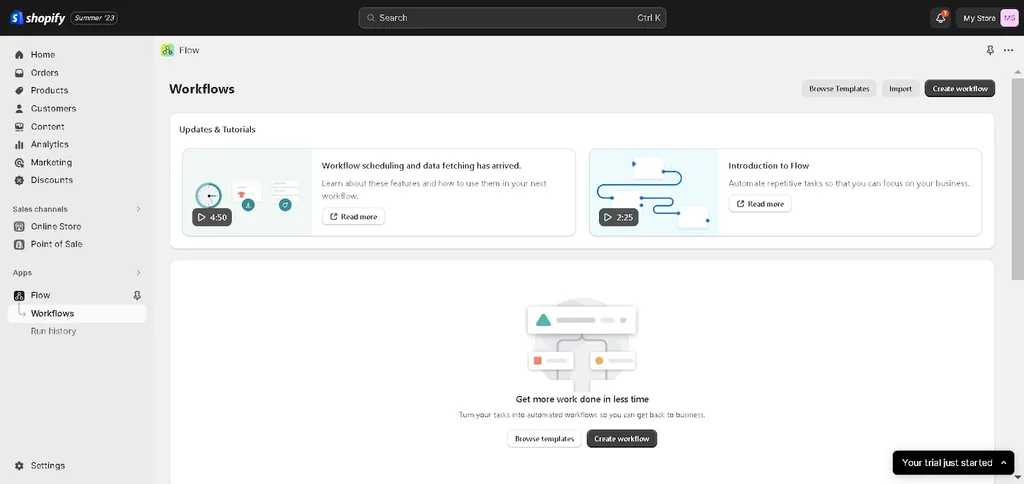
- Review the "Run History" in your Shopify Flow dashboard to identify workflows with "Failed" or "Timed Out" statuses. For detailed debugging steps, refer to the official Shopify Flow Documentation.
- Check API call usage in your custom apps to prevent hitting Shopify Plus rate limits during high-traffic events.
- Audit webhook payloads to ensure your external endpoints are processing data without timeout errors.
What to Avoid: Common Automation Pitfalls
- Circular loops: Avoid workflows where Shopify Flow updates an order, which triggers another workflow to update the same order indefinitely.
- Hardcoded variables: Do not hardcode specific product IDs, collection IDs, or tag names that change seasonally.
- Missing error notifications: Never deploy critical workflows without setting up Slack or email alerts for execution failures.
Step 4: Score and Prioritize New Automation Opportunities Using the ROI Matrix
Do not build automations for low-frequency tasks. We apply the ROI-based automation scoring matrix to evaluate and prioritize new workflows based on engineering effort and operational impact.
Calculate priority using this formula: ROI Score = (Hours Saved per Month x Hourly Labor Rate) / Implementation Cost.
- Quick Wins (High Impact, Low Effort): Auto-tagging high-value customers, automated fraud holds, and low-stock alerts.
- Strategic Projects (High Impact, High Effort): Custom ERP inventory sync, headless CMS updates, and multi-warehouse routing rules.
- Fill-ins (Low Impact, Low Effort): Minor UI adjustments, automated archive tasks, and basic customer segmentation.
- Money Pits (Low Impact, High Effort): Over-engineering custom checkout flows for rare edge cases.
For brands scaling programmatic SEO alongside operations, utilizing our SEO & Data services can unlock scalable organic growth pathways.
Step 5: Establish a Quarterly Automation Audit and Maintenance Schedule
Automations decay over time as Shopify updates its API versions and your operational requirements evolve. In 2026, maintaining lean operations is critical. We recommend establishing the 90-day automation decay cycle protocol to keep your systems running efficiently.
- Schedule audits every 90 days to deprecate unused workflows and remove legacy app access.
- Update API versions for custom-built integrations to avoid deprecation breaks.
- Validate that automated tags still align with active marketing segments and warehouse SKU changes.
- Test backup workflows for critical functions like order routing and fulfillment status updates.
How Avelize Approaches Shopify Plus Automation Audits
Our team executes a comprehensive, three-phase automation audit program designed to streamline your operations:
- Phase 1: Discovery & Mapping (Week 1): We map every active trigger, webhook, and API call across Shopify Flow, Klaviyo, and your ERP. KPI: 100% workflow visibility.
- Phase 2: Bottleneck & Failure Analysis (Week 2): We analyze execution logs to identify silent failures, rate-limiting issues, and manual bottlenecks. KPI: Zero silent API errors.
- Phase 3: Implementation & Optimization (Weeks 3-4): We rebuild failing workflows, consolidate redundant apps, and deploy custom API integrations. KPI: 15+ hours saved weekly.
Our automation audit programs start at $5,000, depending on catalog size and ERP complexity.
Frequently Asked Questions
Is a Shopify Plus automation audit worth it for mid-market brands?
Yes. Mid-market brands processing over $5M ARR often experience "app creep" where redundant tools slow down the store and conflict with order routing. An audit cleans up technical debt and prevents costly fulfillment errors.
How long does a Shopify Plus automation audit take?
A standard audit takes between 2 to 4 weeks depending on the complexity of your tech stack, ERP integrations, and the number of active Shopify Flow scripts.
What is the difference between Shopify Flow and custom API integrations?
Shopify Flow is an out-of-the-box, low-code automation tool native to Shopify Plus that allows merchants to build workflows using 'Trigger, Condition, Action' logic without writing code. It is ideal for internal tasks like auto-tagging high-risk orders, sending low-stock Slack alerts, or segmenting customers. However, Shopify Flow is constrained by standard platform execution limits and cannot handle complex data transformations or real-time bi-directional syncs. In contrast, custom API integrations utilize Shopify's GraphQL Admin API or REST Admin API to connect external systems like ERPs, CRMs, or custom warehouses directly. Custom integrations offer unlimited flexibility, advanced error handling, and the ability to process high-volume payloads, but they require dedicated engineering resources to build and maintain. For high-volume merchants processing over $10M ARR, a hybrid approach combining Shopify Flow for simple tasks and custom APIs for core operations yields the highest efficiency.
How often should we audit our Shopify Flow workflows?
We recommend auditing your workflows every 90 days to align with Shopify's quarterly API release cycle and prevent silent failures caused by deprecated endpoints.
Ready to eliminate operational bottlenecks and reclaim lost margin? Contact our team today to schedule a comprehensive Shopify Plus automation audit and optimize your backend workflows.
Published / Last reviewed: March 2026
Authoritative References
Use these official resources to verify platform-specific claims and implementation details before making commercial or technical decisions.
- Shopify Plus overview
- Google SEO Starter Guide
- Google canonicalization guide
- Google structured data introduction
Related Avelize Services and Guides: Custom Apps · Plus Customization · Technical Audits