
Shopify Plus Google Ads: High-SKU Feed Optimization
By:
Shopify Plus Google Ads High-Sku Feed Optimization: a practical Shopify Plus guide to the SEO, CRO, and revenue decisions that matter for ecommerce teams.
To scale Google Ads for Shopify Plus across catalogs exceeding 10,000 SKUs, merchants must transition from automated app syncing to programmatic feed management. Shopify Merchant Center optimization is the process of structuring, enriching, and synchronizing product data to maximize search relevancy and bidding efficiency. In our work with high-volume merchants, we have found that resolving sync latency and implementing structured title formulas can increase click-through rates (CTR) by up to 34% while eliminating wasted ad spend on out-of-stock inventory.
Key Takeaways
- Implement the five-tier custom label strategy to segment campaigns by real-time gross margin and inventory velocity rather than flat collections.
- Utilize Google Merchant Center Feed Rules to programmatically rewrite titles using category-specific formulas (e.g., Brand + Gender + Product Type + Color + Size).
- Bypass the standard 24-hour API sync lag by deploying the Content API for Shopping paired with real-time Shopify inventory webhooks.
- Audit GTIN compliance across 100% of variants to prevent silent low-exposure penalties in high-competition Google Shopping auctions.
Step 1: Executing a Google Shopping Feed Audit on 10k+ SKU Shopify Plus Catalogs
A google shopping feed audit for Shopify Plus involves programmatically scanning your Google Merchant Center (GMC) product data to identify structural errors, critical attribute gaps, and sync discrepancies across 10,000+ SKUs. Correcting these errors prevents silent account suspensions, improves search relevancy, and maximizes Google Ads performance.

The Enterprise Feed Audit Checklist
- Verify GTIN Compliance: Ensure 100% of your brand-new products have valid GTINs to avoid immediate low-exposure penalties in auction environments.
- Scan for Missing Attributes: Check for missing
[color],[size],[gender], and[age_group]values in apparel categories. - Identify Orphaned Variants: Locate variant SKUs that do not share a common
[item_group_id], which splits historical performance data. - Check Image Link Status: Ensure product images do not contain promotional watermarks or text overlays, which trigger automatic item disapprovals.
What to Avoid During Audits
- Do not rely on the default Shopify Google & YouTube app diagnostics; it often misses silent warnings that suppress up to 30% of your catalog.
- Avoid auditing SKUs manually; use Google Merchant Center's built-in exporter or custom API scripts to analyze data in bulk.
For highly customized catalogs, utilizing professional custom Shopify development can help bridge the gap between your ERP, Shopify backend, and Google Merchant Center feed inputs.
Step 2: Programmatic Shopify Merchant Center Optimization for High-CTR Title Construction
Default Shopify product titles are built for on-site navigation, not search engine intent. Programmatic title optimization restructures product titles at scale to align with high-volume search queries.
How to Fix Generic Titles Programmatically
Instead of editing SKUs individually, use feed rules or supplemental feeds to rewrite titles based on specific category formulas:
- Apparel & Accessories:
[Brand] + [Gender] + [Product Type] + [Color] + [Size](e.g., "Nike Men's Running Shoes Blue Size 11") - Electronics & Hardware:
[Brand] + [Model] + [Product Type] + [Key Attribute](e.g., "Sony WH-1000XM4 Wireless Headphones Black") - Home & Garden:
[Brand] + [Material] + [Product Type] + [Dimensions](e.g., "West Elm Oak Dining Table 72-inch")
Common Title Optimization Mistakes
- Stuffing promotional text like "Free Shipping" or "50% Off" into the
[title]attribute, which violates Google's policies. - Exceeding the 150-character limit, causing critical attributes to be truncated in the user's viewport.
Step 3: Configuring Custom Labels for High-SKU Shopify Plus Google Ads Campaigns
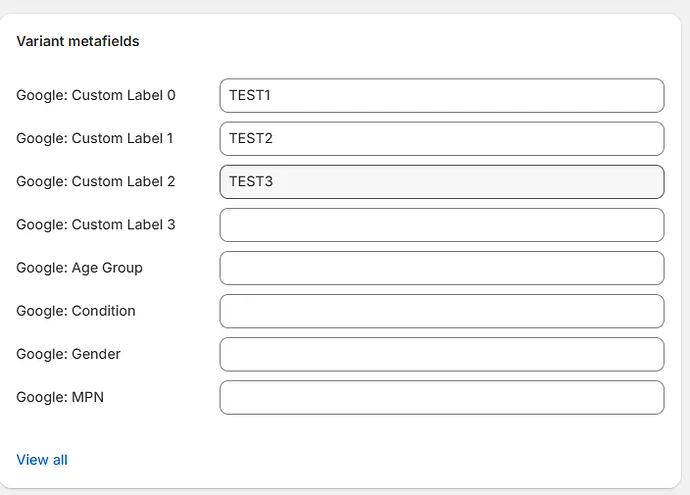
Custom labels allow you to segment campaigns by business metrics rather than flat product categories. This enables aggressive bidding on high-margin items and budget conservation on low-margin products.
A 5-Tier Custom Label Strategy for Google Ads for Shopify Plus
- Custom Label 0 (Margin Tier): Segment by
High_Margin(>50%) andLow_Margin(<30%) to optimize target ROAS targets dynamically. - Custom Label 1 (Performance Status): Tag products as
Best_Sellers,Zombie_SKUs(no impressions in 30 days), orDead_Weight. - Custom Label 2 (Inventory Velocity): Use
High_StockorLow_Stockto push inventory clearances or pull back spend on stockouts. - Custom Label 3 (Seasonality): Group items by
Spring_Summer,Fall_Winter, orCore_Carryover. - Custom Label 4 (Price Sensitivity): Categorize by price buckets (e.g.,
Under_50,50_to_100,Over_100) to align with consumer search behavior.
Implementing these advanced data segmentations requires robust data structures. Aligning your product attributes with clean technical SEO and data solutions ensures your custom labels update dynamically as inventory and margin levels shift.
Step 4: Fixing the Shopify Plus API Sync Lag to Prevent Out-of-Stock Disapprovals
A standard API sync lag between Shopify and Google Merchant Center can take up to 24 hours. This delay leads to wasted ad spend on out-of-stock items and automatic disapprovals due to price mismatches.
How to Fix Sync Lag and Price Mismatches
- Enable Automatic Item Updates: In Google Merchant Center, navigate to Settings > Automatic Improvements and toggle on Price and Availability updates.
- Deploy Content API: Utilize the Content API for Shopping rather than scheduled file fetches to push real-time delta changes.
- Implement Webhooks: Configure a Shopify webhook to trigger a GMC update the instant inventory falls to 0 or price changes in your admin panel.
What to Avoid with Inventory Syncing
- Do not set inventory tracking to "Don't track" if you cannot guarantee real-time fulfillment, as this triggers severe merchant policy violations.
- Avoid bulk price updates during high-traffic campaign hours without pre-scheduling the feed fetch to run immediately after.
Step 5: Advanced Feed Rules in Google Merchant Center to Bypass Shopify App Limitations
Shopify apps often restrict your ability to map complex attributes without writing custom theme liquid code. Google Merchant Center Feed Rules allow you to bypass these limitations directly in the platform.
Common Feed Rules to Implement Immediately
- Clean HTML Descriptions: Use the
[description]attribute rule to strip inline CSS, JS, and HTML tags generated by Shopify page builders. - Default Shipping Weights: Set a fallback shipping weight (e.g., 1 lb) for SKUs missing weight metrics to ensure accurate shipping cost calculations.
- Conditional Brand Mapping: Map empty
[brand]attributes to your store's legal name if the vendor field is blank in Shopify.
Implementation Steps for GMC Feed Rules
- Log in to Google Merchant Center and select Feeds under the Products menu.
- Click on your primary feed and navigate to the Feed Rules tab.
- Click the blue "+" icon to create a rule for your target attribute (e.g.,
[title]). - Define the conditions (e.g., "If brand equals X, set value to Y").
- Save draft, test changes, and click Apply to update your live feed.
How Avelize Approaches High-SKU Feed Optimization
Our team treats product feeds as software infrastructure. We execute a structured 30-day optimization program designed to maximize return on ad spend (ROAS) and search visibility:
- Phase 1: Feed Audit & Schema Mapping (Days 1–7): We run a comprehensive google shopping feed audit to identify structural errors, missing attributes, and unmapped variants.
- Phase 2: Programmatic Title & Label Engineering (Days 8–21): We write custom feed rules and configure our 5-tier custom label strategy to align bidding with product margins.
- Phase 3: Real-Time Sync Integration (Days 22–30): We build custom Shopify webhooks to eliminate the 24-hour sync lag, ensuring price and inventory changes reflect instantly.
Ready to scale your catalog's performance? Learn more about our Technical SEO & GEO programs to optimize your data pipeline.
For enterprise brands looking to maximize their return on ad spend, optimizing the data layer is non-negotiable. Partner with our engineering team by exploring our Shopify Plus development services to build high-performance, real-time feed integrations.
Published / Last reviewed: February 2026
Authoritative References
Use these official resources to verify platform-specific claims and implementation details before making commercial or technical decisions.
Shopify Plus Pricing 2026: What Enterprise Teams Should Budget For
Shopify Plus pricing should not be evaluated as a single monthly fee. For enterprise teams, the real budget usually combines platform fees, payment processing, transaction rules, app costs, implementation work, analytics setup, QA, and ongoing optimization.
The safest way to compare Shopify Plus cost is to separate the decision into four layers:
- Platform cost: the contracted Shopify Plus fee and any commercial terms quoted by Shopify.
- Payment and transaction costs: Shopify Payments, external gateways, payment method mix, and international selling requirements.
- Implementation cost: theme work, migration, integrations, tracking, redirects, QA, and launch support.
- Operating cost: apps, CRO testing, maintenance, analytics, SEO monitoring, and performance optimization.
Shopify Plus Features That Affect Pricing Decisions
The pricing question is not only whether Shopify Plus is more expensive than standard Shopify plans. The better question is whether the additional enterprise capabilities reduce operational friction, technical risk, or conversion loss enough to justify the cost.
- Checkout extensibility and advanced checkout customization needs.
- B2B, wholesale, multi-market, or multi-store operating requirements.
- Higher-volume merchandising, automation, and integration workflows.
- SEO, analytics, and migration safeguards that reduce launch risk.
Hidden Shopify Plus Costs to Include in the 2026 Budget
Many Shopify Plus budgets miss the work around the platform: app rationalization, theme performance cleanup, data migration, redirect mapping, analytics QA, consent tooling, and post-launch conversion measurement. These costs matter because they decide whether the platform change actually improves revenue or simply moves the same problems into a new stack.
When Shopify Plus Is Worth It
Shopify Plus is usually easier to justify when the business has meaningful operational complexity, international growth, B2B requirements, checkout constraints, or performance and SEO debt that is holding back conversion. It is harder to justify when the store only needs a cosmetic redesign or does not yet have the traffic, revenue, or team capacity to use the enterprise features.
Need a Shopify Plus Cost and SEO Review?
If you are comparing Shopify Plus pricing against migration risk, SEO impact, performance debt, or conversion upside, I can review the current store and map the highest-risk cost items before you commit to a migration or rebuild.
Related Avelize Services and Guides: Plus Customization · Ecommerce Web Design Agency