
Shopify Plus International: Global Scale & Localization
By:
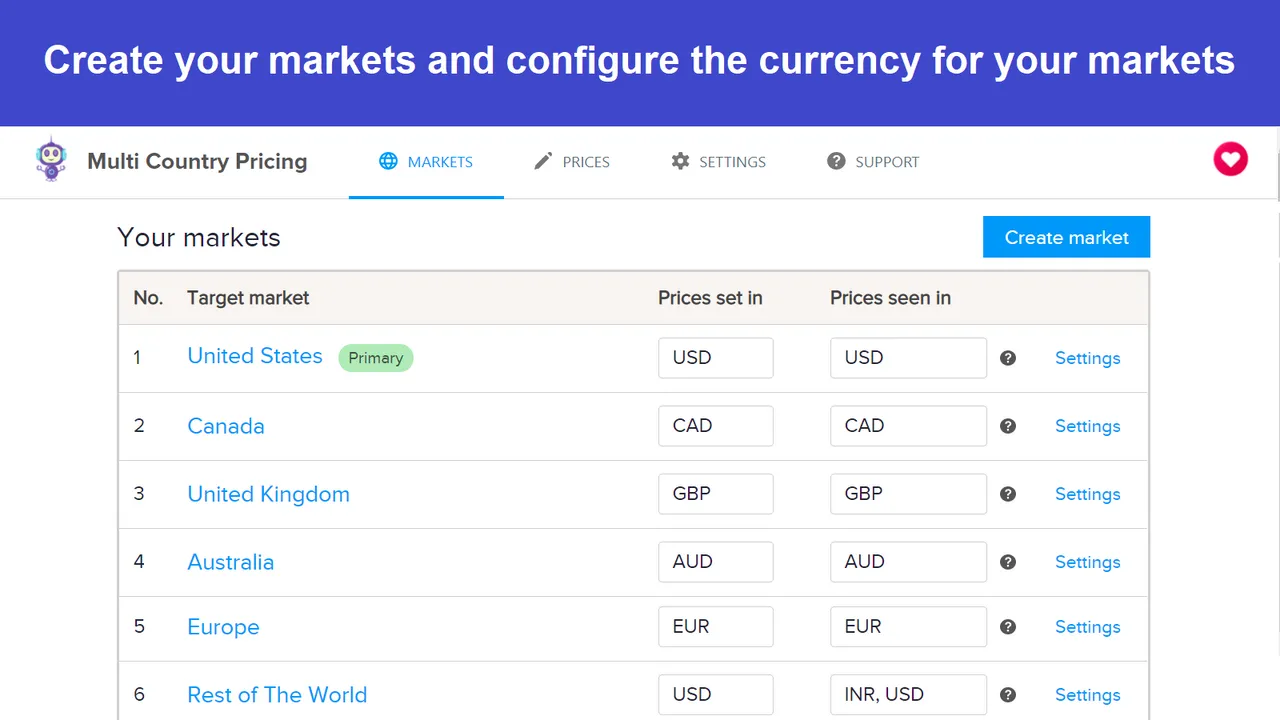
Scaling a $10M+ D2C brand globally on Shopify Plus requires a systematic approach to multi-currency pricing, localized inventory routing, and regional SEO translation. By configuring Shopify Markets or deploying a multi-store architecture, merchants can eliminate checkout friction and capture international demand. We engineer these global setups to ensure seamless synchronization between ERPs, localized warehouses, and regional storefronts.
Key Takeaways
- The Dual-Engine Localization Matrix: Choose Shopify Markets for single-admin efficiency, or multi-store setups for complete regional autonomy.
- DDP Checkout Integration: Collecting duties and import taxes directly at checkout reduces international package rejection rates by up to 40%.
- Smart Order Routing (SOR): Configure proximity-based routing to minimize split shipments and transit times across regional warehouses.
- Subfolder SEO Architecture: Utilize subfolders (e.g.,
/en-ca) to consolidate domain authority and automate hreflang tag deployment.
1. Mapping Your Shopify Plus International Store Architecture: Single Expansion vs. Multi-Store Expansion
Shopify Plus international expansion requires choosing between a single-store setup using Shopify Markets and a multi-store architecture. A single-store setup consolidates inventory and catalog management within one admin, while a multi-store expansion duplicates stores to allow complete regional autonomy over marketing, inventory, and localized codebases.
Feature Single-Store (Shopify Markets) Multi-Store Expansion Catalog Control Unified (with regional price lists) Independent per store Inventory Sync Native multi-location mapping Requires ERP/PIM synchronization Development Overhead Low (single codebase) High (multiple themes/codebases) SEO Complexity Low (automated subfolders) High (manual hreflang mapping)Shopify Markets is a built-in administrative toolset that allows merchants to manage localized pricing, currencies, languages, and domains from a single Shopify admin. If you require custom logic across multiple expansion stores, utilizing professional custom Shopify development ensures seamless data synchronization.
2. Configuring Shopify Markets for Localized Currencies, Pricing, and Languages in 2026
Shopify Markets allows you to control localized buying experiences from a single Shopify admin. You must configure regional pricing rules and languages to maximize conversion rates in EU and APAC regions.
Setting Up Price Lists and Regional Rounding Rules
- Navigate to Settings > Markets and select your target market.
- Set manual exchange rates or use Shopify's automatic rates with a 1.5% conversion fee.
- Apply percentage adjustments (e.g., +10% for APAC to cover localized shipping overhead).
- Configure localized rounding rules (e.g., round to the nearest 0.99 in local currency) to maintain brand pricing standards.
Managing Multi-Language Catalogs
- Install the Shopify Translate & Adapt app or connect a translation API.
- Translate product descriptions, checkout fields, and transactional emails.
- Keep product handles consistent across languages to prevent broken redirect chains.
Implementation: How to Fix Localized Pricing Discrepancies
If local customers see incorrect pricing at checkout, follow these steps to resolve the issue:
- Verify that "Charge tax-inclusive prices" is enabled in your tax settings if selling in the EU or UK.
- Ensure your theme's currency selector is connected to the
localizationliquid object. - Check that your shipping profiles do not override the market-specific pricing rules during checkout initialization.
3. Setting Up International Inventory Routing and Multi-Warehouse Fulfillment
To scale into EU and APAC markets, you must route orders to the closest physical inventory to minimize transit times and customs delays.
Configuring Shopify Smart Order Routing (SOR)
- Set routing rules based on proximity, shipping zone, and inventory availability.
- Prevent cross-border shipping costs by setting a "Minimize split shipments" rule.
- Map localized warehouses directly to specific market shipping profiles.
Step-by-Step Inventory Setup Checklist
- Set up physical warehouse locations in Shopify Admin under Settings > Locations.
- Assign inventory quantities per SKU to each localized warehouse (e.g., US, EU, APAC).
- Create localized Shipping Profiles for each market, linking them to the respective warehouse locations.
- Configure Smart Order Routing rules to prioritize local fulfillment centers first.
- Test checkout scenarios using localized VPNs to verify that inventory is pulled from the correct regional warehouse.
4. Managing Global Duties, Taxes, and Localized Payment Gateways at Checkout
Friction at checkout is the primary cause of international cart abandonment. You must display accurate duties and offer preferred local payment methods.
Calculating Duties and Import Taxes at Checkout
- Enable native duty calculation or use Shopify Markets Pro to calculate duties at checkout.
- Collect duties and import taxes directly at checkout to provide a Delivery Duty Paid (DDP) experience, reducing package rejection rates by up to 40%.
- Ensure every product in your catalog has an accurate HS (Harmonized System) code assigned.
Integrating Local Payment Gateways
- Enable Shop Pay, which supports multi-currency and localized checkouts.
- Activate regional payment methods: iDEAL for the Netherlands, Bancontact for Belgium, and Alipay or KakaoPay for APAC markets.
- Ensure local payment options dynamically display based on the customer's IP address and shipping destination.
5. Translating and Localizing SEO Metadata, URL Structures, and Hreflang Tags
To capture organic search traffic in new markets, your international SEO architecture must clearly signal your regional targeting to search engines.
URL Structure Strategy: Subfolders vs. Subdomains
- Subfolders (Recommended): e.g.,
brand.com/fr. Consolidates domain authority, making it easier to rank in new markets. - Subdomains: e.g.,
fr.brand.com. Best if you have completely different content or separate marketing teams per region.
Automating Hreflang Tag Implementation
- Shopify Markets automatically generates hreflang tags for your localized subfolders.
- Verify that your theme does not contain hardcoded canonical or hreflang tags that conflict with Shopify's native output.
- For complex, multi-store setups, you may need dedicated Shopify SEO services to audit and resolve indexing conflicts.
Common Mistakes to Avoid
- IP-Based Hard Redirects: Never automatically redirect users or search engine crawlers based on IP addresses; this prevents Googlebot from indexing your localized subfolders. Use a non-intrusive localization banner instead.
- Unformatted Sitemaps: Ensure your XML sitemap includes all localized URLs and that they are correctly mapped within Google Search Console.
- Missing Meta Translation: Translating on-page content while leaving meta titles and descriptions in English leads to poor click-through rates in regional search results.
How Avelize Approaches This
We implement international expansion strategies through a structured, phased methodology designed to eliminate technical risk and maximize global conversion rates.
- Phase 1: Architecture Audit & Mapping (Weeks 1-2) | Cost: Custom | KPI: Zero-loss data migration map and finalized domain strategy.
- Phase 2: Shopify Markets & SOR Configuration (Weeks 3-5) | Cost: Custom | KPI: 100% accurate localized pricing and automated inventory routing.
- Phase 3: International SEO & Hreflang Automation (Weeks 6-8) | Cost: Custom | KPI: Clean indexing and correct regional targeting in Google Search Console.
Frequently Asked Questions
Is Shopify Markets worth it for multi-regional expansion?
Yes, Shopify Markets is highly effective for brands seeking to scale globally without the operational overhead of managing multiple independent store admins. It allows centralized inventory control while offering localized pricing, currencies, and languages.
How long does a Shopify Plus international migration take?
A standard international migration and localization setup typically takes between 6 to 8 weeks, depending on the complexity of your ERP integrations, warehouse routing rules, and catalog translation requirements.
What's the difference between Shopify Markets and Shopify Markets Pro?
Shopify Markets is a built-in administrative toolset that allows merchants to manage localized pricing, currencies, languages, and domains from a single Shopify admin, while the merchant remains the legal Merchant of Record (MoR). In contrast, Shopify Markets Pro (powered by Global-e) operates under a Merchant of Record model, where Shopify legally assumes the financial and compliance liabilities for international transactions. Markets Pro automatically handles localized import duties, tax compliance, customs documentation, fraud prevention, and guaranteed currency conversion rates at checkout. While standard Shopify Markets requires merchants to manually configure local tax registrations and manage international shipping carrier relationships, Markets Pro provides an end-to-end, low-risk shipping and compliance infrastructure out of the box. The choice depends on whether your organization has the internal legal resources to manage global tax compliance or prefers to outsource liability for a transaction fee.
Ready to scale your store globally? Learn more about our Technical SEO & GEO programs or explore our Shopify Plus migrations to launch your international expansion strategy.
Published / Last reviewed: October 24, 2026
Authoritative References
Use these official resources to verify platform-specific claims and implementation details before making commercial or technical decisions.
Related Avelize Services and Guides: Technical Audits · Shopify Seo Services · Plus Customization