
Shopify Plus PIM Integration: Automate 5,000+ SKU Syncs
By:
Shopify Plus Pim Integration Automate 5,000+ Sku Syncs: a practical Shopify Plus guide to the SEO, CRO, and revenue decisions that matter for ecommerce teams.
Automating a Shopify Plus PIM integration requires replacing manual CSV uploads and REST endpoints with a dedicated GraphQL sync pipeline mapped directly to custom Metafield definitions. Managing catalog operations exceeding 5,000 SKUs requires using asynchronous bulk operation mutations, SHA-256 payload state hashing, and isolated Dead-Letter Queues (DLQs). This architecture prevents API rate-limit throttling, eliminates field mapping failures, and reduces sync latencies from multi-day delays down to real-time delta updates.
Key Takeaways
- Rate Limit Optimization: Standard GraphQL endpoints restrict operations to a 1,000-point bucket restoring at 50 points/second; large syncs must use
bulkOperationRunMutationto process massive payloads asynchronously. - Delta Sync Hashing: Compute a SHA-256 hash of PIM metadata payloads to trigger attribute updates only on true state changes, preserving API quota for high-frequency inventory adjustments.
- Strict Mapping Rules: Reserve Shopify variants strictly for option-defining attributes (max 3 options / 100 variants per product) and push specs or localized copy into defined Metafield namespaces.
- Resilient Error Isolation: Route mutation failures to an SQS Dead-Letter Queue (DLQ) with automated exponential backoff jitter to isolate errors without blocking store operations.
Mapping PIM Data Architecture to Shopify Plus Metafields and Variant Schemas
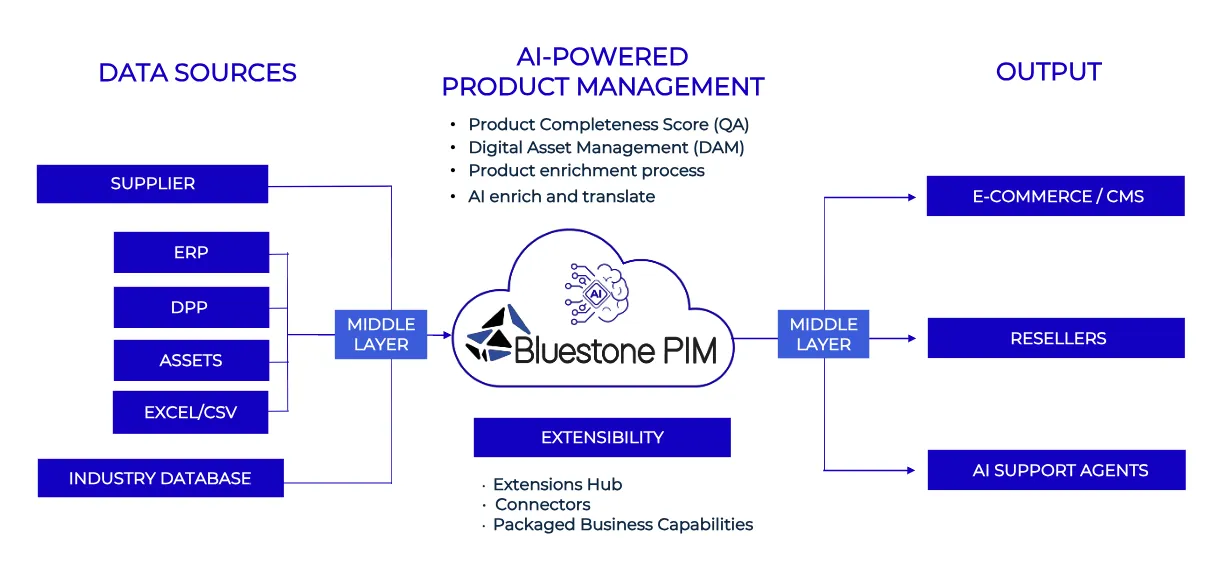
A Shopify Plus PIM integration connects an enterprise Product Information Management system directly to Shopify Plus using GraphQL APIs to synchronize core product attributes, multi-level variants, and custom metafields across channels. It eliminates manual CSV imports by maintaining a single source of truth for high-volume catalogs exceeding 5,000 SKUs.

High-volume catalogs require a strict one-to-one mapping layer between your PIM's data dictionary and Shopify's GraphQL schema to prevent ingestion bottlenecks.
Standard attributes (Title, Vendor, Product Type, Tags) map to core Shopify product objects, while complex attributes must be assigned to namespace-defined Metafields.
- Core Product Object: Assign top-level, search-indexed attributes like title, vendor, status, and handle.
- Variants Schema: Limit options to 3 options and 100 variants per product unless using Shopify's extended variant APIs. Map SKU, Barcode, Option Values, and Grams directly to variant nodes.
- Metafields & Metafield Definitions: Map technical specs, material compositions, and localized copy into reserved namespaces (e.g.,
specifications.weight_capacity).
Enterprise implementations often require bespoke schema alignment through Shopify Development Services to handle multi-tiered variant relationships without introducing database overhead.
What to Avoid: Data Mapping Common Mistakes
- Unbounded Metafield Creation: Creating raw metafields without pre-defining Metafield Definitions causes structural drift across catalogs.
- Using Tags for Filter Criteria: Storing attributes like color, size, or material in tags degrades search performance and breaks faceted filtering at scale.
- Over-utilizing Product Variant Options: Attempting to map non-pricing or non-inventory attributes as variant options hits Shopify's variant caps instantly.
Selecting Your Integration Path: iPaaS Middleware vs. Direct Webhook Pipelines
Choosing between an Enterprise Integration Platform as a Service (iPaaS) and a custom serverless event architecture depends on catalog update velocity and engineering bandwidth.
- iPaaS Middleware (Celigo, Patchworks, Make): Provides pre-built Shopify connectors, visual field mappers, and managed retry queues. Best for teams wanting minimal custom infrastructure management.
- Direct Webhook Pipelines (AWS Lambda / GCP Cloud Functions): Uses serverless event drivers to handle low-latency processing. Best for catalogs requiring custom data transformation rules and high-throughput real-time updates.
Implementation Checklist: Selecting Your Architecture Path
- Assess Catalog Update Volume: Calculate peak updates per minute. If updates exceed 200 SKUs per minute, prioritize direct serverless pipelines.
- Evaluate Data Transformation Rules: Determine if your PIM output requires complex JSON-LD manipulation before payload delivery.
- Determine SLA Requirements: Decide if inventory updates must reflect on-store in under 5 seconds or if a 5-minute batch window is acceptable.
- Audit Middleware Costs: Compare iPaaS volume-based licensing against serverless cloud computing overhead for high-frequency syncs.
Configuring GraphQL Admin API Batches to Bypass Shopify Plus Rate Limits
Legacy REST endpoints enforce rigid bucket limits, whereas the Shopify Plus GraphQL Admin API operates on a calculated cost model providing a budget pool of 1,000 points per store, restoring at 50 points per second.
Updating catalogs exceeding 5,000 SKUs using individual mutations triggers HTTP status 429 Too Many Requests. High-throughput architecture must utilize asynchronous bulk operations or batched GraphQL mutations.
Optimizing payload footprint reduces mutation execution costs, mirroring strategies used in store architecture performance tuning to minimize system latency during large-scale operations.
How to Fix: Implementing Asynchronous GraphQL Operations
Instead of executing real-time single-item mutations during bulk imports, push product payloads using the bulkOperationRunMutation pattern.
- Step 1: Construct a JSONL file containing the target mutation payload for every product or variant update.
- Step 2: Execute the
stagedUploadsCreatemutation to obtain a secure S3 upload URL from Shopify. - Step 3: Upload the JSONL file to the staged target.
- Step 4: Run
bulkOperationRunMutation, passing the staged file key and target GraphQL mutation signature. - Step 5: Listen for the
BULK_OPERATIONS_FINISHwebhook notification to pull the execution result logs.
Automating Multi-Channel SKU Synchronization and Real-Time Inventory Triggers
Synchronizing full product payloads for minor quantity adjustments creates unnecessary network overhead and consumes API points.
Decouple product attribute updates (infrequent, high payload) from inventory level updates (frequent, low payload) using delta updates.
- Attribute Delta Updates: Trigger product syncs only when the PIM payload signature (SHA-256 hash) changes relative to the cached store state.
- Real-Time Inventory Triggers: Route ERP and WMS stock level updates directly to the
inventorySetQuantitiesGraphQL mutation. - Location Id Mapping: Map PIM warehouse identifiers strictly to Shopify
location_idtargets to prevent stock misallocations across channels.
Setting Up Automated Error Handling and Logging for Failed Product Payloads
Payload validation failures, broken image links, or schema mismatch errors must be isolated without halting the entire integration pipeline.
Implement a Dead-Letter Queue (DLQ) pattern within your middleware or serverless execution environment to capture and log non-200 API responses automatically.
How to Fix: Enterprise Error Resolution Architecture
- Dead-Letter Routing: Configure your system to push failed GraphQL mutations to an AWS SQS Dead-Letter Queue or iPaaS error board immediately upon receiving a
userErrorsobject. - Exponential Backoff: Automate retries for transient HTTP errors (status
500,502, or rate-limit codeTHROTTLED) using exponential jitter delay schedules (1s, 2s, 4s, 8s). - Payload Validation Checks: Run client-side JSON schema validations prior to API dispatch to catch missing mandatory fields (e.g., missing variant titles or duplicate SKUs).
- Automated Slack/Email Alerts: Trigger high-priority alerts to operations teams when DLQ error depth exceeds 1% of total catalog volume within a 10-minute window.
How Avelize Approaches Shopify Plus PIM Integrations
Our engineering team builds high-throughput PIM pipelines tailored to high-volume merchants across Shopify Plus, Headless Hydrogen, and enterprise ERP systems. Here is our structured technical process:
- Data Architecture & Schema Audit (Week 1): We map every attribute in your PIM to Shopify standard objects and typed Metafield Definitions, establishing namespace conventions and field validation rules.
- Middleware & Pipeline Engineering (Weeks 2–3): We build direct serverless event handlers (AWS Lambda) or configure enterprise iPaaS middleware (Celigo, Patchworks) with SHA-256 delta hashing and dead-letter queues.
- GraphQL Bulk Mutation Staging (Week 4): We implement the
bulkOperationRunMutationstrategy, staging JSONL updates via Shopify S3 upload buckets to execute 50,000+ SKU updates in single background jobs. - Load Testing & Failover Validation (Week 5): We simulate peak BFCM throughput, verify automated exponential backoff retries under API rate-limiting, and validate location-level stock synchronization SLAs (under 3 seconds).
Frequently Asked Questions
What is a Shopify Plus PIM integration?
A Shopify Plus PIM integration is a synchronized data pipeline that connects a Product Information Management system (like Akeneo, Pimcore, or Salsify) to Shopify Plus via GraphQL APIs. It automates product data enrichment, variant creation, and metafield management across channels without manual CSV files.
How long does a Shopify Plus PIM integration take to implement?
A standard enterprise PIM integration takes between 4 and 8 weeks to design, develop, test, and deploy. This timeline includes schema field mapping, middleware infrastructure setup, GraphQL bulk operation staging, and failover validation.
What is the difference between iPaaS middleware and direct serverless PIM integrations?
iPaaS middleware uses visual connectors and managed retry queues to bridge systems with minimal custom code. Direct serverless pipelines use AWS Lambda or Cloud Functions to process updates with lower latency, lower operational cost at scale, and customized JSON-LD data transformations.
How do you avoid Shopify GraphQL rate limits during large product catalog syncs?
To avoid GraphQL Admin API rate limits during large catalog synchronizations on Shopify Plus, engineering teams must transition from synchronous single-item mutations to Shopify's asynchronous bulk operation framework. Standard GraphQL endpoints operate on a calculated cost model providing a maximum bucket pool of 1,000 points that replenishes at 50 points per second. Executing individual mutations for catalogs exceeding 5,000 SKUs quickly exhausts this bucket, triggering HTTP status 429 rate-limiting response codes. To resolve this, data payloads should be formatted into a JSONL (JSON Lines) file and uploaded directly to a Shopify-hosted S3 bucket generated via the stagedUploadsCreate mutation. Once uploaded, the bulkOperationRunMutation API executes the entire payload in background execution threads without consuming standard API bucket points. After processing finishes, Shopify dispatches a BULK_OPERATIONS_FINISH webhook containing the URL to execution result logs, allowing high-volume merchants to update hundreds of thousands of SKUs reliably without API throttling.
Ready to automate your catalog infrastructure and eliminate multi-channel inventory bottlenecks? Work with our technical engineering team by exploring Avelize Shopify Development Services.
Published / Last reviewed: 2026. Architected by the Avelize Engineering Team.
Authoritative References
Use these official resources to verify platform-specific claims and implementation details before making commercial or technical decisions.
Related Avelize Services and Guides: Custom Apps · Plus Customization · Ecommerce Web Design Agency