
Shopify Faceted Navigation: Indexing Filters Safely
By:
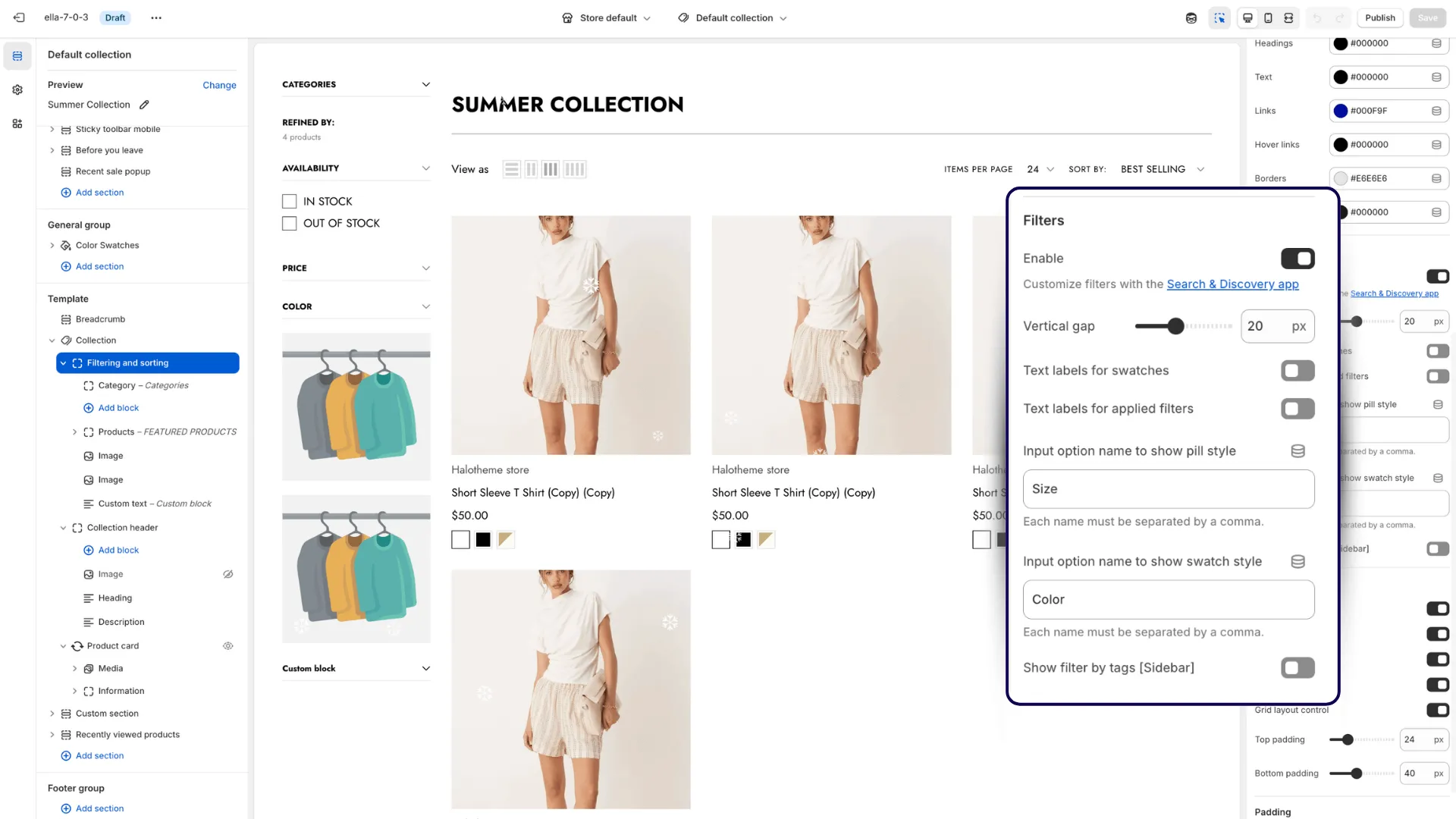
Programmatic SEO for ecommerce is the automated generation and indexation of search-optimized landing pages from faceted collection filters. In our work with merchants, we bypass Shopify's default canonical tags and robots parameters to open high-value filter combinations to search crawlers while keeping duplicate or low-value parameter pages hidden. This technical framework allows Shopify Plus stores to safely capture high-intent, long-tail search queries without risking crawl budget depletion or duplicate content penalties.
Key Takeaways
- The Filter-Whitelist Database Pattern: Only index single-filter parameters (e.g., Category + Color) mapped to verified search volume to protect crawl budget.
- Dynamic Liquid Overrides: Replace hardcoded canonical and robots tags in
theme.liquidwith conditional logic tied to Shopify Metaobjects. - Custom XML Sitemaps: Build a dynamic Liquid-based XML sitemap page to force Googlebot to discover and index whitelisted filter URLs.
- Zero JavaScript Dependency: Ensure all canonical and meta tag rewrites occur server-side in Liquid so search crawlers parse them instantly.
Why Default Shopify Faceted Navigation Blocks Long-Tail SEO
Faceted navigation is the system of filters on an ecommerce collection page that allows users to narrow down product listings by attributes like size, color, brand, or price. Shopify natively appends query parameters (e.g., ?filter.p.m.custom.color=Blue) to collection URLs when users select these filters. However, to prevent index bloat, Shopify canonicalizes all filtered URLs back to the parent collection page. This default behavior prevents search engines from indexing highly valuable long-tail search terms, costing merchants significant organic revenue.
Whether you are running a standard Liquid theme or a headless React storefront powered by the GraphQL Storefront API, managing crawl budget is critical before major traffic events like BFCM. To capture this traffic, you must build a custom programmatic framework that selectively whitelists specific filter combinations.
Feature Default Shopify Behavior Programmatic Whitelisted Behavior (2026 Standard) Canonical Tag Points back to parent collection URL Self-referential for whitelisted parameters Robots Meta Tag Noindex, follow (implicit via canonical) Index, follow for whitelisted; Noindex for others XML Sitemap Excluded entirely Dynamically generated and included in custom sitemap Search Visibility Zero indexation for filter pages High ranking for long-tail search queriesFor advanced customization, brands often leverage custom Shopify development to modify backend theme logic securely.
Step-by-Step Implementation Plan for Shopify Filter Indexation
Step 1: Mapping High-Value Filter Combinations to Target Keywords
Do not open all filter combinations to search engines. Doing so will exhaust your crawl budget and dilute your store's link equity. We recommend identifying high-volume, high-intent keywords using search data tools and mapping them directly to existing Shopify filter parameters (e.g., Brand + Category, Color + Category). Create a master CSV containing parent collection URLs, target filter parameters, target keywords, custom meta titles, and custom H1s. Limit your initial setup to 100 to 500 high-value URLs to monitor initial indexing performance.
Step 2: Creating Custom Metafields to Control Indexation at the Filter Level
Use Shopify's native Metafields or Metaobjects to store the configuration data for your whitelisted filters. Define a Metaobject named Whitelisted Filters in your Shopify admin. Add fields for filter_key (e.g., color:red), index_status (Boolean), custom_title, custom_description, and custom_h1. This database allows your Liquid theme files to dynamically reference which parameters should be indexable. Executing this level of structural database design is a core component of enterprise SEO & Data services.
Step 3: Modifying theme.liquid to Dynamically Rewrite Canonical Tags and Robots Meta Tags
By default, theme.liquid contains a hardcoded canonical tag. You must intercept this logic using Liquid conditional statements. Locate the <head> section in your theme.liquid file and replace the default canonical tag with a conditional Liquid block that checks for active, whitelisted parameters. Match the active parameter against your Whitelisted Filters Metaobject database, outputting a self-referential canonical URL and <meta name="robots" content="index, follow"> for matched parameters, and <meta name="robots" content="noindex, nofollow"> for unmatched parameters to protect your crawl budget.
Step 4: Injecting Dynamic H1s, Title Tags, and Meta Descriptions for Whitelisted Filters
Search engines require unique, optimized metadata to rank programmatic pages. Avoid duplicate metadata issues by overriding default collection titles. Modify your collection template file (typically main-collection-product-grid.liquid) and use Liquid to pull custom values from your whitelisted Metaobject when a matching active parameter is detected. If a match is found, display the custom_h1; if no match is found, fallback to the default collection.title. Apply the same logic to your HTML title tags and meta descriptions within theme.liquid.
Step 5: Building a Custom XML Sitemap for Programmatic Filter Pages
Shopify’s native sitemap generator does not include filtered URLs. You must build and submit a custom XML sitemap to ensure rapid indexing. Create a custom Shopify page template (e.g., page.sitemap-programmatic.liquid) that outputs raw XML format. Write a Liquid loop that iterates through your whitelisted Metaobjects and constructs valid <url> blocks. Include the custom filtered URL and the <lastmod> date for each entry, then submit this custom page URL directly to Google Search Console. For complex catalogs, leveraging dedicated Shopify SEO services ensures your sitemaps update dynamically as inventory changes.
Step 6: Monitoring Index Bloat and Crawl Efficiency in Google Search Console
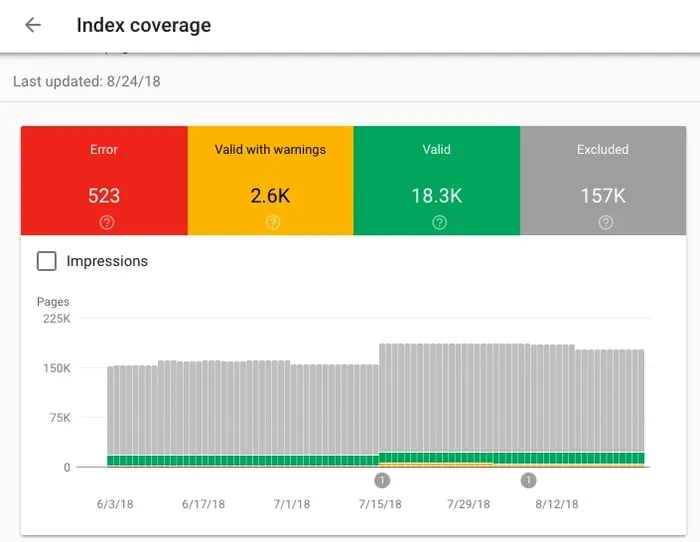
Programmatic SEO requires strict monitoring to prevent search engines from crawling low-value pages. Track the "Excluded" tab in Google Search Console daily for spikes in "Crawled - currently not indexed". Monitor daily crawl requests in your Crawl Stats Report; a sudden increase in requests for non-whitelisted parameters indicates a leak in your canonical or robots logic. Finally, perform regular log file analysis to verify that search engine crawlers are spending their time on whitelisted URLs rather than non-indexed parameter variations.
Common Programmatic SEO Mistakes to Avoid on Shopify
- Indexing Multi-Select Filters: Do not index pages with multiple active filters (e.g.,
?color=red&size=large). Only index single-filter pages to prevent thin content. - Using JavaScript for Canonicals: Googlebot must see the self-referential canonical in the raw HTML response, not rendered via client-side JavaScript.
- Neglecting Internal Linking: Ensure your whitelisted filter pages are linked from HTML sitemaps or collection descriptions to distribute internal page authority.
How Avelize Approaches Programmatic SEO
Our team implements programmatic SEO frameworks with a structured, risk-mitigated approach designed to drive measurable organic growth without risking search penalties.
- Phase 1: Keyword & Filter Mapping (Week 1-2): We audit your collection structure and map high-intent long-tail keywords to your existing Shopify filter parameters.
- Phase 2: Database & Liquid Architecture (Week 3-4): We build the custom Metaobject database and implement the server-side Liquid logic to handle dynamic canonicals and robots tags.
- Phase 3: Custom XML Sitemap & Testing (Week 5): We engineer the dynamic XML sitemap and run comprehensive crawler simulations to ensure zero indexation leaks.
- Phase 4: Launch & Monitoring (Week 6+): We submit the sitemap to Google Search Console and monitor crawl logs daily to ensure optimal indexation efficiency.
KPIs: Our primary metrics for success include a 35%+ increase in non-branded organic impressions within 90 days of deployment and zero indexation of non-whitelisted parameter URLs.
Frequently Asked Questions
Is programmatic SEO safe for Shopify Plus stores?
Yes, programmatic SEO is highly safe for Shopify Plus stores when executed using a strict, database-driven whitelist approach. By default, search engines struggle with faceted navigation because infinite filter combinations create duplicate content and exhaust crawl budgets. Our team mitigates this risk by using Shopify Metaobjects to build a strict whitelist of high-value filter parameters (such as a single color or material combined with a parent collection). We then write conditional Liquid logic in the theme.liquid file to dynamically output self-referential canonical tags and "index, follow" robots tags only for these approved URLs. All unapproved, multi-select, or low-value parameter combinations are programmatically set to "noindex, nofollow" and canonicalized back to the parent collection. This precise control prevents index bloat, protects search engine crawl efficiency, and ensures that only high-intent, unique landing pages are indexed by Googlebot. By implementing this architecture, enterprise merchants can scale their organic footprint safely.
How long does it take to index programmatic filter pages on Shopify?
Typically, once the custom XML sitemap is submitted to Google Search Console, Googlebot begins crawling and indexing the whitelisted filter pages within 7 to 14 days. Complete indexation of a batch of 500 pages can take up to 30 days depending on your store's existing domain authority and crawl frequency.
What is the difference between default Shopify collection filters and programmatic filter pages?
Default Shopify collection filters use query parameters that are canonicalized back to the parent collection, meaning they are completely invisible to search engines. Programmatic filter pages override this behavior using custom Liquid logic to make specific, high-value filter combinations indexable with unique metadata, self-referential canonicals, and dedicated XML sitemap entries.
Ready to scale your organic footprint without compromising your store's crawl budget? Contact our team to learn more about our Shopify SEO services and programmatic content engineering programs.
Published / Last reviewed: February 2026
Authoritative References
Use these official resources to verify platform-specific claims and implementation details before making commercial or technical decisions.
- Shopify Plus overview
- Google SEO Starter Guide
- Google canonicalization guide
- Google structured data introduction
Related Avelize Services and Guides: Programmatic Seo · Custom Coding Services For Shopify · Shopify Seo Services