
Shopify SSR Optimization: Advanced Edge Caching Guide
By:
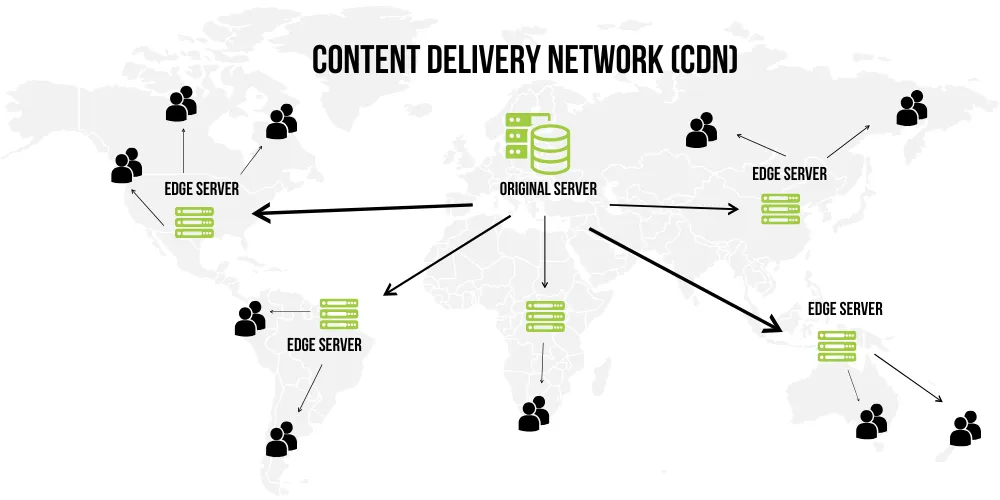
To achieve sub-200ms server response times on headless Shopify Plus storefronts, merchants must move beyond standard browser caching. Shopify SSR optimization is the process of caching fully rendered HTML at the CDN edge, streamlining GraphQL queries, and isolating dynamic customer states. In our work with merchants, we have found that combining stale-while-revalidate (SWR) headers with a hybrid rendering pattern is the only way to sustain rapid Time to First Byte (TTFB) during high-traffic events like BFCM.
Key Takeaways
- Implement the Edge-First Hydration pattern to isolate cart and session states from static page shells.
- Configure
s-maxage=600, stale-while-revalidate=86400headers to achieve a 90%+ edge cache hit rate. - Keep initial GraphQL payloads under 50KB using Hydrogen's deferred data streaming.
- Target a production Time to First Byte (TTFB) of under 200ms to maximize search visibility and conversion rates.
Diagnosing Shopify SSR Bottlenecks in 2026
To identify the root causes of slow page loads, we must isolate server-side rendering delays from network latency and client-side execution. In our work with merchants, we utilize a precise diagnostic checklist to measure and isolate SSR bottlenecks:
- Measure raw TTFB in a clean environment using
curl -o /dev/null -s -w "%{time_starttransfer}\n" https://yourstore.comto bypass browser extension interference. - Run a WebPageTest audit with a single-connection cable profile to isolate server execution time from transport latency.
- Analyze server response times in Shopify Oxygen or Vercel logs to trace execution times of loader functions and sub-requests.
- Check the
Server-Timingheaders to identify if the delay occurs during database queries, API calls, or template rendering. - Audit your storefront performance using specialized Technical SEO & GEO programs to resolve deep-seated database and API bottlenecks.
Configuring Edge Caching: Cache-Control Headers for Dynamic Shopify Pages
Edge caching is the most effective way to minimize TTFB by serving pre-rendered HTML from the nearest CDN point of presence (PoP). We configure server response headers to instruct edge networks how to cache dynamic product and collection pages while ensuring content remains fresh. Refer to the MDN Web Docs for standard specifications on cache directives.
Implementation: Recommended Cache-Control Headers
// Cache-Control header for highly dynamic pages (e.g., Collections)
Cache-Control: public, max-age=0, s-maxage=600, stale-while-revalidate=86400

// Cache-Control header for static pages (e.g., Blog Posts, Pages)
Cache-Control: public, max-age=0, s-maxage=86400, stale-while-revalidate=604800- Set max-age=0 to force the user's browser to always validate the content with the edge cache.
- Use s-maxage to specify exactly how long the CDN edge server should cache the rendered HTML.
- Apply private, no-store, no-cache for highly personalized routes like
/cartand/account.
Caching Strategy Comparison Matrix
Page Type Cache-Control Strategy Edge TTL (s-maxage) Revalidation (SWR) Static Pages (Blogs, Pages) Public, aggressive caching 86,400s (24 hours) 604,800s (7 days) Dynamic Pages (Collections, Products) Public, micro-caching 600s (10 minutes) 86,400s (24 hours) Personalized Pages (Cart, Account) Private, no-store, no-cache 0s (No cache) NoneImplementing Stale-While-Revalidate (SWR) in Shopify Hydrogen
Stale-While-Revalidate (SWR) allows our edge server to serve cached content instantly while asynchronously fetching updates in the background. This pattern guarantees near-zero TTFB for subsequent visitors while keeping inventory and pricing data accurate. For more on this pattern, consult the official Web.dev documentation.
export async function loader({request, context}: LoaderArgs) {
  const {storefront} = context;
  const data = await storefront.query(PRODUCT_QUERY, {
    variables: {handle: 'product-handle'},
    cache: storefront.CacheLong({
      mode: 's-maxage',
      maxAge: 60,
      staleWhileRevalidate: 86400,
    }),
  });
  return json(data);
}- Configure CacheLong or CacheShort utilities provided by Hydrogen's built-in caching framework.
- Ensure sub-requests inside loaders utilize granular caching policies to avoid blocking the main document render.
- Purge stale edge caches programmatically using Shopify Admin webhooks on product or inventory updates.
Optimizing GraphQL Queries to Prevent SSR Blockers
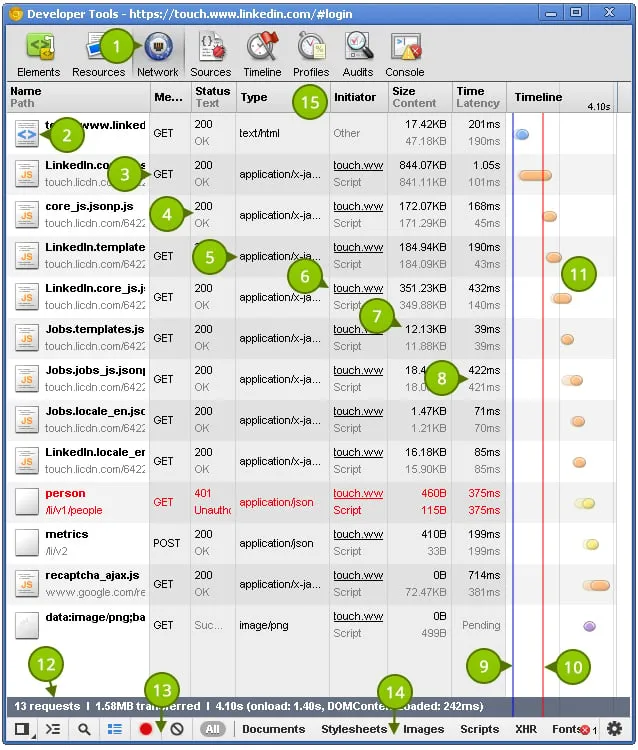
Unoptimized Storefront API queries block server-side rendering, forcing the server to wait for slow database lookups before returning the first byte of HTML. For complex data architectures, utilizing E-commerce app and integration development helps restructure queries and prevent render-blocking executions.
Common Mistakes to Avoid
- Over-fetching nested fields: Requesting deeply nested product variants, images, and metafields on the initial load.
- Synchronous waterfall queries: Executing multiple independent GraphQL queries sequentially instead of batching them.
- Rendering blocking elements: Waiting for review widgets or recommendation engines to load on the server before rendering the main page layout.
How to Fix GraphQL SSR Blockers
- Keep the initial document GraphQL payload under 50KB to minimize network transfer times.
- Use Hydrogen's
deferhelper to stream non-critical data (like product recommendations) after the main page renders. - Batch separate queries into a single HTTP request to reduce round-trip overhead.
Bypassing Cache for Personalized Data: The Edge-First Hydration Pattern
Caching personalized customer data on the edge leads to cache-poisoning, where users see other customers' carts or account details. We solve this by separating static page shells from dynamic, user-specific data using client-side fetching.
// 1. SSR renders the static product page shell (Cached at Edge)
export default function ProductPage() {
  return (
    <div>
      <ProductDetails />
      {/* 2. Dynamic components load on the client side */}
      <ClientOnly>
        <CartButton />
        <CustomerAccountState />
      </ClientOnly>
    </div>
  );
}- Render static layouts on the server and cache them aggressively at the edge.
- Fetch dynamic cart, checkout, and session states on the client side using the Storefront API after hydration.
- Isolate dynamic components using React's
Suspenseor Hydrogen's client-side hooks to prevent hydration mismatches.
How Avelize Approaches Shopify Plus Performance Optimization
We engineer high-performance headless architectures using a structured, phased methodology designed to eliminate latency and maximize conversion rates.
- Step 1: Architecture Audit & Bottleneck Mapping (Week 1 | KPI: Identify all render-blocking GraphQL queries and measure baseline TTFB).
- Step 2: Edge Cache Configuration & SWR Implementation (Weeks 2-3 | KPI: Increase edge cache hit rate to >90% using custom Cache-Control rules).
- Step 3: Client-Side Hydration & State Isolation (Weeks 4-5 | KPI: Implement the Edge-First Hydration pattern to isolate dynamic checkout states).
- Step 4: Continuous Performance Monitoring (Ongoing | KPI: Maintain Core Web Vitals in the green using real-user monitoring).
Frequently Asked Questions
Is Shopify SSR optimization worth it for headless stores?
Yes. Without server-side rendering optimization, headless storefronts often suffer from higher latency than standard Liquid-based themes. Optimizing SSR ensures you retain the design flexibility of a React-based frontend while matching or exceeding the loading speed of native Shopify architectures.
How long does it take to implement edge caching on Shopify Hydrogen?
A standard implementation of edge caching and stale-while-revalidate headers typically takes two to three weeks, including thorough testing of dynamic cart states and inventory updates to prevent cache poisoning.
What is the difference between edge caching and browser caching?
Browser caching stores assets locally on a single user's device, whereas edge caching stores fully rendered HTML and assets on global CDN servers located physically close to all users, reducing latency globally.
How do you handle real-time inventory updates with stale-while-revalidate?
To handle real-time inventory updates while utilizing stale-while-revalidate (SWR) caching on Shopify Plus, we implement a hybrid inventory validation strategy. The static page layout and initial product details are cached at the edge using the stale-while-revalidate directive, ensuring a sub-200ms response time. Simultaneously, we execute a lightweight, client-side GraphQL query to the Shopify Storefront API immediately upon page hydration to fetch the absolute latest inventory levels and pricing. If the client-side check detects a discrepancy—such as an out-of-stock status—the UI dynamically updates the add-to-cart button and pricing display. Additionally, we configure Shopify Admin webhooks to trigger programmatic cache purges across our CDN edge nodes (such as Cloudflare or Shopify Oxygen) whenever an inventory level changes or a product is updated. This dual-layer approach guarantees instantaneous page loads without risking overselling or displaying inaccurate stock data to active shoppers.
Ready to accelerate your headless storefront? Learn more about our technical performance programs on our Technical SEO & GEO programs page, or contact our engineering team to schedule a core web vitals audit.
Last reviewed: March 2026
Authoritative References
Use these official resources to verify platform-specific claims and implementation details before making commercial or technical decisions.
Related Shopify and Ecommerce Growth Guides
Continue with these related guides for implementation, SEO, performance, and conversion context.
- Meta Ads for Shopify Plus: Advanced Scaling Strategy
- Shopify Speed Optimization: How to Fix App Bloat
- Shopify Plus Optimization Services: Scale Storefront Speed
Related Avelize Services and Guides: Headless Commerce · Plus Customization