
Shopify Plus Mobile CRO: Best Practices for 2026
By:
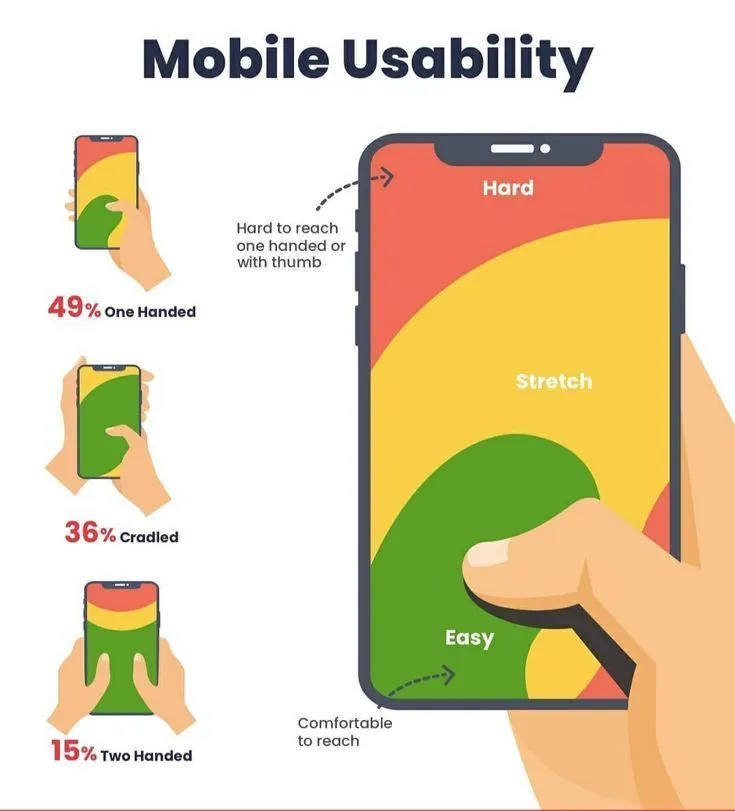
Shopify Plus mobile CRO (conversion rate optimization) is the systematic process of diagnosing and resolving mobile-specific friction points—such as slow render-blocking scripts, inefficient navigation, and complex checkouts—to align mobile conversion rates with desktop baselines on enterprise-level Shopify architectures. In our work with merchants, we find that closing the mobile-to-desktop conversion gap requires transitioning from legacy layouts to modern, API-driven checkout systems and optimizing the mobile viewport for single-handed interaction.
Key Takeaways
- LCP Target: Achieve a mobile Largest Contentful Paint (LCP) of under 2.5 seconds by deferring non-critical JavaScript.
- Checkout Migration: Transition from deprecated
checkout.liquidto Checkout Extensibility to leverage Shopify's native high-performance architecture. - One-Tap Payments: Prioritize Shop Pay, Apple Pay, and Google Pay to capture at least 40% of mobile transactions.
- Thumb-Zone Design: Implement sticky "Add to Cart" buttons and large tap targets (minimum 48x48 pixels) to reduce interaction friction.
Audit Your Mobile Speed: Eliminating Render-Blocking Scripts on Shopify Plus
Slow mobile load times directly depress conversion rates. For every 1-second delay in mobile page load, conversions can drop by up to 20%. Mobile devices often struggle with CPU execution limits, meaning heavy Javascript payloads delay interactivity far longer than on desktop devices.
What to Avoid
- Overloading the theme head with non-critical tracking pixels and third-party app scripts.
- Relying on unoptimized, oversized hero images above the fold on mobile viewports.
How to Fix
- Identify and defer non-critical Javascript using
asyncordeferattributes. - Audit your Shopify apps and remove legacy code fragments left behind by uninstalled applications.
- Implement critical CSS inlining to render above-the-fold elements instantly.
- Leverage enterprise-grade Shopify speed optimization to refactor custom Liquid files and minimize DOM depth.
- Target a mobile Largest Contentful Paint (LCP) of under 2.5 seconds.
Streamline the Mobile Checkout: Transitioning from checkout.liquid to Checkout Extensibility
The checkout flow is where mobile conversion rates suffer the highest drop-off. Transitioning to Shopify’s modern checkout infrastructure is critical for enterprise security, speed, and customization.
What to Avoid
- Retaining deprecated
checkout.liquidlayouts that slow down mobile processing. - Overloading the checkout screen with unnecessary custom fields and mandatory account creation.
How to Fix
- Migrate to Checkout Extensibility to leverage Shopify’s native, high-performance checkout architecture.
- Deploy custom UI extensions via custom Shopify development services to inject trust badges and dynamic upsells without sacrificing speed.
- Implement single-page checkout layouts to reduce the number of steps required to complete a purchase.
- Limit form fields to essential billing and shipping inputs only, utilizing auto-fill features where possible.
Optimize Mobile Navigation and Search: Reducing Friction in the Product Discovery Funnel
Mobile users have limited screen real estate and lower patience thresholds. If they cannot find a product within 3 taps, they will bounce.
Implementation Checklist
- Implement a persistent, sticky search bar at the top of mobile viewports.
- Configure auto-suggestions and visual search results to speed up discovery.
- Simplify the mobile hamburger menu to a maximum of 5 primary categories.
- Use large tap targets (minimum 48x48 pixels) to prevent misclicks and user frustration.
- Integrate dynamic, faceted filtering that loads instantly via AJAX without full page refreshes.
To implement these structural layouts seamlessly, utilize professional Shopify Plus development services to build high-performance navigation menus.
Implement One-Tap Payments: Configuring Shop Pay, Apple Pay, and Google Pay for Mobile Users
Typing credit card numbers on a mobile keyboard introduces extreme friction. Accelerated checkouts bypass this step entirely, boosting mobile conversion rates significantly.
What to Avoid
- Hiding express checkout buttons below the fold on mobile screens.
- Requiring complex multi-step verification for returning customers using accelerated wallets.
How to Fix
- Place Shop Pay, Apple Pay, and Google Pay buttons at the top of the cart page and directly on product detail pages (PDPs).
- Configure Shopify Payments to prioritize local payment methods dynamically based on customer geography.
- Ensure express checkout buttons load instantly by prioritizing their script execution order.
- Monitor payment gateway analytics to ensure at least 40% of mobile transactions are completed via one-tap methods.
Design Mobile-First Product Detail Pages (PDPs): Sticky Add-to-Cart and Thumb-Zone Accessibility
Mobile PDPs must be designed strictly for single-handed thumb interaction. Vital purchase information must remain visible at all times during the scroll journey.
What to Avoid
- Placing the primary "Add to Cart" button in a position that requires two-handed navigation.
- Using small, hard-to-tap dropdown menus for variant and size selection.
How to Fix
- Implement a sticky "Add to Cart" button that remains anchored to the bottom of the screen as users scroll.
- Keep critical product details—price, review star ratings, and inventory alerts—above the fold.
- Optimize variant selectors using large, tappable swatches rather than standard dropdown menus.
- Utilize professional CRO and mobile UX design systems to eliminate visual clutter and compress media assets.
- Ensure all interactive elements reside within the natural physical "thumb zone" of the mobile screen.
Measure Mobile CRO Success: Setting Up Custom Shopify Analytics Reports for Mobile-Specific Drop-offs
You cannot optimize what you do not measure. Enterprise operators must segment data by device type to isolate and resolve mobile-specific drop-offs.
Step-by-Step Measurement Checklist
- Navigate to Shopify Admin > Analytics > Reports and create a custom report filtered by Device Category.
- Compare mobile vs. desktop for Online Store Conversion Rate, targeting a mobile-to-desktop ratio of at least 70%.
- Track Session-to-Add-to-Cart and Add-to-Cart-to-Checkout metrics specifically for mobile users.
- Monitor mobile Average Order Value (AOV) differentials to identify mobile cross-sell friction.
- Configure Google Analytics 4 (GA4) custom funnels to map out checkout step drop-off rates on mobile devices.
- Consult with enterprise Shopify data specialists to configure server-side tracking and resolve attribution discrepancies.
How Avelize Approaches Mobile CRO
Our team deploys the Mobile-First Conversion Sprint—a 4-week technical optimization program starting at $8,500. We audit render-blocking scripts, migrate legacy checkouts to Checkout Extensibility, and implement thumb-zone UX patterns, targeting a minimum 15% uplift in mobile conversion rate (CR) and a sub-2.0s mobile LCP.
Frequently Asked Questions
Is Shop Pay worth it for mobile checkout optimization?
Yes. Shop Pay significantly reduces mobile checkout friction by auto-filling shipping and billing details for over 150 million saved users, increasing checkout-to-order conversion rates by up to 50% compared to standard guest checkouts.
What is the average mobile conversion rate for Shopify Plus stores?
According to industry benchmarks compiled by Shopify and leading e-commerce analytics platforms, the average mobile conversion rate for Shopify Plus merchants typically ranges between 1.5% and 2.5%, compared to desktop conversion rates which often exceed 3.5% to 4.5%. This persistent mobile-to-desktop conversion gap—often hovering around 50%—is primarily driven by mobile page speed latency, complex checkout navigation, and friction during payment input. To close this gap, enterprise merchants must optimize their mobile Largest Contentful Paint (LCP) to under 2.5 seconds and implement accelerated checkout solutions like Shop Pay, which has been shown to increase checkout-to-order conversion rates by up to 50% compared to standard guest checkouts. By systematically addressing these performance and usability barriers, high-performing Shopify Plus stores can elevate their mobile conversion rates closer to a 3.0% baseline, significantly maximizing mobile average order value (AOV) and overall digital marketing efficiency.
How long does a mobile CRO audit take?
A comprehensive technical mobile CRO audit typically takes 2 to 3 weeks. This includes full speed diagnostics, checkout friction mapping, and user behavior analysis across key mobile viewports.
Ready to eliminate mobile checkout friction and unlock hidden revenue? Contact our team today to learn more about our specialized Technical SEO & GEO programs and conversion optimization services.
Published / Last reviewed: February 2026
Authoritative References
Use these official resources to verify platform-specific claims and implementation details before making commercial or technical decisions.
- Shopify Plus overview
- Google SEO Starter Guide
- Google canonicalization guide
- Google structured data introduction
Related Shopify and Ecommerce Growth Guides
Continue with these related guides for implementation, SEO, performance, and conversion context.
- Shopify CRO Audit: Enterprise UX Design Frameworks
- Shopify Checkout Extensibility: A CRO Playbook for Plus
Related Avelize Services and Guides: Conversion Rate Optimization · Store Redesign · Plus Customization